10
English
MEMORY RECALL FUNCTION ------- BLOCK MEMORY MODE
The Cal. 141 features a dual memory mode:
Single memory mode ..... The single memory mode is the default-set mode. The lap/split time data of one measurement from start
to stop can be stored. When the stopwatch is reset, and a new measurement is commenced, the lap/split
time data of the previous measurement will be automatically deleted.
Block memory mode ...... The block memory mode is an advanced mode designed for professional level use. A sequence of
measurement data obtained from start to stop (or reset) is recorded as a “block.” Up to 100 blocks of data
can be stored in memory without deleting the previous data.
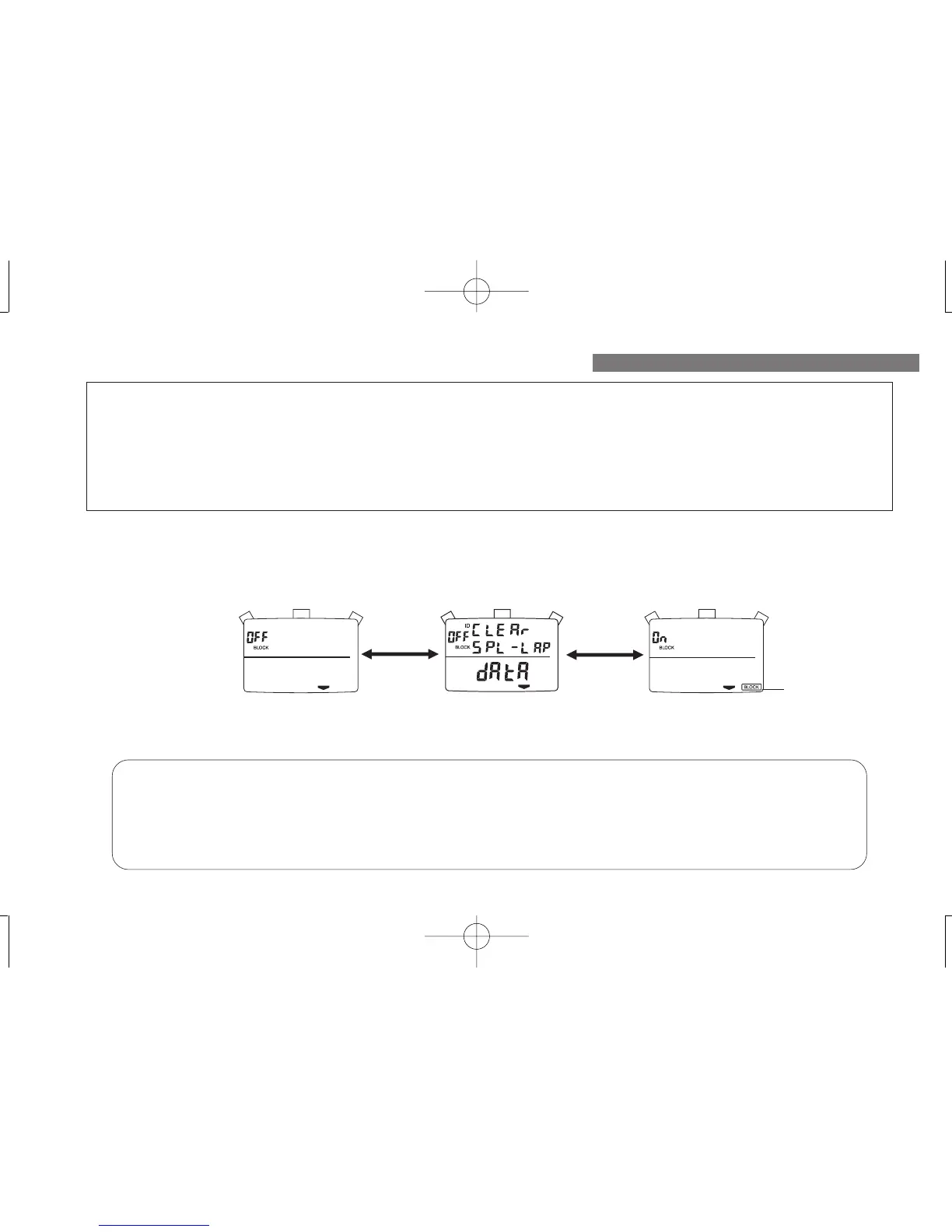
<How to change the memory mode>
1. While in the TIME/CALENDAR display, press “B” 8 times until “BLOCK” appears on the display, above which either “ON” or “OFF”
is flashing.
2. Press “A” for 1.5 seconds until the memory mode changes with a long beep.
Benefits of block memory mode
Easy data management ............ The block number as well as starting time and date of measurement are automatically
recorded and stored.
Handy data storage ................ Creation of a new block of data will not erase the previous data in memory. While
in the single memory mode, a new measurement will delete the latest measurement
data.
Block mark*
* When the block memory mode is selected, the BLOCK
mark appears at the bottom right on the display regardless
of the display mode.
AA
Single memory mode
Block memory mode


 To Next Page