U.4.45
Date Code 20020501 User’s Guide SEL-421/SEL-421-1 Relay
Basic Relay Operations
Reading Oscillograms, Event Reports, and SER
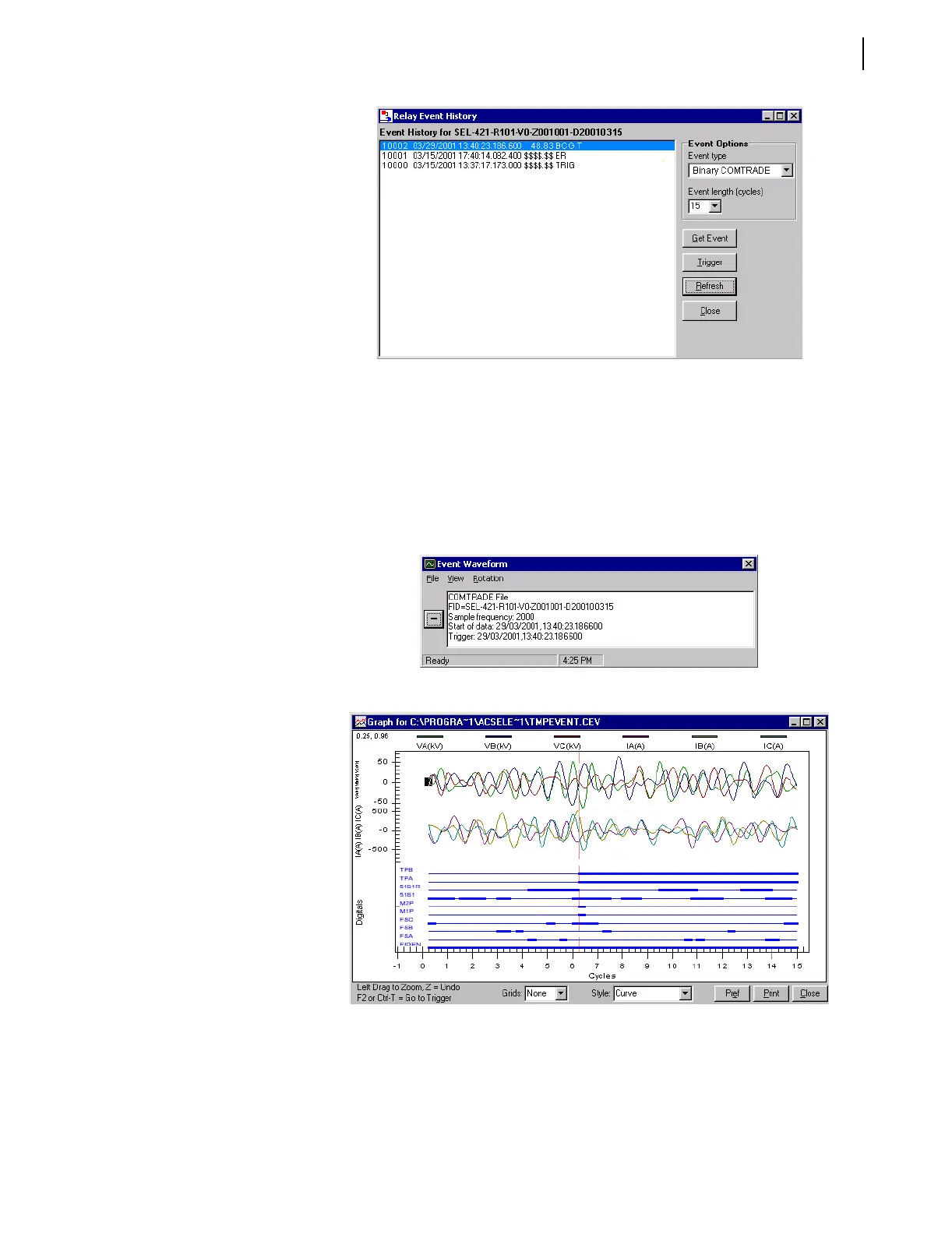
Figure 4.37 Relay Event History Dialog Box in the ACSELERATOR Software.
Step 4. Get the event. Select Binary COMTRADE in the Event Type
dialog box. Highlight the event you want to view and click the
Get Event button. The relay saves the .HDR, .CFG, and .DAT
files in the
ACSELERATOR 421\EVENTS\ directory with the
HR_nnnnn file prefix (nnnnn represents the event number).
The
ACSELERATOR software then presents the Event
Waveform window similar to that in Figure 4.38 and the
sample event oscillogram of Figure 4.39.
Figure 4.38 ACSELERATOR Event Waveform Window.
Figure 4.39 Sample Event Oscillogram.
You can also examine a phasors display, an event harmonic analysis display,
and the event summary from the Event Waveform View menu. See Analyze
Events on page U.3.15 in the User’s Guide and Section 3: Analyzing Data in
the Applications Handbook for more information.


 To Next Page