INSTRUCTION MANUAL CODE 80342 REV O 11/2021 Page: 48
J.P. SELECTA s.a.u. Autovía A-2 Km 585.1 Abrera 08630 (Barcelona) España Tel 34 937 700 877 Fax 34 937 702 362
e-mail: selecta@jpselecta.es - website: http://www.grupo-selecta.com
Selection: water or heart probe
Selection of the “end of step” condition:
Fo:The end of step occurs when the program-
med Fo.
Time: The end of step occurs when the program-
med temperature and time have elapsed.
Selection: from the lethality table:
Fo Sterilization (default)
Fo Pasteurization H (high)
Fo Pasteurization L (low)
F
0
Custom (customizable)
P03
add
Fo /
time
back
Save
moRe
pRobe/
heaRt
Fo/
SteRile
1 121.0ºC 00h 03m +1.60bar
2 80.0ºC 00h 05m +1.60bar
PRE 80ºC
PUR 98ºC 05m 00s
CALENTANDO TIEMPO TOTAL: 00h 46M 23S
7.10 Starting a program
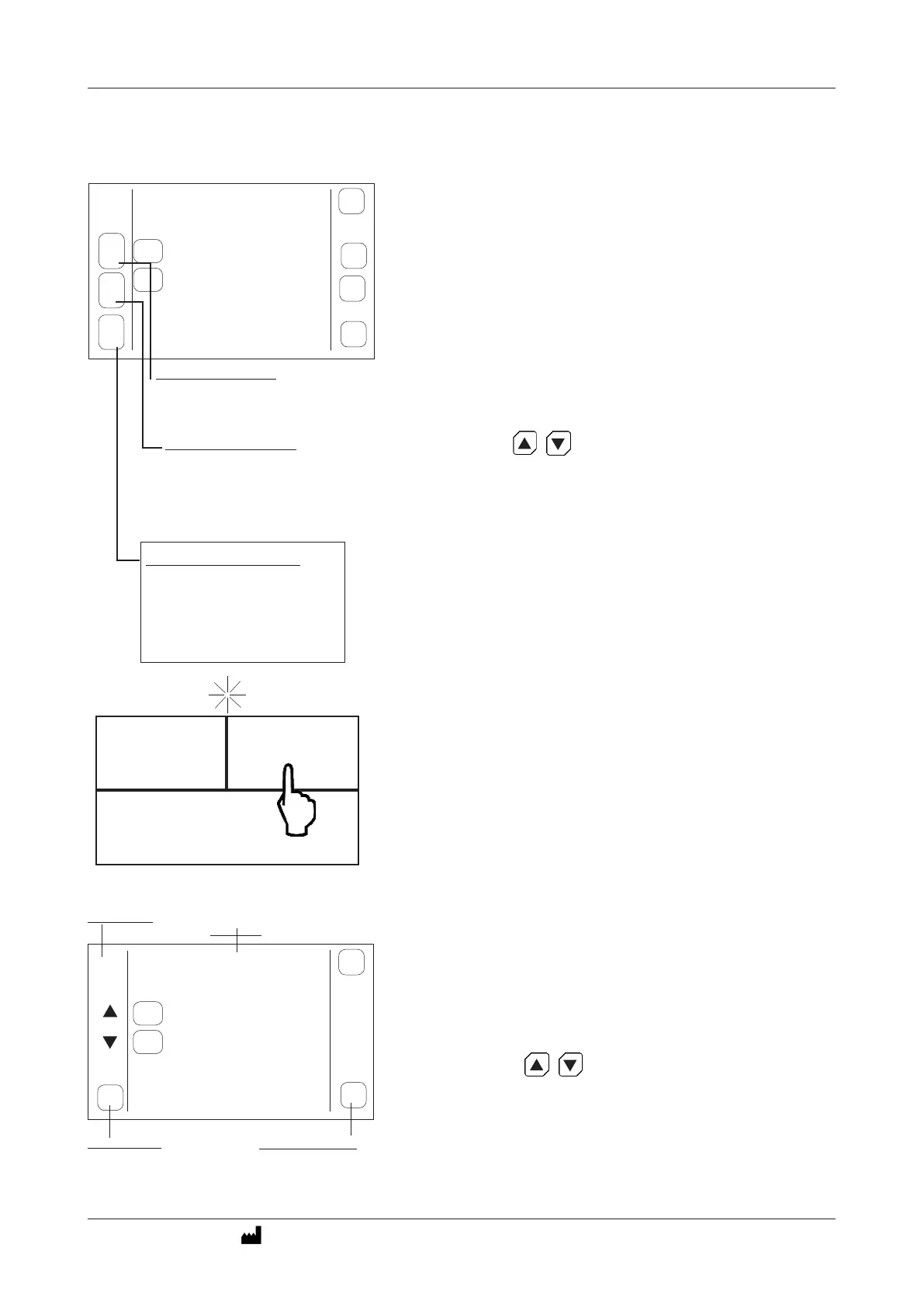
Click on «PROGRAMMING» to select the program.
Click on the arrows to select the program.
The programs are numbered P01, P02, P03, ....
(Each program can have up to 6 steps)
Program number
Program step
Select the program
Press to edit the program
1 121.0ºC 00h 03m +1.60bar
PRE 80ºC
PUR 98ºC 05m 00s
P03
edit
Sel
back
2 80.0ºC 00h 05m +1.60bar
SETTINGS
PROGRAMMING
TASK
7.9 Create or modify a program
- Click on «PROGRAMMING».
- Select a program to modify it.
Click on the arrows to select the program to be modied.
The programs are numbered P01, P02, P03, ....
(Each program can have up to 6 steps)
To modify / create a program, click on «EDIT».
- Press directly, with your nger or a pointer, on the temperature, time,
pressure to modify its value.
- Click on the “step” number to delete it or add a new one.
- Select the temperature control probe:
• Heartprobe:
• Waterprobe: (Only in specic cases, sealed bag)
Press SAVE to save the program.
Press BACK to exit the programming screen.
See section 5.2 for more details.
Note: To facilitate programming, when modifying the time, the calculated
value of F
0
appears at the bottom of the screen.
In the example: STEP 2 - 80°C, 5 minutes, pressure «1.6» bar.
The equipment in the cooling phase follows the sequence of lling/emptying
the chamber until the programmed temperature is reached.
The time of this phase has the purpose of maintaining the inner temperature
during the programmed time.
Note that cooling is done by using the inlet water. It is not possible to cool
below the inlet water temperature, the equipment will give an error because
it will not be able to achieve this temperature.
F
0
: 2.94
F
0
=2,94



 To Next Page