CUSTOM CHANNEL SET-UP/SUMMARY
4.10.1 MULTI-POINT CALIBRATION
Introduction
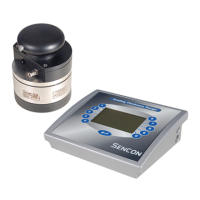
If the distribution of film weight on your calibration panel is not uniform it may
be possible to achieve a more accurate calibration of the SI9500 by
calibrating at several points on the panel and taking the average. Special
software has now been produced to achieve this and is available in units with
software version 1.17 and higher. The version can be displayed by pressing
CLEAR and END simultaneously while in Measure mode.
Setting for Multi-Point Calibration
Refer to appendix 1 of your manual sections A1.2, A1.5 and A1.6. Switch
position 4 should be closed. This will enable the multi-point calibration
facility.
Operation
1. Press CALIBRATE to enter calibration mode.
2. Select lacquer type.
3. Place probe on sample and press ENTER.
4. Repeat stage 3 for as many points as required.
5. Press END or select the next lacquer type.


 To Next Page