SMP100 User Guide
38
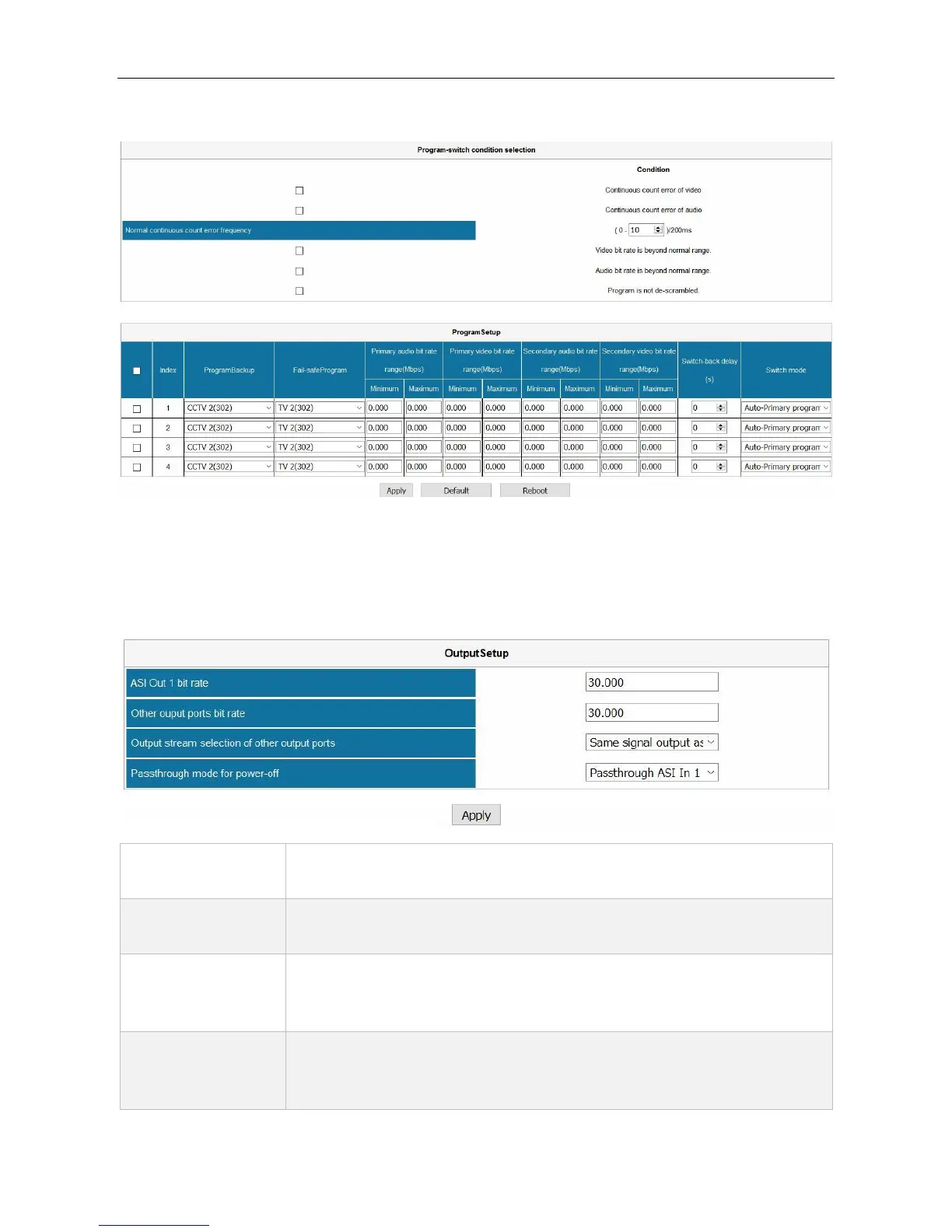
If you choose Program-level for Switch level settings, the UI will be like this:
As you can see in the image above, you have to configure Program-switch condition selection
and Program Setup.
Module Configuration > SWITCH > Output
Configure the constant bitrate for the output ASI port 1. This constant rate
should be larger than the effective rate of the input streams.
Other output port
bitrate
Configure the constant bitrate for the output ASI port 2. This constant rate
should be larger than the effective rate of the input streams.
Output stream
selection of other
output ports
ASI Switch module will output one of the following four inputs even the whole unit
is off: Same signal output as ASI Out 1, Pass-through ASI In 1 (Primary), Pass-
through ASI In 2 (Secondary), Pass-through ASI In 3 (Fail-safe)
Pass-through
mode for power off
ASI Switch module will output one of the following three inputs even the whole
unit is off: Pass-through ASI In 1 (Primary), Pass-through ASI In 2 (Secondary),
Auto



 To Next Page