EasyManua.ls Logo

Sencore SMP100 - Page 56

Default Icon
68 pages
Print Icon
To Next Page IconTo Next Page
To Previous Page IconTo Previous Page
Loading...
SMP100 User Guide
50
GOP Size
6~63
AC3 AC Mode
1+1(L, R)
1/0(C)
2/0(L, R)
GOP Close
Disable, Enable
Aspect Ratio
Conversion
Automatic, 16x9_LetterBox
16x9_CutOff, 4x3_PillarBox
4x3_CutOff
Same PID for PCR
and Video
Video Max Encode Rate
(Payload)(Kbps)
Output Resolution
720x480_60i
720x576_50i
1920x1080_60i/50i
1208x720_60p/50p
Video Min Encode Rate
(Payload)(Kbps)
Video Encoder
Type
H264, MPEG2
Latency Adjustment
(ms)
Enter a value to adjust the audio
and video synchronization. Enter
a positive value to delay audio
encoding. Enter a negative value
to hasten audio encoding.
SDHD
4SD/2HD channel mode.
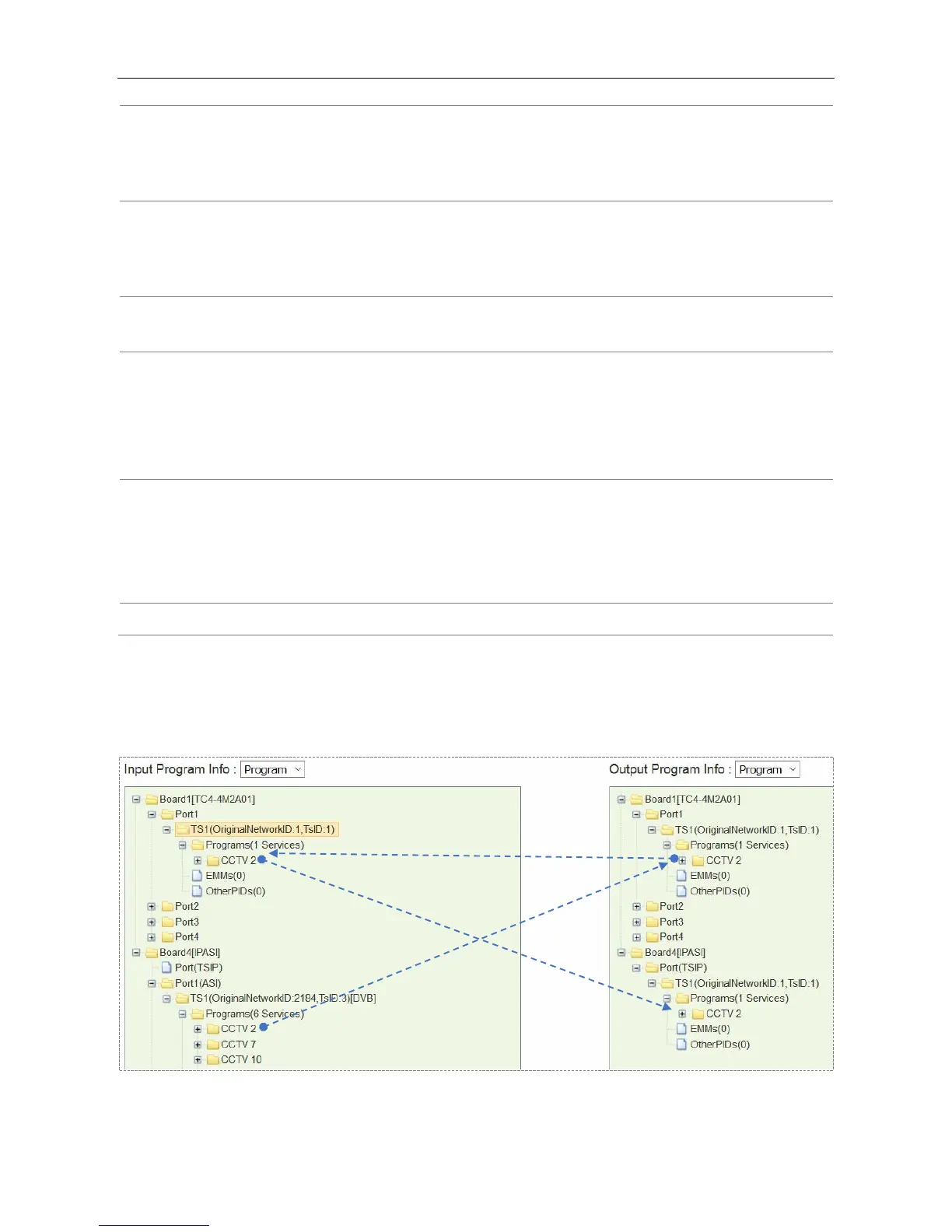
Drag a program to a TC4 output port for transcoding process. The transcoded program will be in the
corresponding TC4 input port. Then the transcoded program can be sent to an output port.

Table of Contents