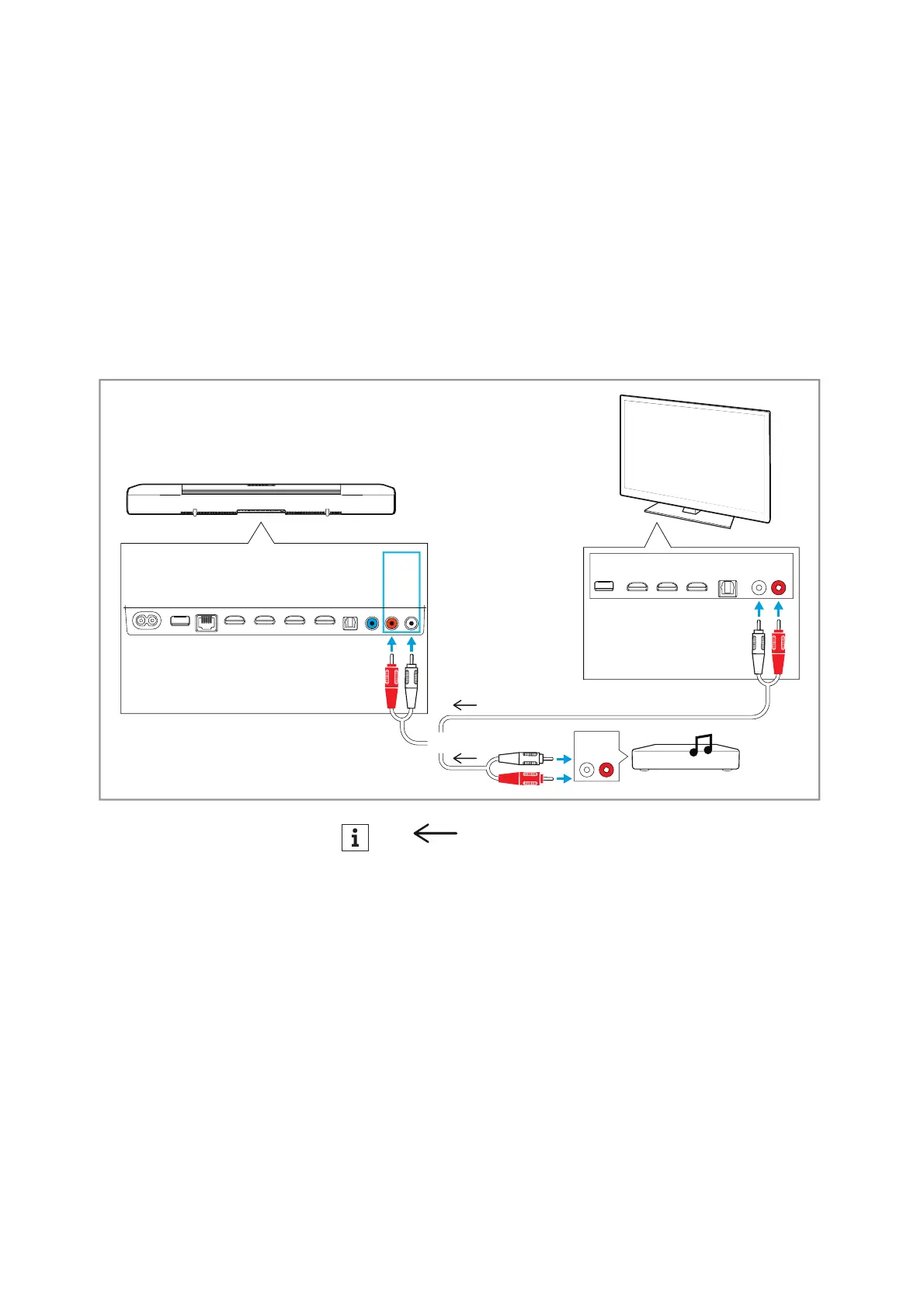
Connecting devices to the AMBEO Soundbar
AMBEO Soundbar | 23
Analog connection
• Required cable: stereo RCA cable
To connect the Soundbar to a TV or an audio source (e.g. CD player):
▷ Connect the red connector of an RCA cable (to be ordered sepa-
rately) to the red AUX IN socket and the white connector of the
s
ame cable end to the white AUX IN socket on the Soundbar.
▷ Connect the other red connector of the cable to the red socket
and the white connector of the same cable end to the white
socket of the TV or audio source.
L
AUDIO
R
AUX IN
SW PRE
OUT
OPT IN
HDMI 3 IN
HDMI 2 IN
HDMI 1 IN
HDMI TV
(eARC) OUT
ETHERNET
USB
POWER
e.g. CD
player
L
AUDIO
R
OR
*
*
*
Audio signal
Connection diagram (example)
Connect your audio sources to the AMBEO Soundbar and your TV
according to the following diagram (example). Sennheiser recom-
mends connecting the audio sources f
or high-resolution surround
formats directly to the AMBEO Soundbar using a High Speed HDMI
®
Cable.











 To Next Page