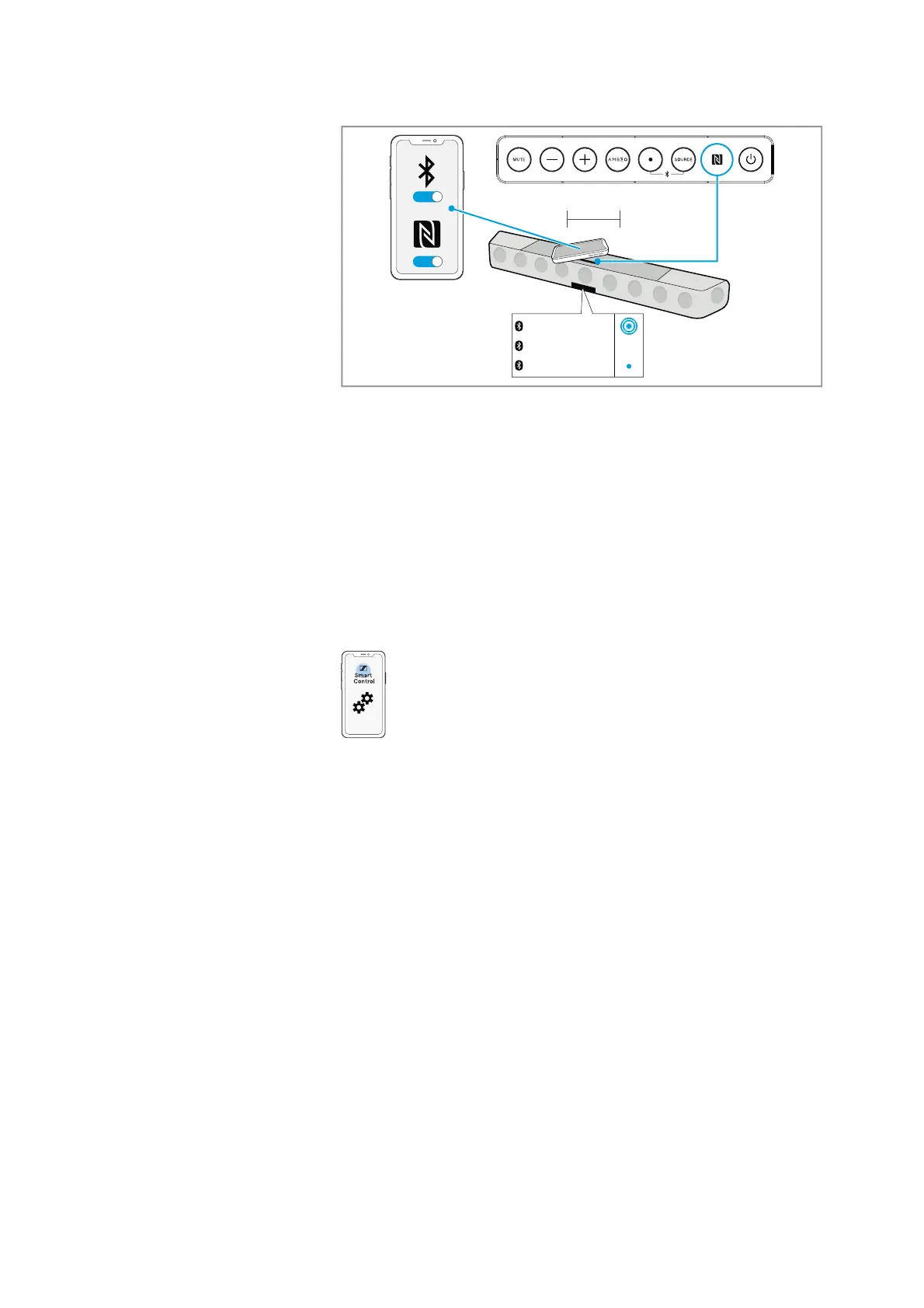
ON
ON
< 3 cm
Pairing
Connected
Stan‘s iPhone
Using the AMBEO Soundbar
38 | AMBEO Soundbar
Disconnecting the AMBEO Soundbar from an NFC device
▷ Place your paired NFC device close (less than 3 cm) to the NFC
antenna on the Soundbar.
The Soundbar is disconnected from the NFC device. The display
shows “Disconnected”.
The status LED goes off.
Installing the Smart Control app
To control the Soundbar using a smartphone, Bluetooth Low Energy
(Bluetooth LE, at least version 4.2) is required.
To make full use of all the settings and functions of the AMBEO
Soundbar, you need to have the free Sennheiser Smart Control app
installed on your smartphone.
Download the app from the Apple App
Store or from Google Play and
install it on your smartphone. Alternatively, you can visit the follow-
ing website:
http://www.sennheiser.com/smartcontrol
▷ Start the Smart Control app.
▷ Follow the instructions in the app.
▷ Press the multi-function button and the SOURCE button for 2 sec-
onds to accept the Bluetoot
h Low Energy connection.
The Smart Control app recognizes the Soundbar and activates all
a
vailable settings and functions.











 To Next Page