25
Adjusting settings via the operating menu
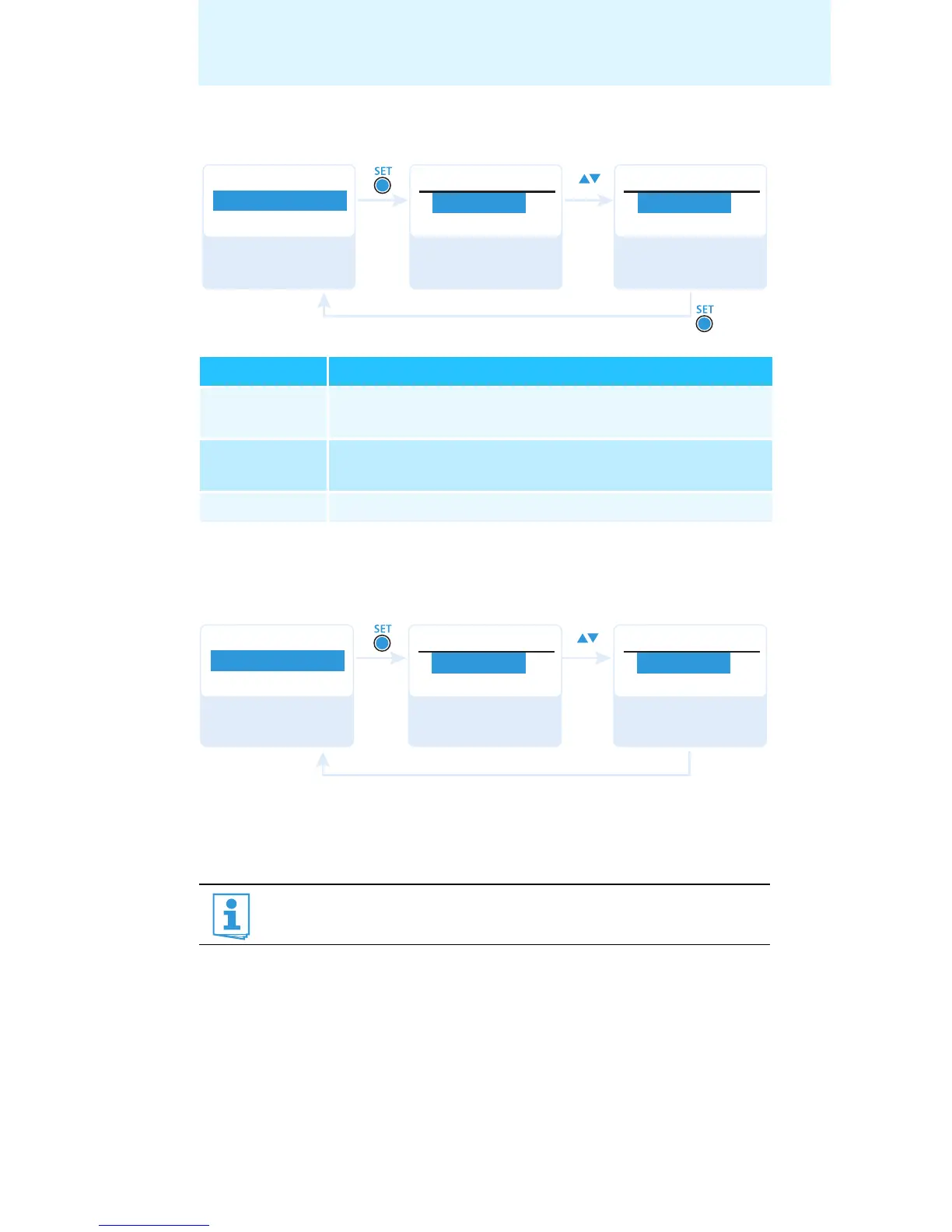
Setting the mode for the MUTE switch – “Mute Mode”
For information on how to use the MUTE switch , refer to page 13.
Adjusting the transmission power – “RF Power”
Via the “RF Power” menu item, you can adjust the transmission power in
three steps (“Low”, “Standard”, “High”).
Mode Function
“AF On/Off” When the switch is in the MUTE position, no audio
signal is transmitted.
“RF On/Off” When the switch is in the MUTE position, the RF signal is
deactivated
.
“Disabled” The muting function is deactivated.
It is vital to observe the notes on the enclosed frequency informa-
tion sheet!
Advanced
Menu
Mute Mode
Mute Mode
Mute Mode
RF On/OffAF On/Off
“Stored”
Call up
“Mute Mode”
Select the desired
setting
Store the setting
Advanced
Menu
RF Power
Standard
RF Power
Low
RF Power
“Stored”
Call up
“RF Power”
Select the desired
setting
Store the setting










 To Next Page