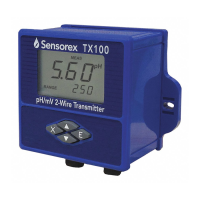
The Sensorex TX105 pH/ORP Transmitter is a 2-wire device designed for industrial process monitoring, measurement, and control applications. This user manual provides comprehensive information for its installation, setup, operation, and maintenance.
Before any wiring or repairs, it is crucial to remove line power and ensure the transmitter is unpowered. All such operations should be performed by qualified personnel. If the transmitter's safety is questionable (e.g., visible damage, improper operation, or storage at temperatures above 176°F (80°C) for extended periods), it should be disabled to prevent unintended operation. Installation must comply with local codes and instructions in this manual, observing the transmitter's specifications and parameter ratings.
Technical Specifications:
Display:
- Type: LCD: 128x65 dot matrix, capable of displaying figures or alphabets in various sizes (12x8, 28x15, 32x18).
- Update Rate: 1 second.
- Contrast: User-selectable, 5 levels.
Measurement:
- pH Range: 0.00 to 14.00 pH.
- ORP Range: -2000mV to +2000mV.
- Temperature: PT1000 sensor, 0 to 60 °C (32 to 140 °F).
- Accuracy: ± 0.5% of reading.
- Repeatability: ± 0.05% of span.
- Temperature Drift: Zero and Span: ± 0.02% of span per °C (typical at 25°C).
Electrical:
- Power: 19-48VDC, regulated, 30mA maximum.
Current Output:
- Type: Isolated 4-20 mA output.
- Resolution: 0.004 mA (12-bit).
- Update Rate: 1 second.
- Maximum Loop Impedance: 250Ω @24V; 600Ω @31V; 1500Ω @48V.
Memory:
- Type: Non-volatile, retaining all user settings indefinitely without battery backup.
Open-Collector Output (OC Output):
- Type: Isolated.
- Sink Current: 50 mA maximum.
- Pull-up Voltage: 40 VDC maximum.
- Configurable Modes: High mode, Low mode, Proportional pulses.
Ambient Conditions:
- Operation: -10 °C to 70 °C (14 °F to 158 °F); 0-95% relative humidity, non-condensing.
- Transport/Storage: -15 °C to 80 °C (5 °F to 176 °F); 0-95% relative humidity, non-condensing.
Standards and Approvals:
- CE: Certified Compliant to European Community Standards.
Usage Features:
Installation:
The TX105 pH/ORP transmitters are available in two installation styles: panel mount and field mount.
- Panel Mount: Designed for installation using a 1/4 DIN Punch. Recommended clearance of 1 inch on all sides between instruments. Installation involves sliding a gasket over the back, placing the instrument into the panel cut-out, attaching a mounting bracket with quick clips, and ensuring secure attachment. Disassembly requires pressing the mounting bracket clips and pulling the instrument away.
- Field Mount: Requires a wall mounting kit (plastic rear cover with gasket and fixing screws). Installation involves placing the gasket, threading electrical cables through connectors, connecting power, sensor, and OC output wires, securing the rear cover to the front enclosure with screws, and fixing the entire unit to a surface using screws or cables.
Electrical Connections:
The manual provides detailed diagrams for various connection scenarios:
- Standalone Application: Power supply (24VDC+ and 24VDC-) connected to transmitter terminals (V+/Loop+ and V-/Loop-). Loop current is not used in this setup.
- Connection to a PLC with Built-in Power Supply: PLC terminals (24VDC+, 24VDC-, 4-20mA Loop Input) connected to transmitter terminals (V+/Loop+ and V-/Loop-).
- Connection to a PLC with Separate Power Supply (Option A & B): Diagrams show connections for power supply (24VDC+, 24VDC-) and PLC (4-20mA Loop Input) to the transmitter terminals (V+/Loop+ and V-/Loop-).
- Sensor Input Connections: Specific wiring for TC (Red, Black), REF (coax braid), PH (coax center), ORP (coax center) to transmitter terminals (Temp+, Temp-, REF, PH/ORP Input). Includes configurations for 10K Ohm Resistor.
- OC Output Connections: Diagrams for connecting to a PLC with built-in or separate power supply, showing OC input+ and OC input- connected to transmitter terminals (O.C.+ and O.C.-).
Open Collector Output Operation:
The OC output can function as a switch, a warning, or generate proportional pulses. It can be disabled by selecting "OFF" in the OC OUTPUT menu. The "parameter" can be pH, ORP, or temperature.
- Low Mode: OC output is active when the parameter is less than a user-set point and inactive when it exceeds the set point plus hysteresis.
- High Mode: OC output is active when the parameter is greater than a user-set point and inactive when it falls below the set point minus hysteresis.
- Proportional Pulsing: Generates a pulse sequence at a rate defined in the OC OUTPUT menu. The pulse rate is proportional to the process value between a starting and end point. For example, 0 pulses/min below 0.0 pH, 100 pulses/min at 5.00 pH, and 200 pulses/min above 10.00 pH.
The menu system includes a view menu (topmost level, default display) and an editable menu, with multiple levels.
- Navigation: UP/DOWN arrow keys to scroll within a level, ENTER key to move to a lower level, ESC key to move to an upper level.
- Timeout: The system returns to the view menu after 10 minutes of inactivity.
- Editing: Only highlighted items can be edited. Changes are effective immediately upon pressing ENTER. ESC exits without saving.
- Default Display: Shows pH and temperature (e.g., 3.90 PH, 22.1 °C).
- Sensor Input: Monitors millivolt input from the pH electrode (e.g., 164 mV).
- 4-20mA Output: Monitors the 4-20 mA loop output for pH (e.g., 8.44 mA).
- EasyCal: Initiates system calibration for pH measurement.
EasyCal Details (pH):
Supports two buffer sets:
- Standard: pH 4.00, 7.00, 10.00.
- DIN 19267: pH 4.65, 6.79, 9.23.
- Procedure: Place sensor in pH buffer 1, wait 30 seconds for stabilization. Use the RIGHT key to select the pH value and ENTER. Repeat for pH buffer 2. Sensor temperature should be set before EasyCal for new electrode installations.
- Default Display: Shows ORP value (e.g., 366 mV).
- Sensor Input: Monitors millivolt input from the ORP electrode (e.g., 164 mV).
- 4-20mA Output: Monitors the 4-20 mA loop output for ORP (e.g., 8.44 mA).
- Access: Press and hold ENTER for 3 seconds. A password may be required (RIGHT-DOWN-UP-DOWN key sequence).
- Main Menu: Contains CALIBRATION, OUTPUT, and OPTIONS menus.
- TEMPERATURE UNIT: Sets temperature unit (°C or °F).
- TEMPERATURE: Sets the temperature value (e.g., +20.0 °C). This should be done before any calibration.
- STANDARD/SLOPE CALIBRATION: Applies linear calibration to pH measurement.
- Procedure: Similar to EasyCal, involving placing the sensor in pH Buffer #1, setting the pH value, then repeating for pH Buffer #2 to set the slope.
- Output 4~20mA: Sets pH or temperature as the source for the 4-20mA current loop output. Defines minimum and maximum pH/temperature values for 4-20mA output.
- OC Output: Selects pH or temperature as the source for the open collector output. Sets OC mode (High, Low, Pulse) and related parameters.
- MIN ALARM: Sets minimum setpoint and hysteresis for low mode.
- MAX ALARM: Sets maximum setpoint and hysteresis for high mode.
- PULSE: Sets range and pulse rate for proportional pulsing.
- STANDARD: Applies a one-point linear calibration to ORP measurement (e.g., 000mv).
- Output 4~20mA: Sets minimum and maximum ORP values for the 4-20mA current loop output. Valid range: -2000mV to +2000mV.
- OC Output: Selects OC mode and relative parameters (same as pH).
- CONTRAST: Adjusts LCD contrast (1 to 5, 5 being highest).
- FILTER: Sets time parameter for averaging input values (1S, 2S, 5S, 8S, 10S, 20S, 40S, 60S). Larger values provide more stable displays but longer response times.
- LOOP ADJUST 4mA: Adjusts minimum current output (3.70 mA to 5.00 mA) to match external measurement.
- LOOP ADJUST 20mA: Adjusts maximum current output (19.00 mA to 21.00 mA) to match external measurement.
- TEST 4~20mA OUTPUT: Manually selects output current (3.7 mA to 21.00 mA) to test the loop output. Value changes by 0.01mA per key press, or 0.1mA when held for 5 seconds.
- TEST OC OUTPUT: Manually selects the state of the open collector output.
- PASSWORD MENU: Enables/disables password for Main Menu access. Password is fixed (RIGHT-DOWN-UP-DOWN key sequence).
- RESTORE FACTORY SETTINGS: Restores default settings. Requires correct key code (RIGHT-DOWN-UP-DOWN key sequence).
Maintenance Features:
Troubleshooting:
The manual includes a comprehensive troubleshooting guide for various display messages and potential issues:
- "Please wait 30s for sensor stabilization!": Wait 30 seconds.
- "Please Check Sensor!": During pH EasyCal, if detected sensor input is >2PH away from selected pH value or range of possible buffer value. During pH Standard/Slope calibration, if detected sensor input is >2PH away from the entered pH value. During ORP One Point calibration, if detected sensor input is >120mV away from the entered ORP value.
- Suggestions: Check sensor and restart calibration. Press "Enter" to accept the value.
- "Please Maintain or Replace Sensor!": During pH EasyCal, if detected sensor input is >4PH away from selected pH value or range of possible buffer value. During pH Standard/Slope calibration, if detected sensor input is >4PH away from the entered pH value. During ORP One Point calibration, if detected sensor input is >240mV away from the entered ORP value.
- Suggestions: Press "Enter" to interrupt calibration. Replace sensor and restart calibration. Press "ESC" to re-enter or reselect pH or ORP value.
- "Buffer #2 is too close to Buffer #1": During pH EasyCal 4 7 10 or Standard/Slope calibration, buffer 2 is within 2PH of buffer 1. During pH EasyCal DIN19267 calibration, buffer 2 is within 1PH of buffer 1.
- Suggestions: Check buffers. Replace Buffer #2 with an appropriate pH value and continue calibration. Press "ESC" to interrupt calibration when "Place Sensor in pH Buffer #2" is prompted again. Restart calibration with appropriate buffers.
- "Value Must Be Larger Than -10°C(or 14°F)!": During temperature calibration, the entered value is smaller than -10°C (or 14°F).
- Suggestions: Enter the appropriate value.
- "Value Must Be Smaller Than 70°C(or 158°F)!": During temperature calibration, the entered value is larger than 70°C (or 158°F).
- Suggestions: Enter the appropriate value.
- "Value Too Large(or Small)!": During temperature calibration, the entered value is more than 25 degrees away from the detected value.
- Suggestions: Check the sensor and restart calibration. Enter the appropriate value.
- "HYSTERESIS Too Large": The HYSTERESIS is greater than the MAX SETPOINT.
- Suggestions: Set HYSTERESIS to a smaller value than MAX SETPOINT.
- "Wrong Password": The password entered is incorrect.
- Suggestions: Enter the correct password.

 Need help?
 General

 To Next Page