Home
Serstech
Laboratory Equipment
ARX
Page 30
Serstech ARX - Page 30
62 pages
Manual
Save Page as PDF
To Next Page
To Next Page
To Previous Page
To Previous Page
Loading...
30
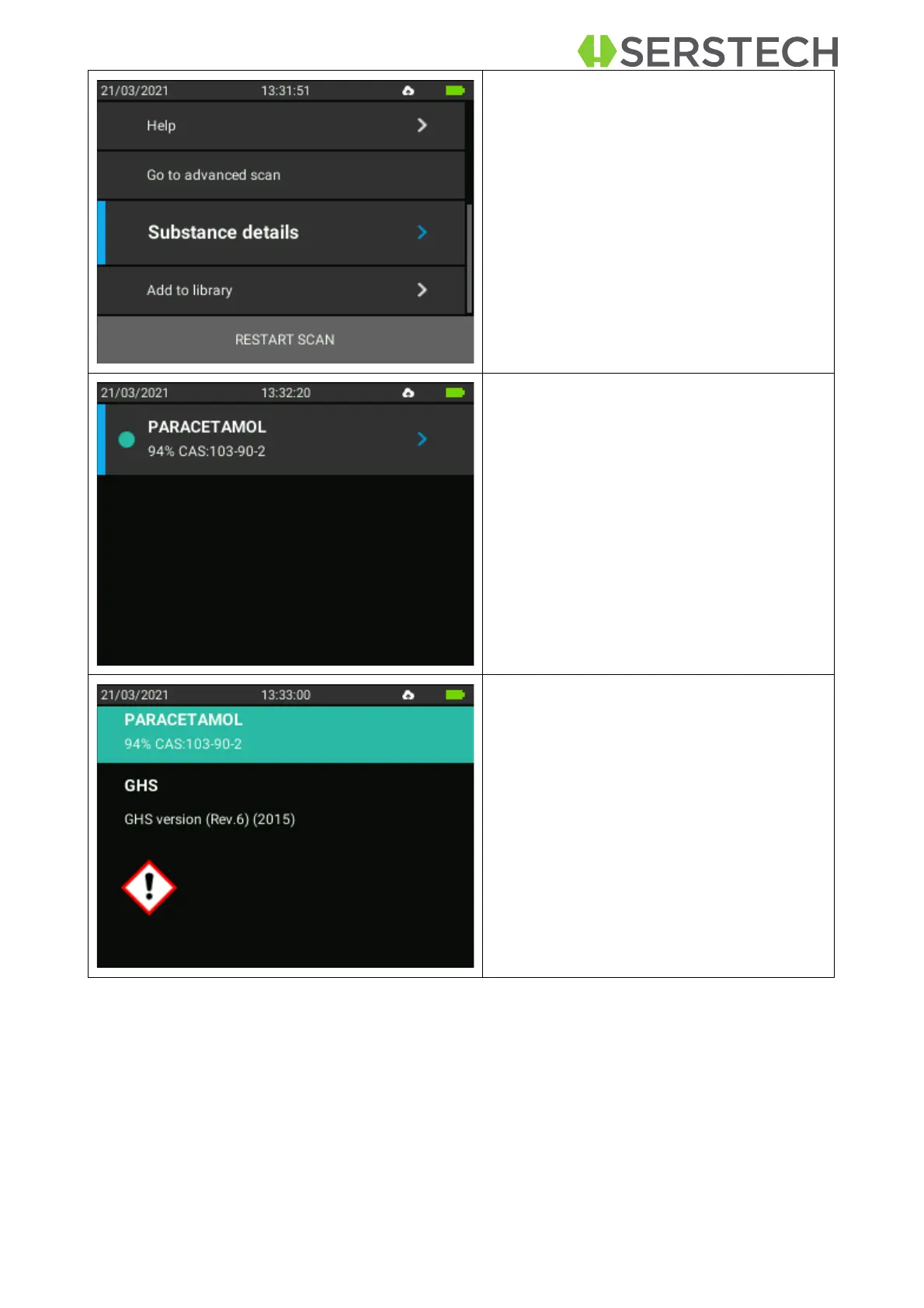
There
is
also
th
e
po
ssibility
t
o
view
the
S
ub
sta
nce
det
ails
by
selecting
t
his
op-
tion.
The identified substance will be
displayed.
Some
of
the
properties,
su
ch
as
match-
ing
percentage
(94%),
CA
S
number
and
some GHS details will be displayed.
After
seeing
a
ll
desired
details,
the
user
must
p
ress
Bac
k
button
to
return
to
t
he
measurement screen.
29
31
Table of Contents
Main Page
Default Chapter
2
Table of Contents
2
1 Introduction to the Arx Instrument
4
Instrument Safety
4
Liability
4
Handling
5
Intellectual Property Rights
5
Equipment Modifications
5
Trademark Acknowledgments
5
Support
6
Contact Information
6
Invisible Laser Safety Considerations
6
2 Casing
8
3 Accessories
9
Vial Holder
9
Small Sample Adapter
14
Calibration Cap
15
USB Cable
15
Barcode Reader
15
4 Arx Instrument
19
Instrument Labels
19
Instrument Keypad
21
5 Arx Log in
21
6 Main Menu
23
7 Scan
24
Quick Scan
24
Scan Analysis Result
27
Advanced Scan
31
Advanced Scan Analysis Result
37
Verify
39
Verify Analysis Result
42
Calibration Check
43
8 Scan History
45
9 Settings
47
About
47
USB Mass Storage
48
Time and Date
48
Language
49
Factory Reset
50
System Info
50
10 Log out
51
11 Chemdash
52


 To Next Page