Home
Serstech
Laboratory Equipment
ARX
Page 47 (Settings)
Serstech ARX - Settings; About Device
62 pages
Manual
Save Page as PDF
To Next Page
To Next Page
To Previous Page
To Previous Page
Loading...
ARX User Manual
9.
Setti
ngs
9.1
Ab
out
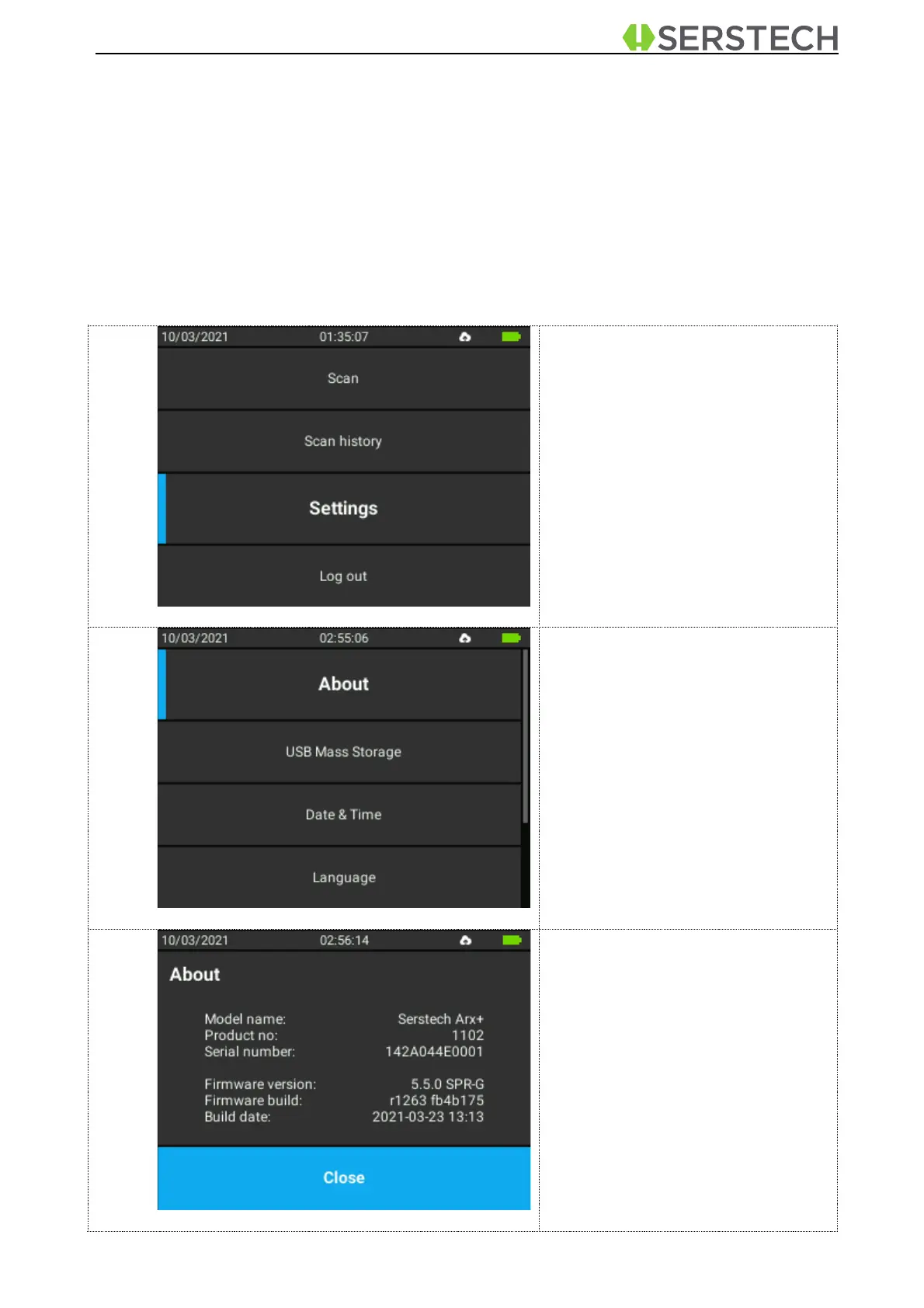
In the About screen the device settings for firmware and hardware are displayed.
Select
Set
tin
gs
in
the Main
me
nu
.
Select
About
.
Th
e
device
settings
fo
r
firmware
and hardware are displayed.
Scroll
using
to
vie
w
the
in
formation
on
the
instrument
serial
numb
er,
software
an
d
microcontroller
firm
-
ware version.
This
in
formation
cannot
be
e
dited
by the user.
46
48
Table of Contents
Main Page
Default Chapter
2
Table of Contents
2
1 Introduction to the Arx Instrument
4
Instrument Safety
4
Liability
4
Handling
5
Intellectual Property Rights
5
Equipment Modifications
5
Trademark Acknowledgments
5
Support
6
Contact Information
6
Invisible Laser Safety Considerations
6
2 Casing
8
3 Accessories
9
Vial Holder
9
Small Sample Adapter
14
Calibration Cap
15
USB Cable
15
Barcode Reader
15
4 Arx Instrument
19
Instrument Labels
19
Instrument Keypad
21
5 Arx Log in
21
6 Main Menu
23
7 Scan
24
Quick Scan
24
Scan Analysis Result
27
Advanced Scan
31
Advanced Scan Analysis Result
37
Verify
39
Verify Analysis Result
42
Calibration Check
43
8 Scan History
45
9 Settings
47
About
47
USB Mass Storage
48
Time and Date
48
Language
49
Factory Reset
50
System Info
50
10 Log out
51
11 Chemdash
52


 To Next Page