50
Version 3 2012-08
GB
7. Individual settings
7.1 Setting the grinding neness
The grinding neness affects the taste of the coffee. Select the grinding ne-
ness according to the type of coffee you are using.
NOTE!
For a light roast, you should set a high neness;
for a dark roast a medium neness is optimal. The
roast is normally printed on the coffee package.
CAUTION!
If the neness setting is moved without grinding
coffee beans, the grinder can be damaged.
– Only shift the grinding neness while the grinder
is grinding.
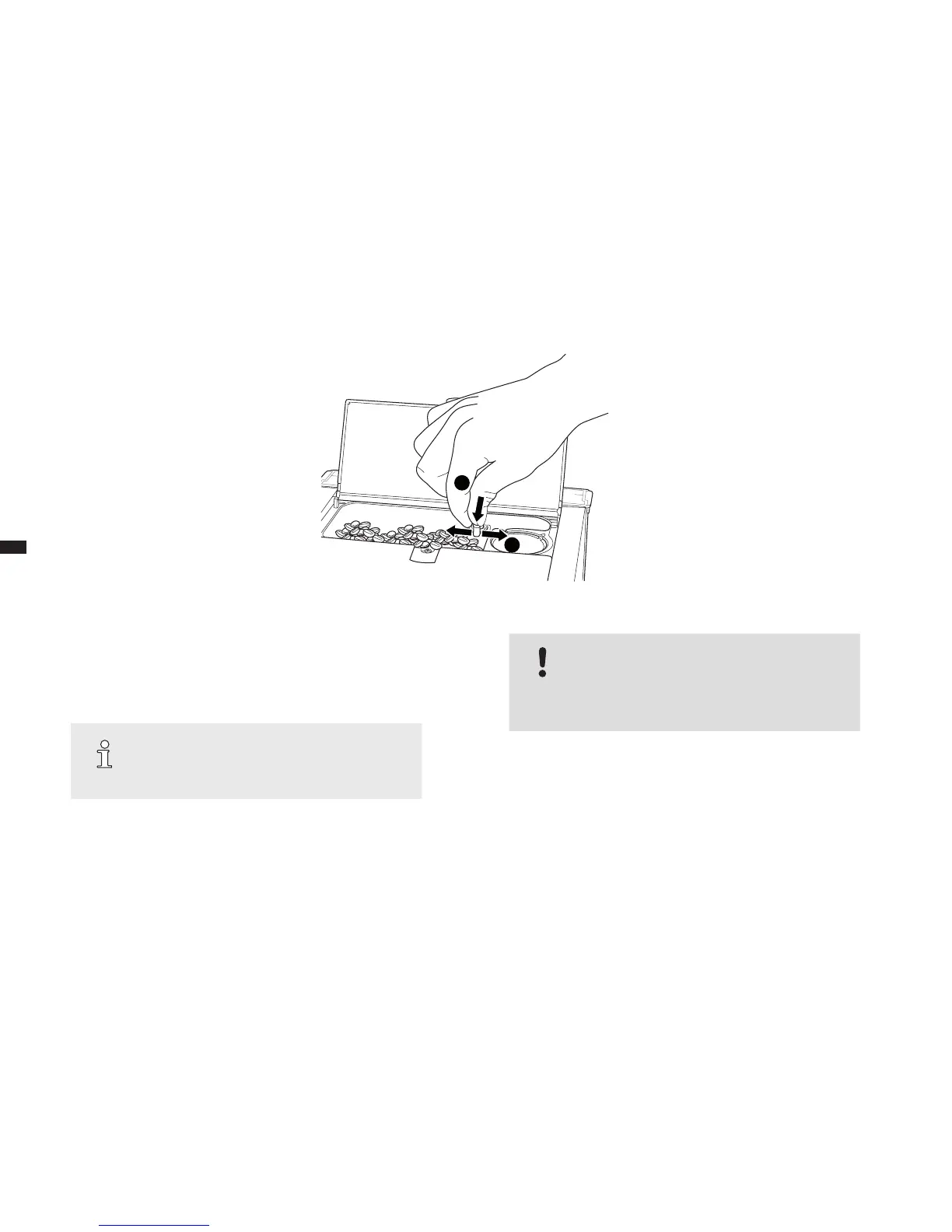
Here's how to set the grinding neness:
1. Place a cup on the cup tray below the coffee-milk dispenser of the de-
vice and adjust the height of the coffee-milk dispenser to the cup height.
2. Open the cover of the bean container.
3. By turning the e-Select, select a beverage.
4. Press the e-Select.
 The grinder grinds.
1.
2.
g. 8: Setting the grinding neness





 To Next Page