64
Version 3 2012-08
GB
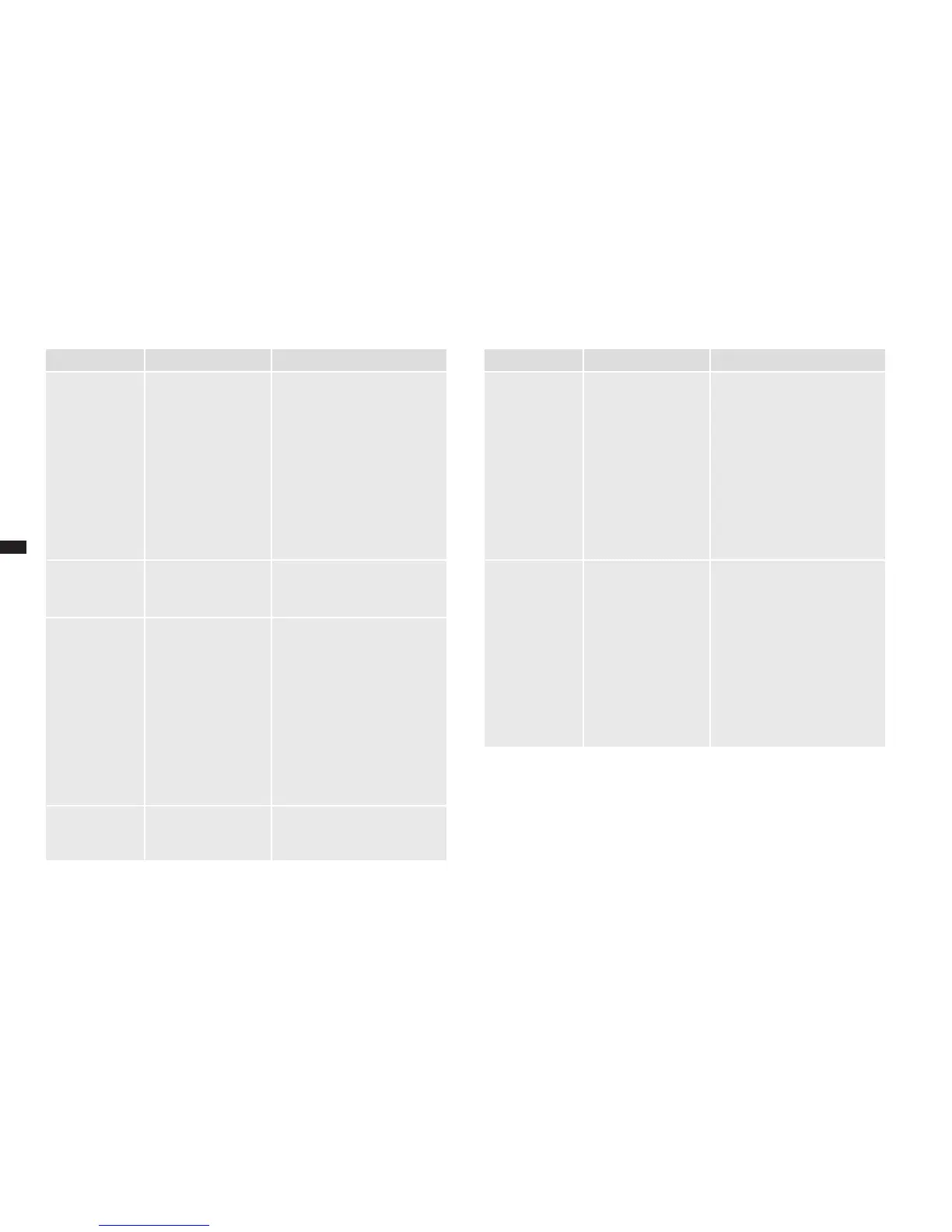
Display Cause Remedy
WATER SUP-
PLY ERROR.
There is not enough
water in the brewing
unit.
Clean the water tank and
especially its water discharge
on the oor.
Fill the water tank halfway
with cold drinking water and if
necessary, remove the water
lter and replace it.
If problem persists, also clean
the brewing unit (►"8.3
Cleaning the brewing unit").
SYSTEM ER-
ROR. PLEASE
RESTART.
A system error oc-
curred.
Switch the device off for sev-
eral seconds and then switch it
on again.
GRINDER
BLOCKED.
CONTACT
SERVICE.
The grinder is
blocked.
Set the grinder regulator on
the coarsest neness (►"7.1
Setting the grinding neness")
and prepare another coffee
speciality.
If this solves the problem, set
the desired neness again for
the next beverage.
If problem persists, contact
customer service.
SYSTEM ER-
ROR. CONTACT
SERVICE.
A system error oc-
curred.
Call customer service.
Display Cause Remedy
TOO MUCH
COFFEE.
CANCEL
There is too much
coffee in the brewing
unit.
Clean the brewing unit (►"8.3
Cleaning the brewing unit").
In the future, set a higher
neness (►"7.1 Adjusting the
grinding neness").
When you have added ground
coffee via the powder dosing
chamber, reduce the amount
of coffee powder which you
are putting in for a cup portion.
TOO LITTLE
GROUND COF-
FEE.
CANCEL
There is too little
coffee in the brewing
unit.
Clean the brewing unit (►"8.3
Cleaning the brewing unit").
In the future, set a coarser
neness (►"7.1 Adjusting the
grinding neness").
When you have added ground
coffee via the powder dosing
chamber, increase the amount
of coffee powder which you
are putting in for a cup portion.





 To Next Page