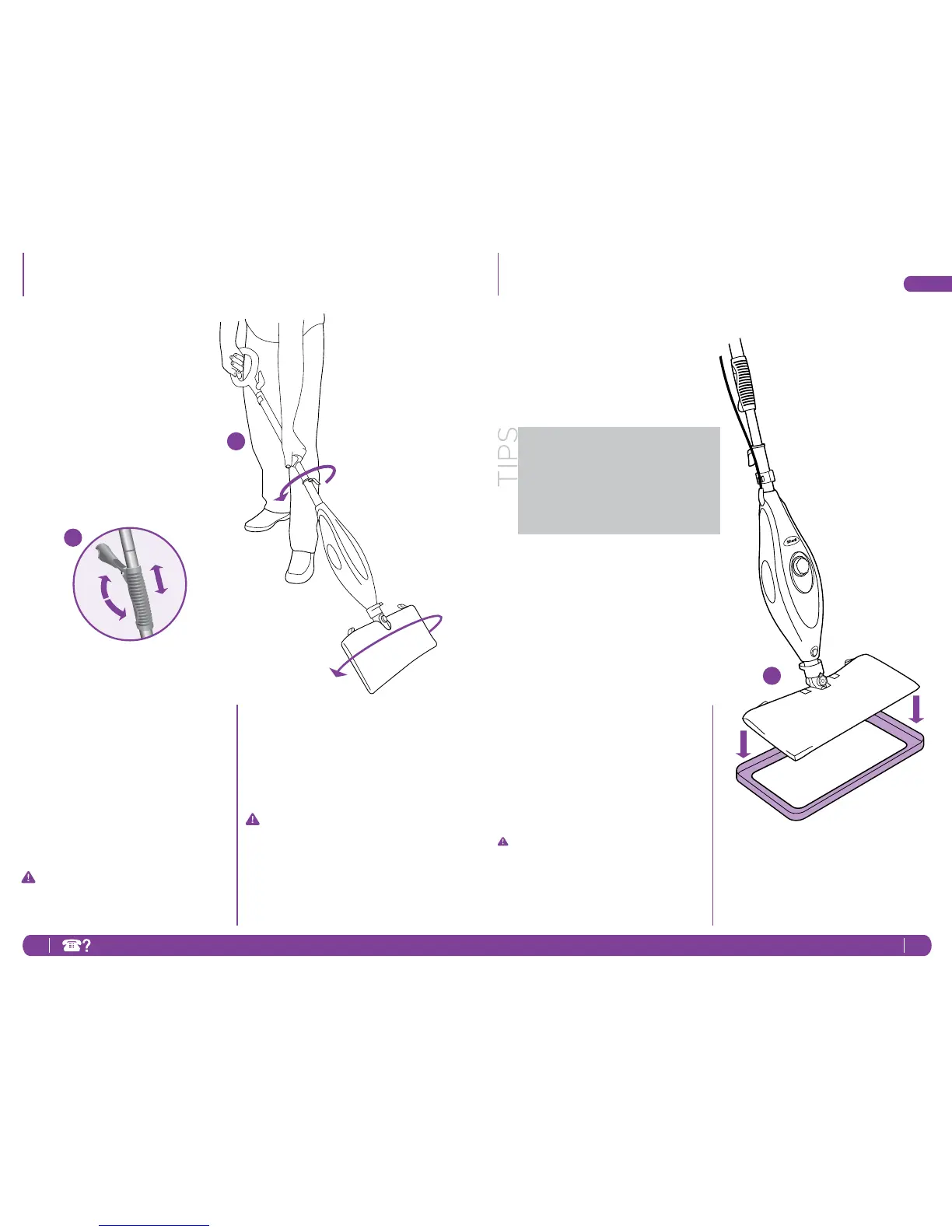
3 Foryourcomfort,youcanadjustthe
heightofthemop.Justliftthelatch
onthetube90degreestotheopen
position.Holdingthehandle,extend
thetubetotheheightthat’srightfor
youandthencloselatchtolocked
position.
4 Whenonesideofthemicro-ber
pocketgetsdirty,justipthemop
headandyoucanquicklystartusing
theotherside.Dirtcan’thideon
eitherside.
IMPORTANT:Pleasewait3-5minutes
fortheSteamMoptocooloffbefore
switchingthemopheadorthe
micro-berpockets.
5 Whenthewatertankisempty,the
steammopwillstopproducing
steam.Youcanrellthewatertank
atanytimeaslongasthemopis
unpluggedfromtheoutlet.Follow
theinstructionsfrompage3.This
goesforswitchingthemopheadsor
micro-berpocketsaswell.
IMPORTANT:Neverleavethesteam
mopwithadamp/wetmicro-ber
pocketonanyoorsurfaceforany
amountoftimeasthismaydamage
theoor.
4
3
Using Your Steam Mop - cont’d
Using Your Carpet Glider
THE CARPET GLIDER
1 TheCarpetGlidercanbeusedwith
therectanglemopheadtolightly
steamyourcarpetandarearugs.
Justplacethemopheadontop
ofthegliderandmovebackand
forthacrossasectionofthecarpet.
Thesteammopwon’tcleanyour
carpetingorareasrugs,butit’sgreat
fordeodorizingandfreshening.
NOTE:PleasenotethattheSteam
Moprestsontopofthecarpetglider
anditisnotaxedattachment.
Donotleavesteammopwithcarpet
gliderinonestationarypositionfor
anyperiodoftime.
1
TheSteamMopwon’tclean
yourcarpetingorarea
rugs.However,it’sgreatfor
deodorizingandfreshening.




 To Next Page