Care of Your Steam Mop
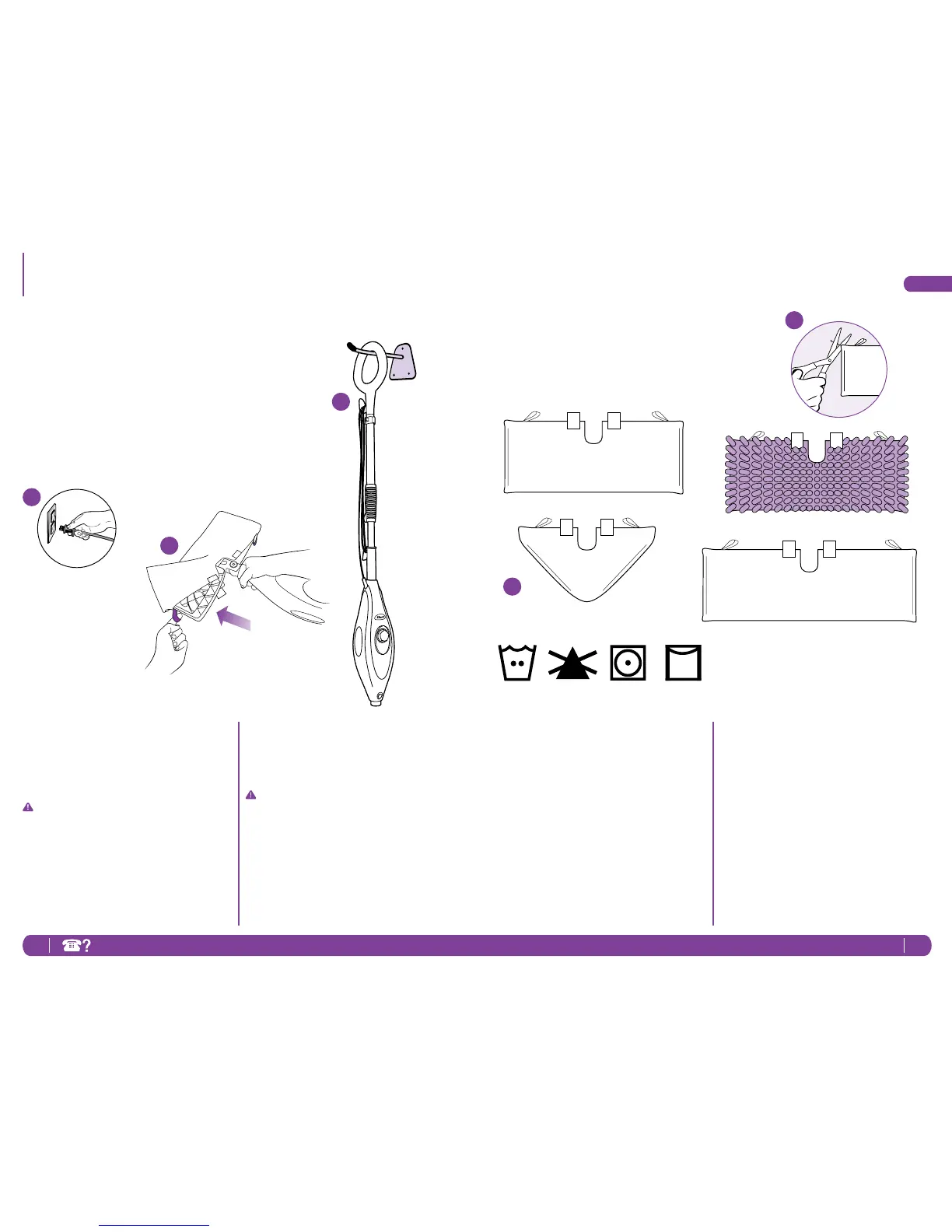
2 Removethemicro-bercleaning
pocketbyreleasingthequick
fastenersandusingthelavender
looponthesideofthepocket,
avoidingcontactwiththehotpocket
ordirt.Thenemptythewatertank.
IMPORTANT: Beverycareful
becausethecleaningpocketscan
getveryhotfromthesteam,souse
cautionwhenremovingthem.Let
theunitcool2-3minutes.
3 TostoretheShark
®
SteamMop
hangingup;rstremovethehead
(afterithascooledandthesteam
hasbeenreleased)thenhangona
largehook.
NOTE:Ifyouwanttostoreit
standinguprightthenmakesure
it’sleaningagainstawallforadded
supportandsafety.Alwaysstore
yourSteamMopwiththemicro-ber
pocketremoved,awayfromchildren
orhightrafcareas.
AFTER USE AND STORAGE
1 Whenyouhavenishedusing
thesteammop,andyouroors
areclean,unplugthecordfrom
theoutletandmoveitintoan
uprightposition.Lettheunitcool
2-3minutesandreleasesteamby
pumpingthehandleseveraltimes
beforeremovingthemicro-ber
cleaningpocketfromthemophead.
1
2
3
KEEPING YOUR MICRO-FIBER
CLEANING POCKET AS GOOD
AS NEW
1 Werecommendwashingyourmicro-
berpocketsseparatelyfromother
fabricstoavoidpickinguplint.
Onlyuseliquiddetergent.
(nopowderdetergent)Don’tuse
anyfabricsoftenersorbleach.
Linedryordryonalowdryer
setting.
2 Ifthereareloosethreadsonthe
pocketcarefullycutthethreadwith
scissors.Don’tpullonthemorcutat
thebase.
1
2




 To Next Page