38
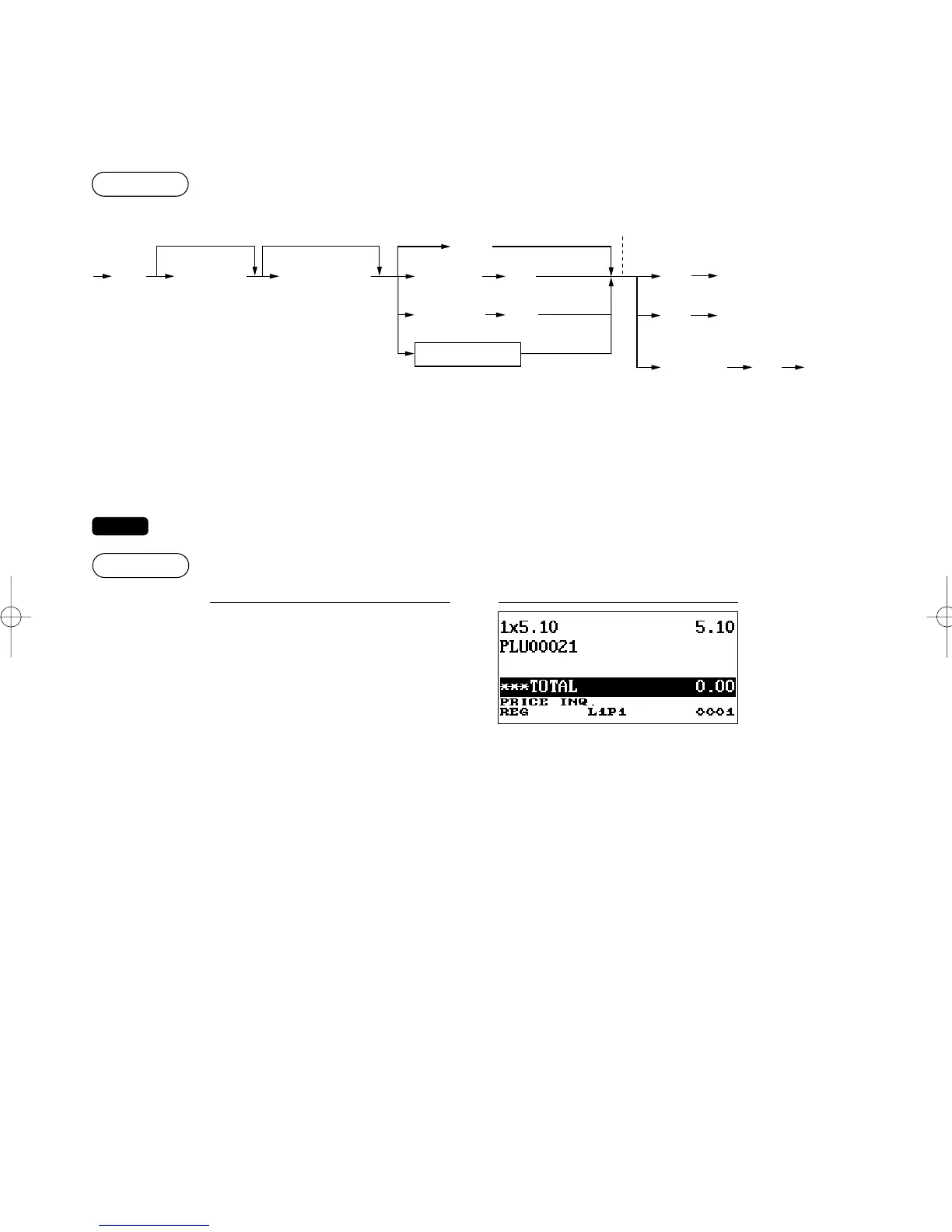
■ PLU/EAN information inquiry (view) function
This function displays the unit price of a PLU/EAN item (view mode).
*1: The unit price is displayed when the PLU/EAN code is entered.
*2: Press the
L
keys to cancel the view mode.
*3: Press the
`
key to register the displayed PLU/EAN item.
*4: You can change the unit price temporarily in the MGR mode. The unit price programmed in the PGM mode is
not changed. You need to make a manager code entry to enter the MGR mode before the transaction.
For the repeat entry, use the
+
key.
Ù
a
DisplayKey operation
s
Ù
Numeric entry
(Q'ty )
EAN code
Price/PLU
level shift
Ä
Scan EAN code
*
1
The unit price is displayed.
L
`
*
2
*
3
x
Direct PLU key
s
PLU code
Unit price
(MGR mode)
`
*
4
ER-A280F_N(SEEG)(E)-2 09.6.18 6:50 AM Page 38



 To Next Page