3. Select the category that you want to check by touching it
twice.
All entries that have been assigned the selected category
B
are shown in the Index mode. You can return to the view
screen by touching the category tab once.
Adding categories to the category list
You can add a category directly to the category list at any
time in the
To Do
application. You can have up to 32
categories.
1. Press (MENU), touch (MODIN], and select
CATEGORIES.
*r
If
YOU
are in the Edit mode, touch [CATEGORIES
1
.
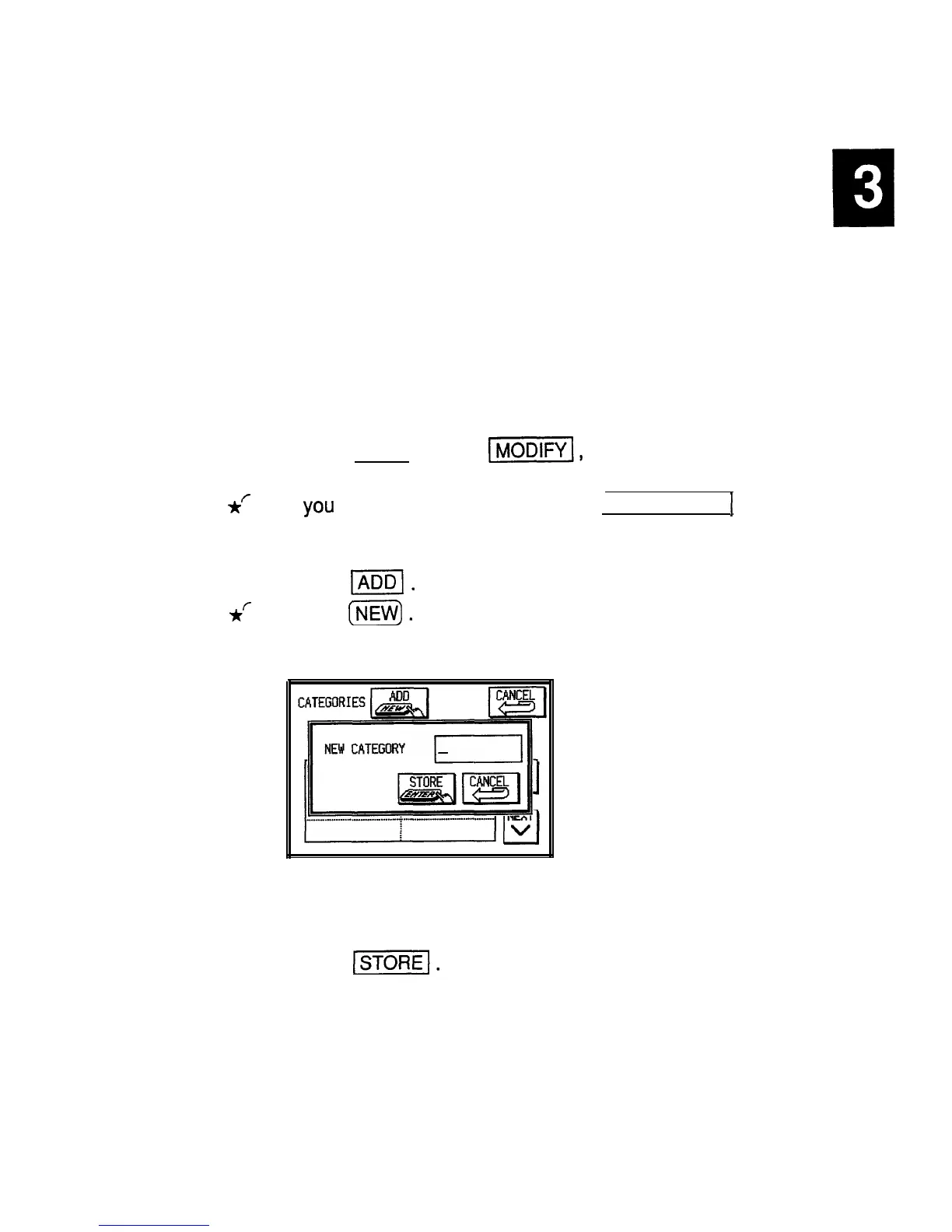
The CATEGORIES window opens.
2. Touch
lml.
*r
Press
[jZ@.
A NEW CATEGORY window opens.
3. Enter a category name up to 12 characters long.
4. Touch
1-1.
The new category is added to the list, and all categories
are resorted.
Editing categories
If you want to edit a category name, you are
115


 To Next Page