Copying
and
pasting
text
between
applications
You may find a need to copy text from one place to another in the
unit.
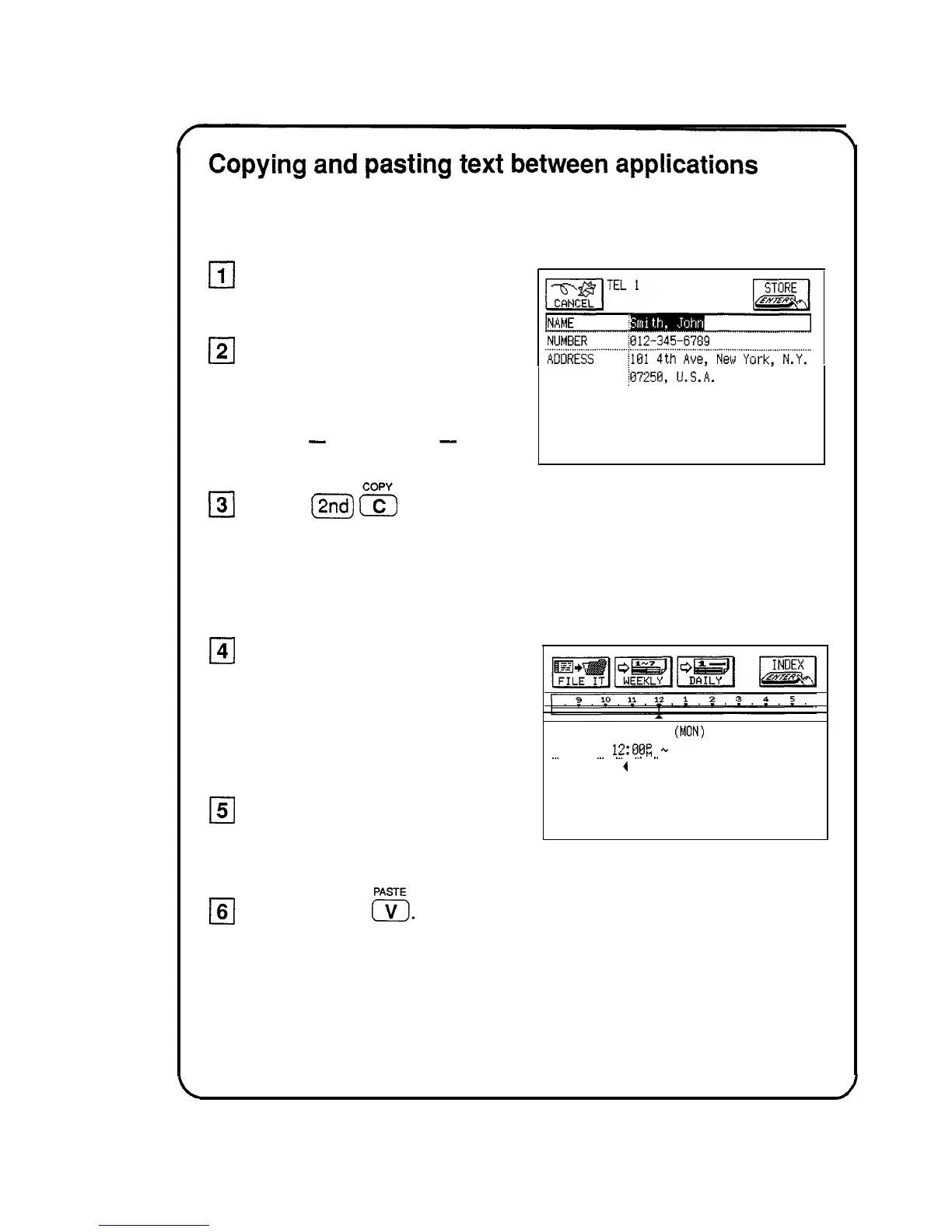
Go to the entry you
want to copy text from.
121
Drag the pen over a word
or sentence to select it.
The text will be displayed in
reverse
-
white on black
-
to
indicate it is selected.
131
Press
j2nd)
s
to copy
the text to the clipboard.
Anything currently on the clipboard
is replaced with the text you just
copied.
141
Go to the entry you want to
add the text to.
Be sure you are in the EDIT mode
when adding text to an entry.
151
Touch the desired place of
insertion.
16(
Press (2nd)
E.
DATE: FEB 14 1994
(MON)
. . . . . . . . . . . . . . . . . . . . . . . . . . . . . . . . . ...! . . . . . . . . . . . . . . . . . . . . . . . . . . . . . . . . . . . . . . . . . . . . . . . . . . . . . . . . . . . . . . . . . . . . . . . . . . . . . . . . . .
TIME:
12:E)BR
+.
:
__.
.
_..
._.
,_.
,.
. . . . . .
Lunch with
4
See “Copying or Moving a Block of Text,” Chapter 7, for more details.
22


 To Next Page