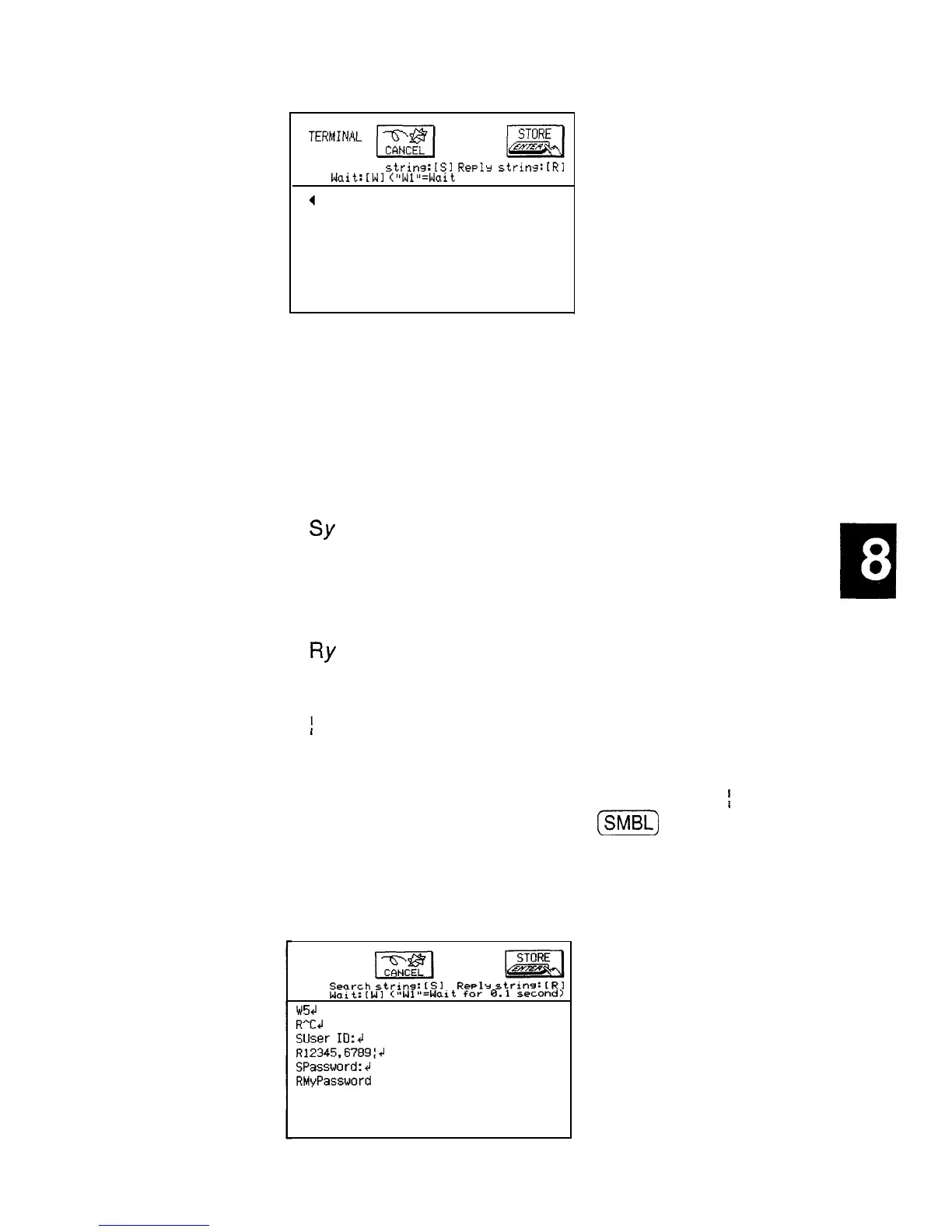
Search
strins:ISl
Reply
strins:[Rl
Wait:iWl
("Wl"=Wait
for 0.1 second)
The auto log-on procedure is set up using the character
strings (text) you would normally enter manually when
logging on to the BBS or information database, in
conjunction with these commands:
l
Wn
.
SY
.
RY
l
i
Wait
n
tenths of a second; for example, W2
would introduce a 0.2 second pause before the
next step of a procedure.
Instructs the unit to search for a character
string, sent from the BBS, for example, before
moving to the next step of the log-on procedure.
For example, SUSER ID: means wait for the
text “USER ID:” to be received before continuing.
Instructs the unit to reply to a character string.
For example, RJOHN JOHNSON means send
the text “JOHN JOHNSON”.
Inserts a carriage return at the end of a
character string. Carriage returns must be
included at the end of lines in a log-on
procedure to execute the procedure.
;
is
entered from unit using
[M)
.
For example, if you are entering the log-on script to
access CompuServe, you should see something like the
screen below.
TERMINAL
Search
strins:
IS1
Re~lr
string:
CR1
Wait:[Wl
C”Wl”=Wait
for
0.1
second)
w5cl
R"Ccl
Suser
ID:4
R12345,6789:J
SPassword:4J
RMyPassword
269


 To Next Page