41
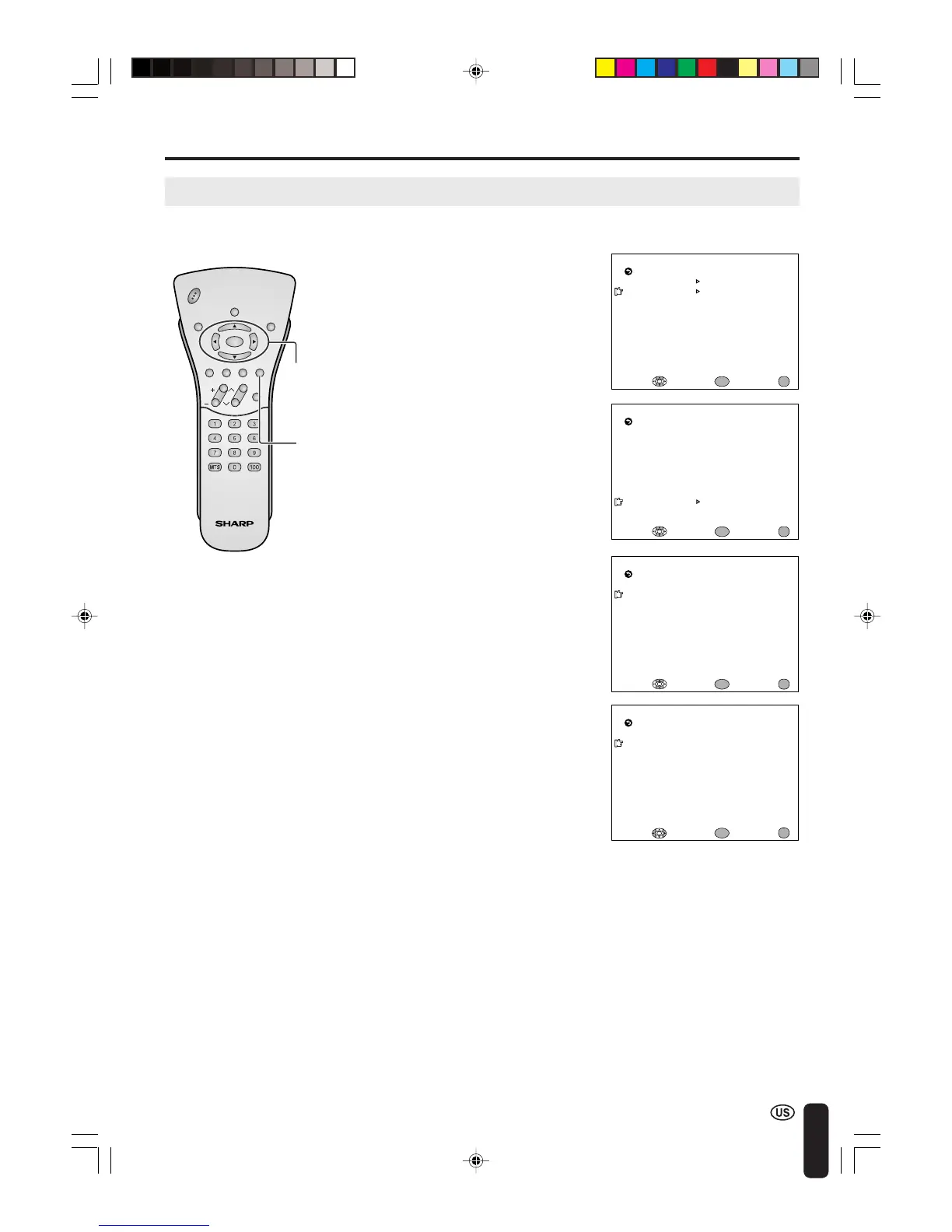
2 Press a/b to move the cursor to
TV GUIDELINES, and press
ENTER.
3 Press a/b to move the cursor to
BLOCK CONTENT, and press
ENTER.
4 Press a/b to move the cursor to
the desired item, and press
ENTER.
A
• If you set TV-14 to BLOCK, TV-MA is automatically blocked. Contents D, L, S and V are automatically blocked by
X in the table on page 38.
■ Setting BLOCK CONTENT
TV GUIDEL I NES
TV–Y [ –––––]
SELECT : EXIT:
BLOCK CONT ENT
[ ]
RETURN
TV–Y7 [ –––––]
TV–G [ –––––]
TV–PG [ –––––]
TV– 14 [ –––––]
TV–
M
A [ –––––]
ENTER :
ENTER
MENU
D [ –––––]
EXIT:
RETURN
L [ BLOCK ]
S [ –––––]
V [ –––––]
FV [ –––––]
BLOCK CONTENT
ENTER :
ENTER
ADJUST :
MENU
ENTER/
a/b/c/d
CHVOL
POW
ER
ENTER
DISPLAY
MUTE
SLEEP PIC. FLIP
BRIGHT TV/VIDEO MENU
FLASH-
BACK
M
PAA
TV GUIDEL INES
STATUS
SELECT : EXIT:
RETURN
V–CHI P BLOCK
[OFF]
ENTER :
ENTER
MENU
D [ –––––]
SELECT : EXIT:
RETURN
L [ –––––]
S [ –––––]
V [ –––––]
FV [ –––––]
BLOCK CONTENT
ENTER :
ENTER
MENU
ADJUSTMENTS (Continued)
Adjusting V-CHIP Settings (Continued)
1 Repeat steps 1 to 3 of [1] MPAA
RATING. (See page 39.)
5 Press c/d to select BLOCK or
----- (unblock), and press ENTER.
6 Press MENU to return to the
main screen.
MENU
LC-20B4U(E)-d 03.2.26, 3:31 PM41














 To Next Page