LC-32/40/46LE600E/RU/S (1st Edition)
2 – 1
LC32LE600E
ServiceManual
CHAPTER 2. OPERATION MANUAL
[1] OPERATION MANUAL
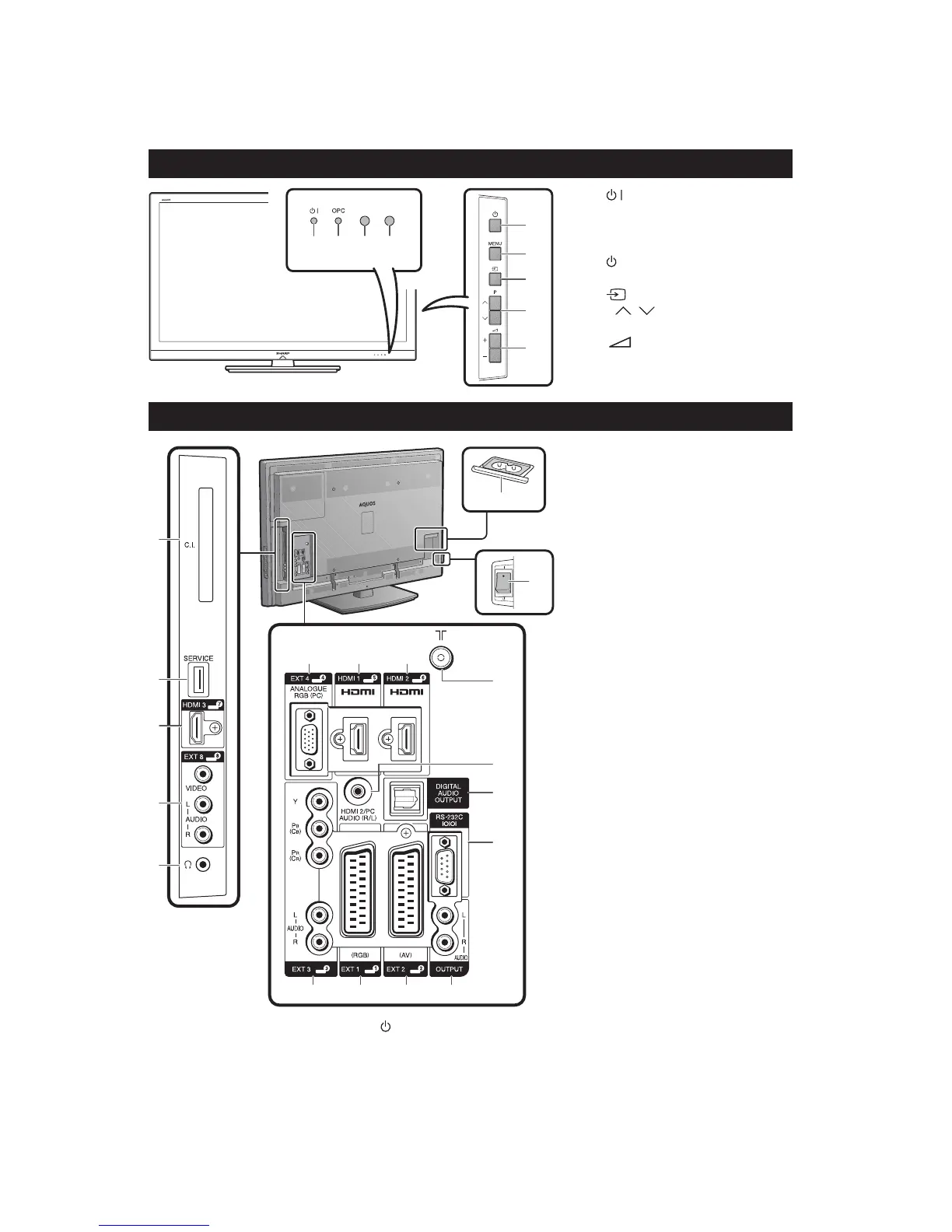
TV (Front view)
1 2 34
5
6
7
8
9
(Standby/On indicator)
OPC indicator
Remote control sensor
OPC sensor
(Power button)
MENU (Menu button)
(Input source button)
P / (Programme [channel]
buttons)
+/- (Volume buttons)
1
2
3
4
5
6
7
8
9
TV (Rear view)
1
2
3
4
5
8 9 10
11
12
14
13
15 16 17 18
6
7
*1
*2
COMMON INTERFACE slot
SERVICE terminal (USB terminal
for service personnel only)
HDMI 3 (HDMI) terminal
EXT 8 terminals
Headphones
AC INPUT terminal
MAIN POWER switch
EXT 4 (ANALOGUE RGB)
terminal
HDMI 1 (HDMI) terminal
HDMI 2 (HDMI) terminal
Antenna terminal
HDMI 2/PC AUDIO (R/L) jack
DIGITAL AUDIO OUTPUT
terminal
RS-232C terminal
EXT 3 (COMPONENT/AUDIO)
terminals
EXT 1 (RGB) terminal
EXT 2 (AV) terminal
OUTPUT (AUDIO) terminals
WARNING
Excessive sound pressure from earphones
and headphones can cause hearing loss.
Do not set the volume at a high level.
Hearing experts advise against extended
listening at high volume levels.
The SERVICE terminal is reserved only
for qualified service personnel. Do not
connect anything to the terminal.
1
2
3
4
5
6
7
8
9
10
11
12
13
14
15
16
17
18
•
•
•
When the MAIN POWER switch is turned off ( ), the amount of electric power consumed will be reduced to 0.01 W or less. However,
unlike when unplugging the AC cord, the power is not completely disconnected.
The HDMI 2 and EXT 4 terminals can both use the same audio input terminal (HDMI 2/PC AUDIO (R/L)). However, the proper item must
be selected in the “PC Audio Select” menu.
*1
*2













 To Next Page