LC-32/40/46LE700E/RU/S,LU700E/S,LX700E/RU,LC-52LE700E/RU/S
4 – 11
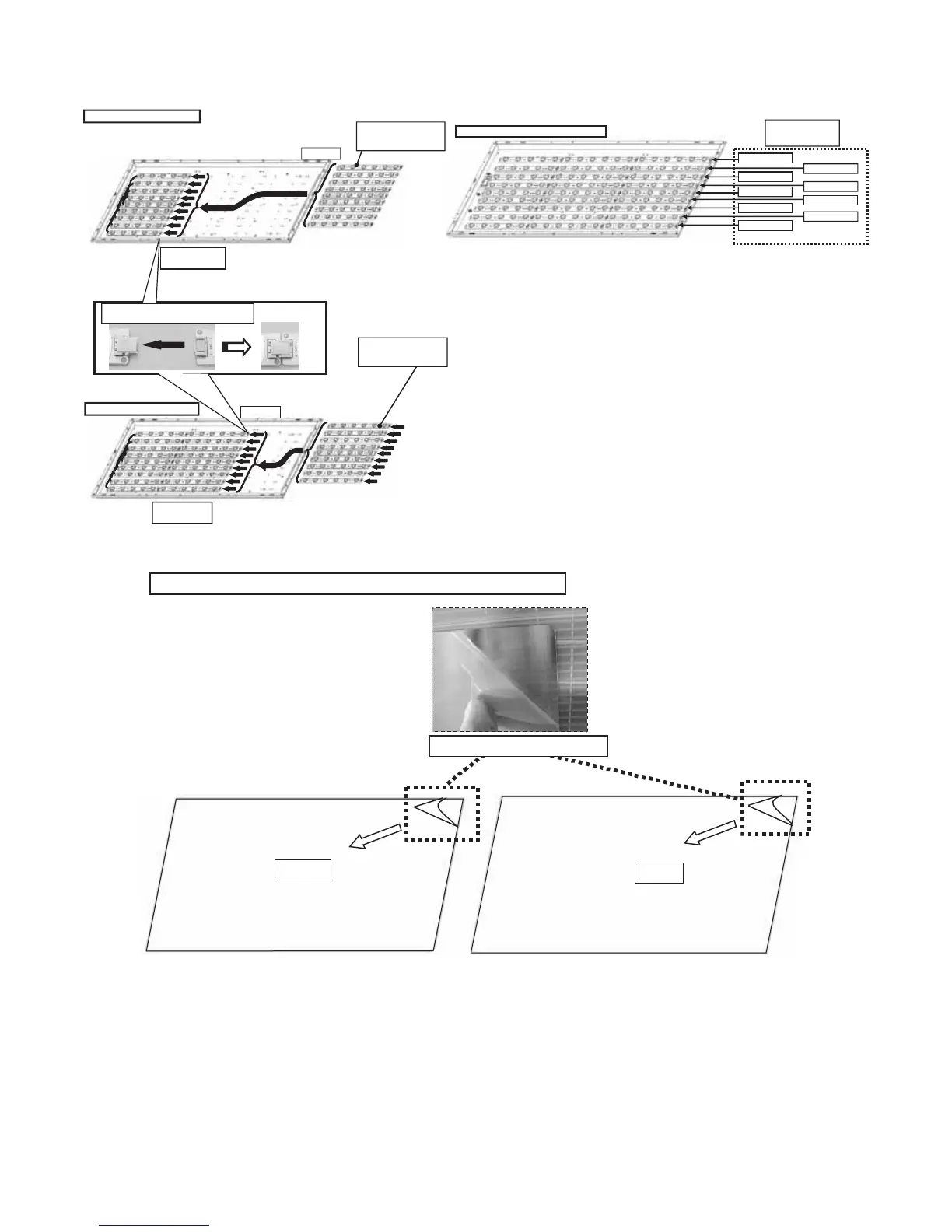
10. Handling notes (40 inch moels).
1. Set and connect LED-PWBs.
2. Peel off the lamination film of LENS SHEET on the both sides.
㽲Set LED-PWB(6LED) 㬍9
LED-PWB(6LED)
RUNTKA596WJ01 㬍5
RUNTKA596WJ02 㬍4
LED-PWB(6LED)
RUNTKA596WJ01 㬍5
RUNTKA596WJ02 㬍4
㽴Set LED-PWB(6LED) 㬍9
It being alternated
RUNTKA***WJ01
and RUNTKA***WJ02.
RUNTKA***WJ01
RUNTKA***WJ02
RUNTKA***WJ01
RUNTKA***WJ02
RUNTKA***WJ01
RUNTKA***WJ02
RUNTKA***WJ01
RUNTKA***WJ02
RUNTKA***WJ01
Note: Set sequential LED-PWB as below.
bottom
(C-PWB) side
Top side
Top side
Insert the connector horizontally mutually.
Do not add inadequate power.
bottom
(C-PWB) side
FRONT
BACK
Peel off the lamination film of LENS SHEET on the both sides.
Peel off the lamination film.






 To Next Page