LC-46/60LE925E
4 – 11
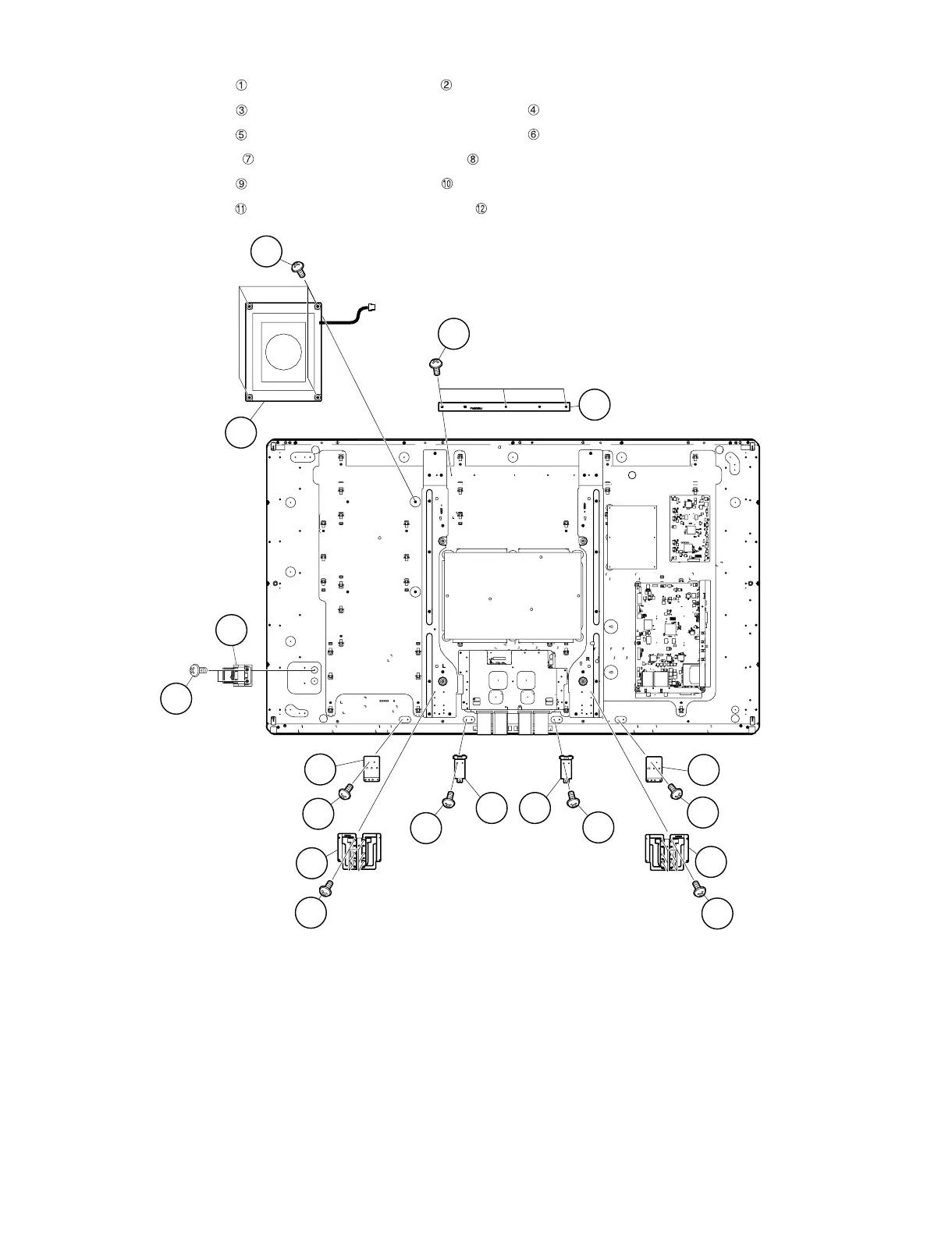
6. Removing of BL Support Angle, LCD Angle (Bottom-MA), Stand Angle and Speaker (Woofer).
1. Remove the 3 lock screws and detach the BL Support Angle .
2. Remove the 2 lock screws and detach the 2 pieces LCD Angle (Bottom-MA) .
3. Remove the 2 lock screws and detach the 2 pieces LCD Angle (Bottom-MA) .
4. Remove the 12 lock screws and detach the 2 pieces Stand Angle .
5. Remove the 4 lock screws and detach the Speaker (Woofer) .
6. Remove the 2 lock screws and detach the ECO Switch with Holder .
Speaker
(Woofer)
9
10
11
12
1
2
BL Support Angle
Stand Angle
5
LCD Angle
(Bottom-MA)
LCD Angle
(Bottom-MA)
4
3
8
7
8
7
3
4
5
6
6
Stand Angle
LCD Angle
(Bottom-MA)
ECO Switch
with Holder





 To Next Page