MX-5001N SIMULATION 6 – 112
[RSPF]
A-I: When the adjustment value is increased, the image loss is
increased.
1step = 0.1mm
50-28
Purpose
Adjustment
Function (Purpose)
Used to automatically adjust the image
loss, void area, image off-center, and image
magnification ratio.
Section
Operation/Procedure
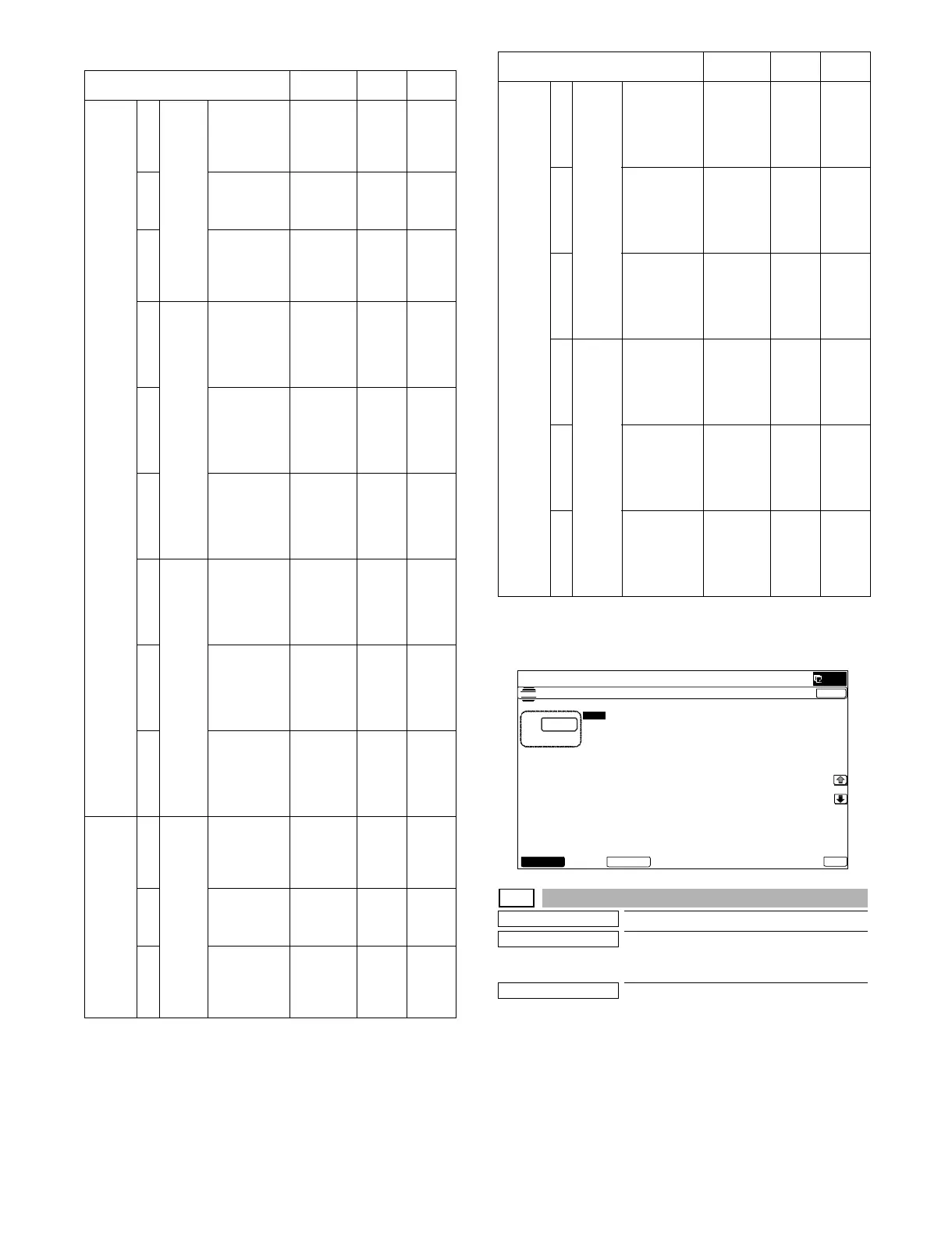
The following adjustment items can be executed automatically with
SIM50-28.
* ADJ 8 Print image magnification ratio adjustment
(Main scanning direction) (Print engine section)
* ADJ 9 Image off-center adjustment (Print engine section)
* ADJ 14/15 Scan image magnification ratio adjustment
* ADJ 16 scan image off-center adjustment
* ADJ 17 Print area (void area) adjustment (Print engine section)
* ADJ 18 Copy image position, image loss adjustment
Item/Display Content
Setting
range
Default
value
FAX
send
AImage
loss
amount
setting
OC
LEAD_EDGE
(OC)
OC lead
edge
image loss
amount
setting
0 - 100 30
(3mm)
B FRONT
_REAR (OC)
OC side
image loss
amount
setting
0 - 100 20
(2mm)
C TRAIL_EDGE
(OC)
OC rear
edge
image loss
amount
setting
0 - 100 20
(2mm)
DImage
loss
amount
setting
SPF
SIDE1
LEAD_EDGE
(SPF_SIDE1)
Front
surface
lead edge
image loss
amount
setting
0 - 100 20
(2mm)
E FRONT
_REAR
(SPF_SIDE1)
Front
surface
side image
loss
amount
setting
0 - 100 20
(2mm)
F TRAIL_EDGE
(SPF_SIDE1)
Front
surface
rear edge
image loss
amount
setting
0 - 100 30
(3mm)
GImage
loss
amount
setting
SPF
SIDE2
LEAD_EDGE
(SPF_SIDE2)
Back
surface
lead edge
image loss
amount
setting
0 - 100 20
(2mm)
H FRONT
_REAR
(SPF_SIDE2)
Back
surface
side image
loss
amount
setting
0 - 100 20
(2mm)
I TRAIL_EDGE
(SPF_SIDE2)
Back
surface
rear edge
image loss
amount
setting
0 - 100 30
(3mm)
When
image
send
mode
(Except
for FAX
and
copy)
AImage
loss
amount
setting
OC
LEAD_EDGE
(OC)
OC lead
edge
image loss
amount
setting
0 - 100 0
(0mm)
B FRONT
_REAR(OC)
OC side
image loss
amount
setting
0 - 100 0
(0mm)
C TRAIL_EDGE
(OC)
OC rear
edge
image loss
amount
setting
0 - 100 0
(0mm)
When
image
send
mode
(Except
for FAX
and
copy)
D Image
loss
amount
setting
SPF
SIDE1
LEAD_EDGE
(SPF_SIDE1)
Front
surface
lead edge
image loss
amount
setting
0 - 100 0
(0mm)
E FRONT
_REAR
(SPF_SIDE1)
Front
surface
side image
loss
amount
setting
0 - 100 0
(0mm)
F TRAIL_EDGE
(SPF_SIDE1)
Front
surface
rear edge
image loss
amount
setting
0 - 100 0
(0mm)
G Image
loss
amount
setting
SPF
SIDE2
LEAD_EDGE
(SPF_SIDE2)
Back
surface
lead edge
image loss
amount
setting
0 - 100 0
(0mm)
H FRONT
_REAR
(SPF_SIDE2)
Back
surface
side image
loss
amount
setting
0 - 100 0
(0mm)
I TRAIL_EDGE
(SPF_SIDE2)
Back
surface
rear edge
image loss
amount
setting
0 - 100 0
(0mm)
Item/Display Content
Setting
range
Default
value
ǂǂǂ6,08/$7,21
ǂǂ12
&/26(
7(67
6&$11(5)$;6(1'$//('*($'-8670(179$/8(
$˖
˷
˹
˖/($'B('*(
2&
$˖
˖)5217B
5($52&
%˖
˖75$,/B
('*(2&
&˖
˖/($'B('*(
63)B6,'(
'˖
˖75$,/B('*(
63)B6,'(
)˖
˖)5217B5($5
63)B6,'(
(˖
˖/($'B('*(
63)B6,'(
*˖
˖)5217B5($5
63)B6,'(
+˖
˖75$,/B('*(
63)B6,'(
,˖
2.6&$11(5)$;



 To Next Page