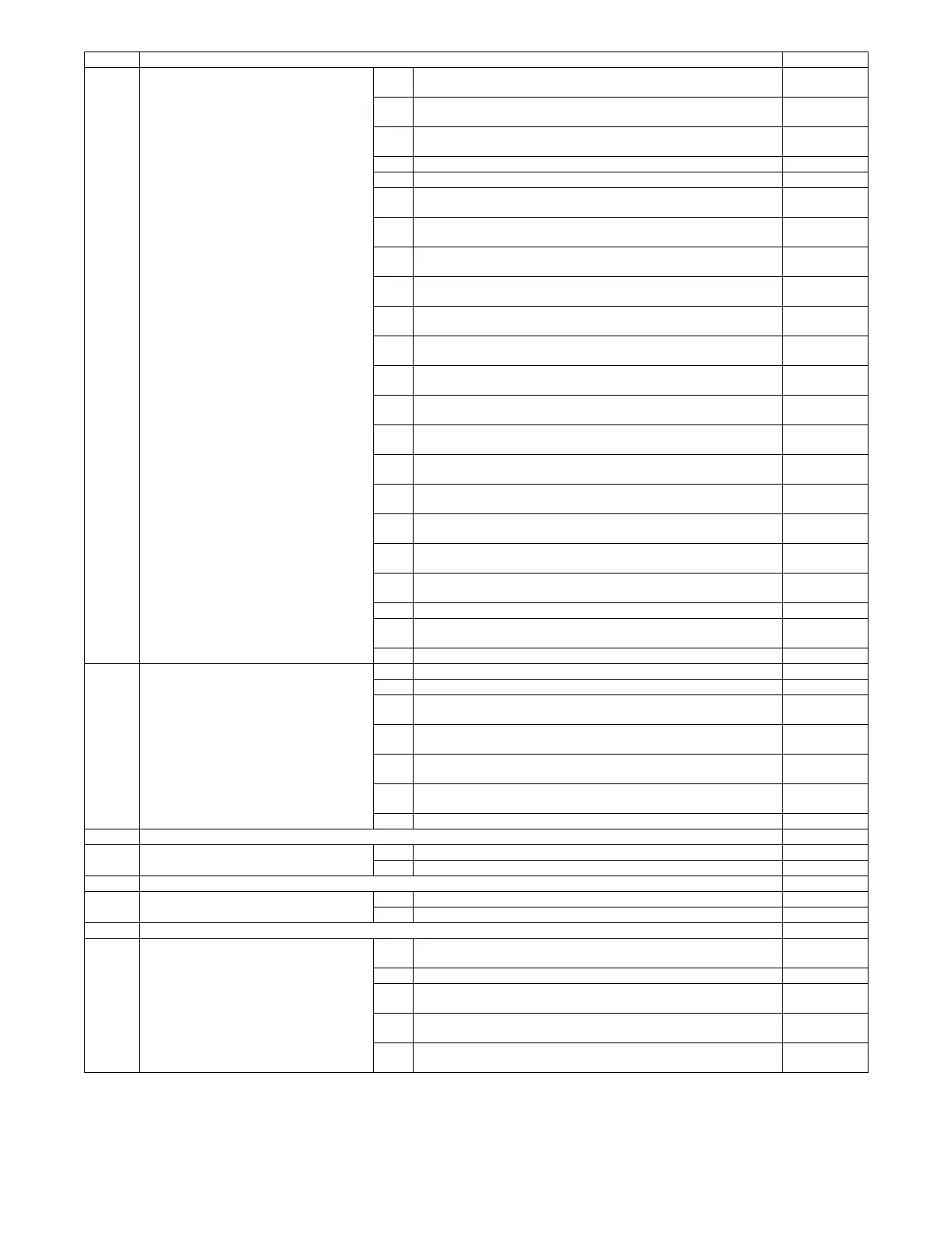
MX-5001N ADJUSTMENTS 5 – 2
ADJ 20 Copy color balance/density adjustment 20A
(1)
CCD gamma adjustment (CCD calibration) (Normal document copy
mode)
63-3 (63-5)
20A
(2)
CCD gamma adjustment (CCD calibration) (DSPF mode) 63-3 (63-5)
20A
(3)
Shading adjustment (DSPF mode)
20B Copy color balance adjustment (Auto adjustment) 46-24
20C Copy color balance adjustment (Manual adjustment) 46-21
20D Copy density adjustment (Each color copy mode) (Whole adjustment)
(Normally unnecessary to adjust)
46-1
20E Copy density adjustment (Each monochrome copy mode) (Whole
adjustment) (Normally unnecessary to adjust)
46-2
20F Copy color balance adjustment (Color balance adjustment at each density
level in each color copy mode) (Normally not required)
46-10
20G Monochrome copy density/gamma adjustment (Each monochrome copy
mode) (Normally not required)
46-16
20H Condition setting of document density reading operation (exposure) in the
monochrome auto copy mode (Normally not required)
46-19
20I Document background density reproducibility adjustment in the
monochrome auto copy mode (Normally unnecessary to adjust)
46-32
20J Copy density adjustment for low density section (Each copy mode)
(Normally unnecessary to adjust)
46-63
20K Color copy text, line image edge gamma, density adjustment/Text⋅Map
mode gamma, density adjustment
46-27
20L Color document reproducibility adjustment in the monochrome copy mode
(Normally unnecessary to adjust)
46-37
20M Black ingredient amount adjustment in color copy mode (Normally
unnecessary to adjust)
46-38
20N Sharpness adjustment in the color auto copy mode (Normally
unnecessary to adjust)
46-60
20O Copy high density part density correction setting (Prevents against tone
gap) (Normally unnecessary to adjust)
46-23
20P Copy color balance adjustment (single color copy mode) (Normally not
required)
46-25
20Q Copy density adjustment in the RSPF mode (Normally unnecessary to
adjust)
46-9
20R DSPF mode copy density adjustment (Normally not necessary to adjust)
20S Auto color balance adjustment by the user (Copy color balance auto
adjustment ENABLE setting and adjustment)
26-53
20T Copy color balance adjustment (Automatic adjustment for each dither) 46-54
ADJ 21 Printer color balance/density adjustment 21A Printer color balance adjustment (Auto adjustment) 67-24
21B Printer color balance adjustment (Manual adjustment) 67-25
21C Printer density adjustment (low density part density adjustment) (Normally
unnecessary to adjust)
67-36
21D Printer high density part desnsity correction setting (high density part tone
gap countermeasure) (Normally unnecessary to the setting change)
67-34
21E Auto color balance adjustment by the user (Printer color balance auto
adjustment ENABLE setting and adjustment)
26-54
21F Copy/Printer color balance and density adjustment (Automatic
adjustment)
46-74
21G Printer color balance adjustment (Automatic adjustment for each dither) 67-54
ADJ 22 Fusing paper guide position adjustment
ADJ 23 Document size sensor adjustment 23A Document size sensor detection point adjustment 41-2
23B Adjust the sensitivity of the original size sensor 41-2
ADJ 24 Manual paper feed tray paper size (width) sensor adjustment 40-2
ADJ 25 RSPF/DSPF tray paper size (width) sensor
adjustment
25A RSPF tray paper size (width) sensor adjustment 53-6
25B DSPF tray paper size (width) sensor adjustment 53-6
ADJ 26 Touch panel coordinate setting 65-1
ADJ 27 Image loss, void area, image off-center,
image magnification ratio auto adjustment
with SIM50-28
27A Print image main scanning direction image magnification ratio automatic
adjustment
50-28
27B Image off-center automatic adjustment 50-28
27C Copy lead edge image reference position adjustment, image off-center,
sub scanning direction image magnification ratio automatic adjustment
50-28
27D RSPF mode image off-center, image lead edge position, sub scanning
direction image magnification ratio automatic adjustment
50-28
27E DSPF mode image off-center, image lead edge position, sub scanning
direction image magnification ratio auto adjustment
50-28
Job No Adjustment item list Simulation



 To Next Page