EasyManua.ls Logo

Sharp MZ-5500 - Page 55

Sharp MZ-5500
114 pages
Print Icon
To Next Page IconTo Next Page
To Previous Page IconTo Previous Page
Loading...
Table
7-1
FDD
specification
Recording
capacity
(formatted)
320KB
Sec
tors
16
sectors/track
Tracks
40
tracks/side
Recording
surface
Two
sides
Track
density
(TrI)
48
Recording
density
(HPl)
5876
(max)
Data
transfer
rate
250KB/s
Recording
method
MFM
Transfer
method
HFM
Access
t~me:
Average
93ms
Track
to
track
6ms
Settling
15ms
Head
load
mechanism
None
(head
load
time=O)
7-2.
HZ-5600
MFD
(640KB)
interface
general
description
(MZ-5600)
!
Sincc
tlle
MZ-5600 '
series
are
equipped
with
a
large
capacity
mini-floppy
disk
driv
e ,
the
MFO
interface
for
the
MZ-5600
series
is
different
from
that
for
tll e MZ-5500
series
in
detail.
The
MFD
interface
can
control
up
to
four
units
of
the
HFD
,
drives
and,
in
addi
tion,
the
HZ-5600
has
the
expansion
MFD
interface
connector
on
the"back
of
the
machine
which
permits
expansion
of
two
more
units
of
the
external
MZ-IFIJ
mini-floppy
disk
drive
options.
The MZ-5631
permits
internal
expansion
with
the
MZ-1F15
mini-floppy
disk
drive.
WllPn
using
the
640KB
(200)
disk
on
the
MZ-5600,
it
is
possible
to
read
from
(lllci
write
to
the
disko
However,
when
using
the
320~B
disk,
only
reading
is
possible
as
it
is
designed
to
read
the
disk
which
has
been
created
by
other
mod
e l
of
personal
computers
such
as
the
MZ-5500.
To
read
the
320Kß
disk,
'
"0"
1ll1lSt
be
specifi
ed
[or
the
FD
l~gical
number.
For
more
details,
refer
t C)
th
e
CP/l"1-86
and
MS-DOS
manuals.
256
B
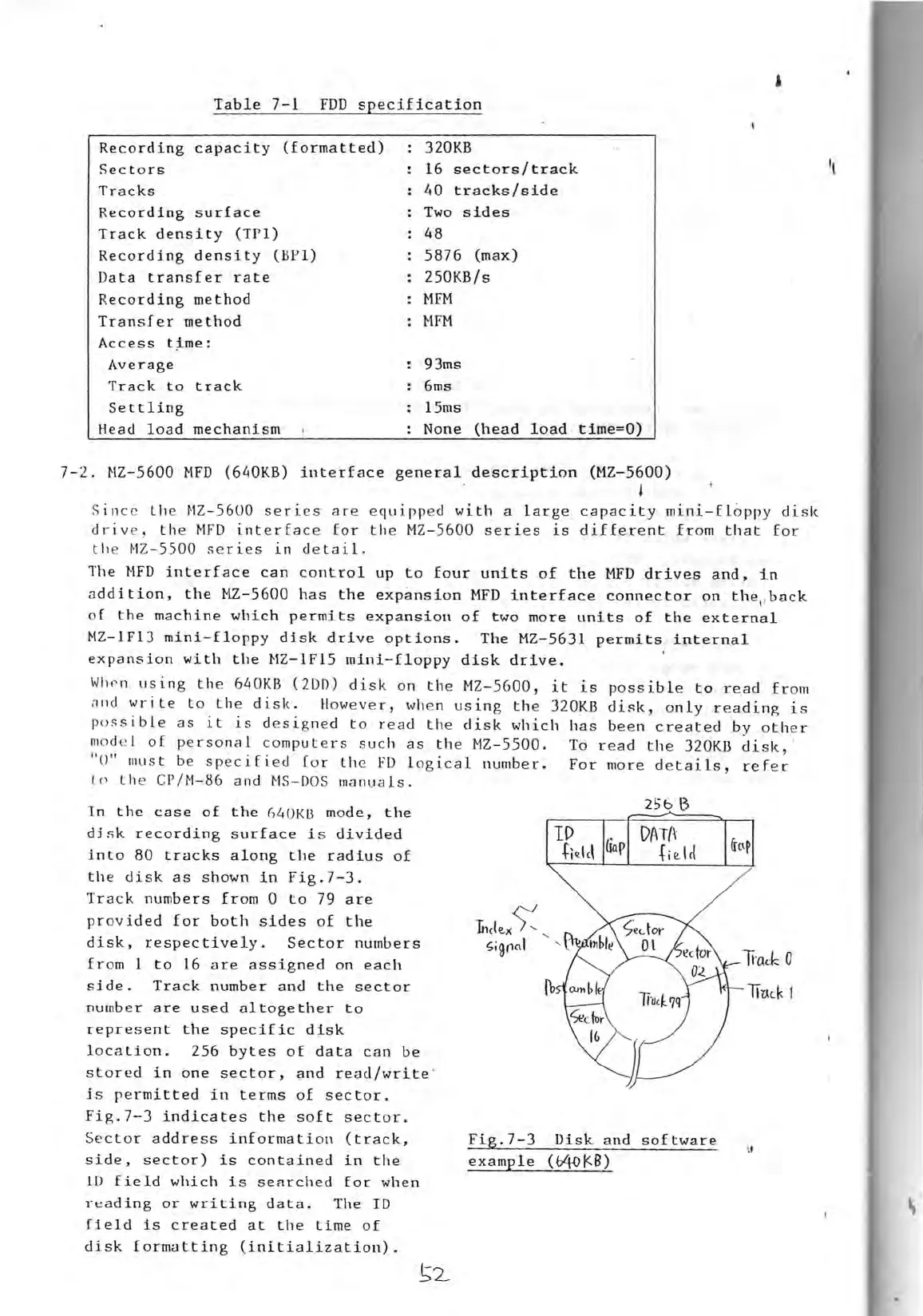
In
the
ease
of
the
640Kß mode,
the
djsk
recording
surface
is
divided
into
80
tracks
along
the
radius
of
the
disk
as
shown
in
Fig.7-3
.
Track
numbers
from
0
to
79
are
provided
for
both
sides
of
the
disk,
respectively.
Sec
tor
numbers
Cld~
0
from
1
to
16
areassigned
on
each
side.
Track
number
and
the
sec
tor
DAT{\
Gap
+i~lct
lI
'
'
lT~(J
1
number
are
used
altogether
to
represent
the
specific
disk
Iocation.
256
bytes
of
data
can
be
stored
in
one
sector,
and
read/write
'
js
permitted
in
terms
of
sector.
Fig.7-J
indicates
the
soft
sector.
Sec
tor
address
information
(track,
Fig.7-3
Disk
and
software
\t
side,
sector)
is
contained
in
the
example
(04OI<B)
10
field
which
is
searched
for
when
reading
or
writing
data.
The
ID
ffeld
is
created
at
the
time
of
disk
formatting
(initialization).

Related product manuals