Connecting to Video Equipment
Connecting the Projector to Other Devices
-20
1
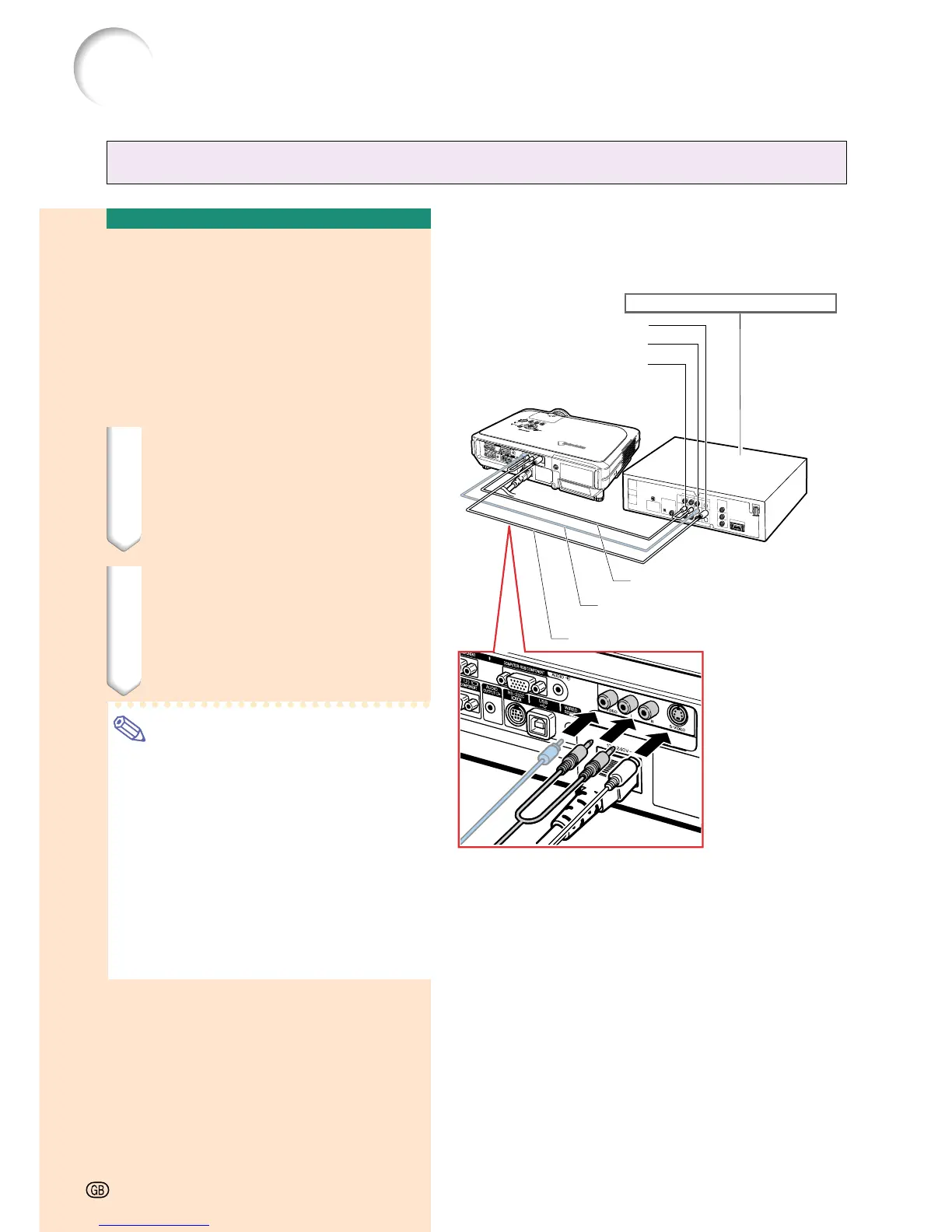
S-video cable (commercially available)
Connecting to Video
Equipment Using an
S-video, a Composite
Video or an Audio Cable
Using an S-video, video, or audio cable, a VCR,
laser disc player or other audio-visual equip-
ment can be connected to INPUT 3, INPUT 4
and AUDIO (L/R) input terminals.
1 Connect the projector to the
video equipment using an S-
video cable or a composite
video cable (both commercially
available).
2 Connect the projector to the
video equipment using a ø3.5
mm stereo minijack to RCA au-
dio cable (commercially avail-
able).
Note
• The INPUT 4 (S-VIDEO) terminal uses a
video signal system in which the picture
is separated into color and luminance sig-
nals to realize a higher-quality image. To
view a higher-quality image, use a com-
mercially available S-video cable to con-
nect the INPUT 4 terminal on the projec-
tor and the S-video output terminal on the
video equipment.
• A ø3.5 mm stereo minijack to RCA audio
cable (commercially available) is required
for audio input.
To S-video output terminal
To video output terminal
To audio output terminal
2
ø3.5 mm stereo minijack to RCA
audio cable (commercially available)
1
Composite video cable
(commercially available)
VCR or other audio-visual equipment
-20





 To Next Page