Connections and Setup
-21
Optional
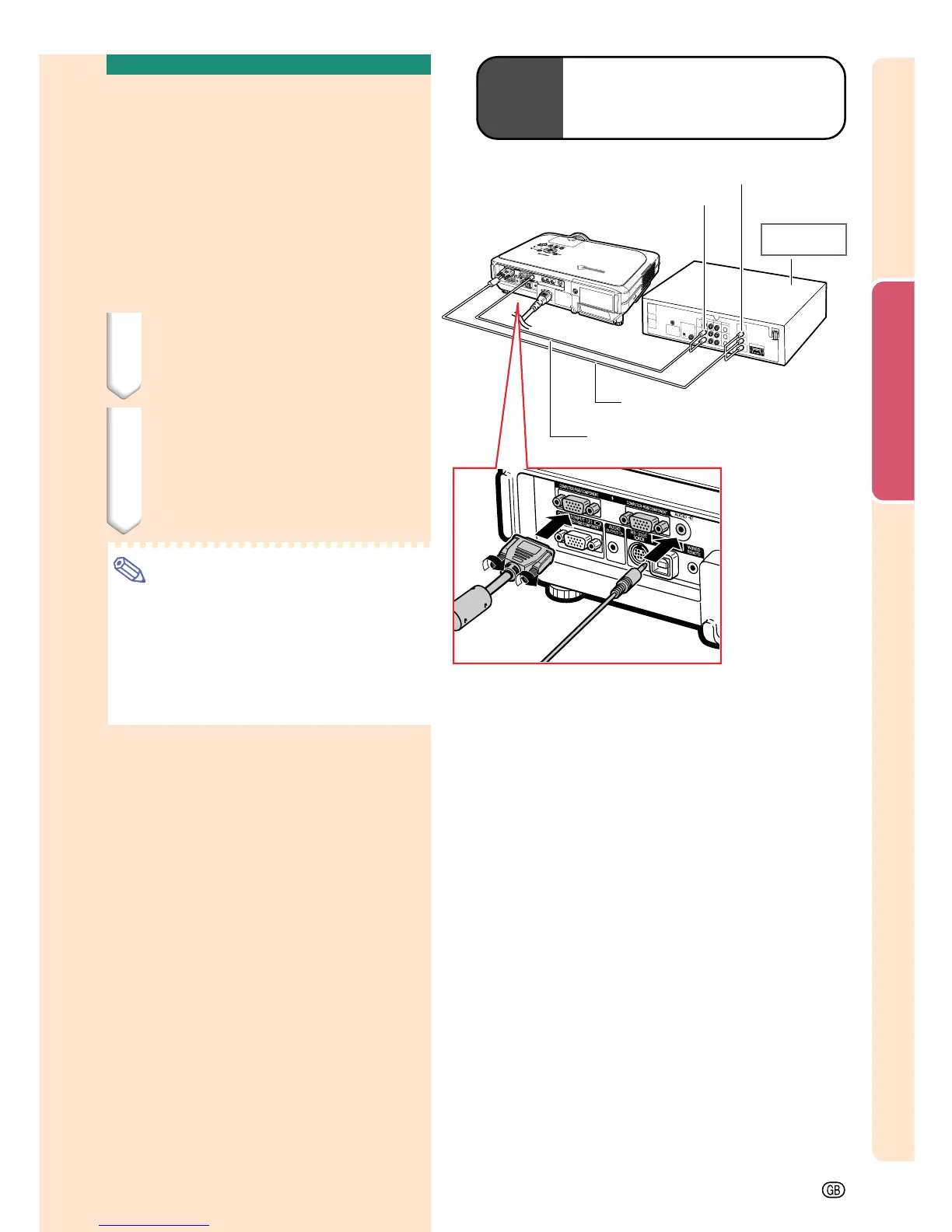
cable
3RCA to 15-pin D-sub cable
Type: AN-C3CP
(9'10" (3.0 m))
To analog component
output terminal
To audio output terminal
2
ø3.5 mm stereo minijack to RCA audio cable
(commercially available)
1
3 RCA to 15-pin
D-sub cable (sold separately)
DVD player or
DTV* decoder
Connecting to
Component Video
Equipment
Use a 3 RCA to 15-pin D-sub cable when con-
necting to the INPUT 1 or 2 terminal, compo-
nent video equipment such as DVD players
and DTV* decoders.
*DTV is the umbrella term used to describe
the new digital television system in the United
States.
1 Connect the projector to the
video equipment using the 3
RCA to 15-pin D-sub cable.
2 Connect the projector to the
video equipment using a ø3.5
mm stereo minijack to RCA au-
dio cable (commercially avail-
able).
Note
• When connecting the projector to the
video equipment in this way, select “Com-
ponent” for “Signal Type” in the “Picture”
menu. See page 46.
• A ø3.5 mm stereo minijack to RCA audio
cable (commercially available) is required
for audio input.





 To Next Page