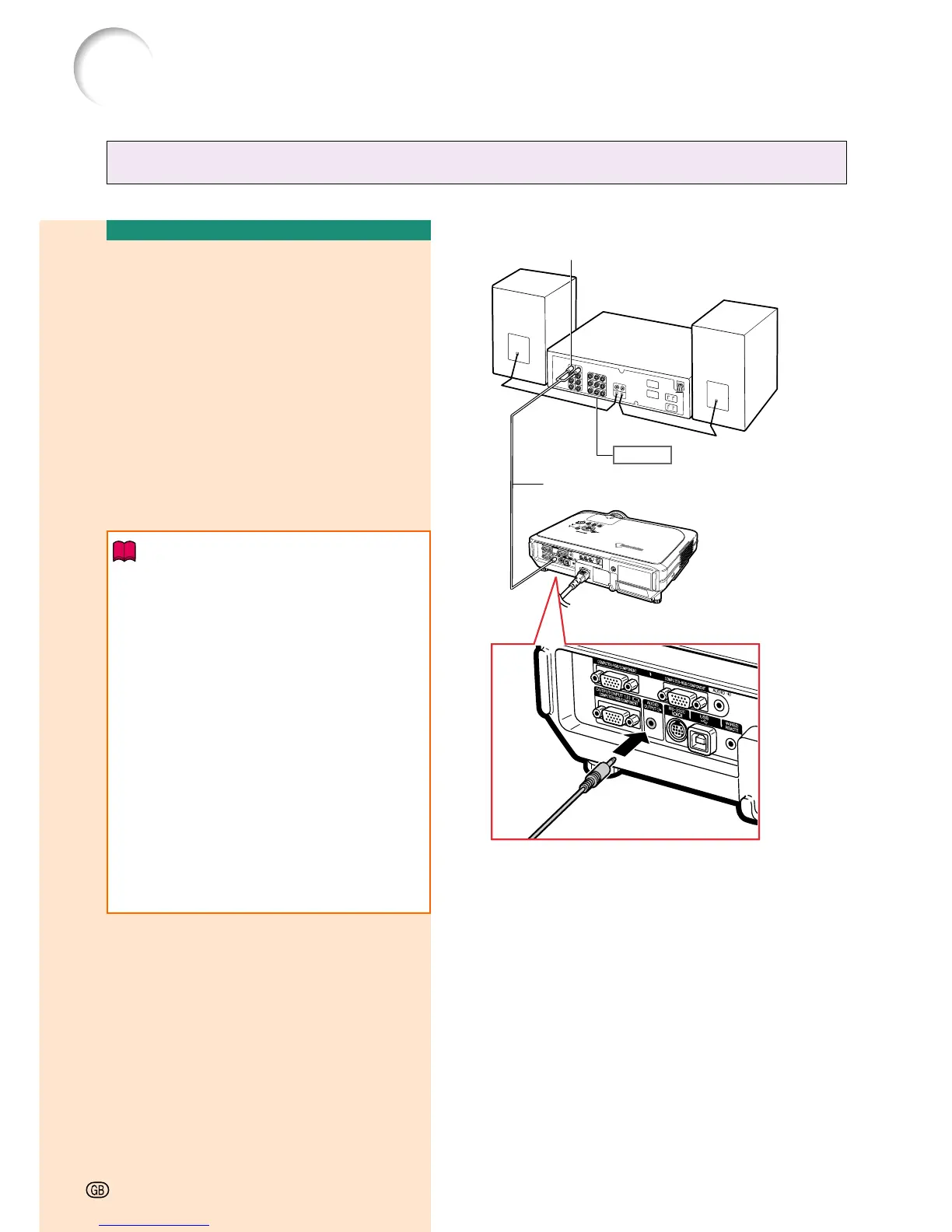
Connecting to an Amplifier
Connecting to an
Amplifier or Other Audio
Components
Using a ø3.5 mm stereo minijack to RCA au-
dio cable, an amplifier or other audio compo-
nents can be connected to the AUDIO OUT-
PUT terminal.
Connect the projector to the
amplifier
using a ø3.5 mm
stereo minijack
to
RCA
audio cable (commercially
available).
Info
• Always turn off the projector before
connecting to audio components, in order
to protect both the projector and the
components being connected.
• By using external audio components, the
volume can be amplified for better sound.
• The AUDIO OUTPUT terminal allows you
to output audio to audio components from
the selected AUDIO input terminal (for
INPUT 1 and 2) or AUDIO (L/R) input
terminals (for INPUT 3 and 4) connected
to audiovisual equipment.
• For details on Variable Audio Output (VAO)
and Fixed Audio Output (FAO), see
page 63.
• A ø3.5 mm stereo minijack to RCA audio
cable (commercially available) is required
for audio input.
Amplifier
Audio input terminal
ø3.5 mm stereo minijack to RCA audio cable
(commercially available)
Connecting the Projector to Other Devices
-22







 To Next Page