-24
Optional
cable
Computer RGB cable (32'10" (10.0 m))
Type: AN-C10BM
AN-C10MC
AN-C10PC
Connecting to a Monitor
Watching Images on
Both the Projector and
a Monitor
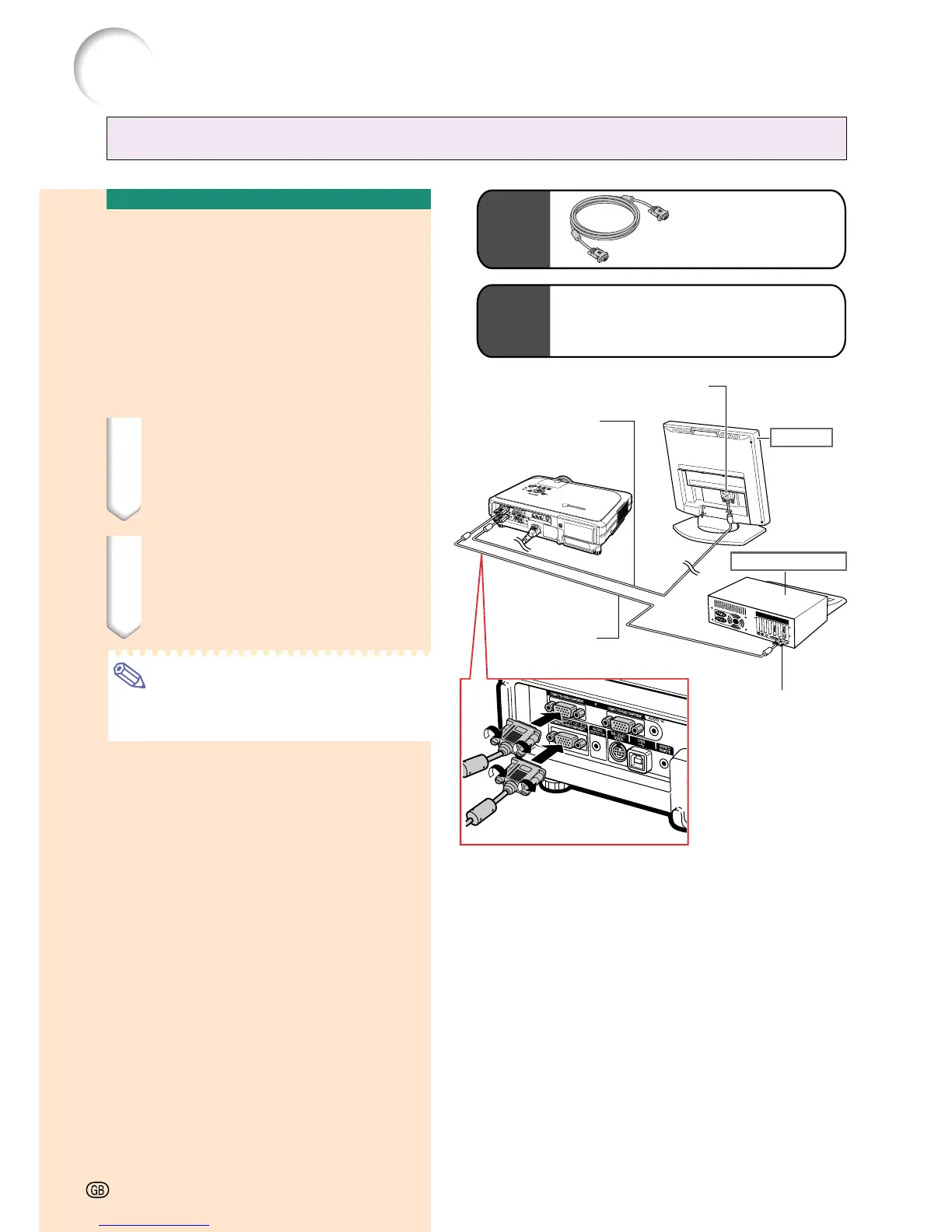
You can display computer images on both the
projector and a separate monitor using two
sets of an RGB cable. An RGB cable is sup-
plied with this projector. You need to buy an-
other RGB cable for connecting the projector
to a monitor.
1 Connect the projector to the
computer and monitor using
RGB cables (one is supplied,
the other is sold separately).
2 In the “Options(1)” menu, se-
lect “Economy Mode”, “Mntr.
out/RS232” and then “ON”.
(see page 69.)
Note
• Analog RGB signals as well as Component
signals can be output to the monitor.
Connecting the Projector to Other Devices
To RGB input terminal
Monitor
RGB cable
(sold separately)
RGB cable
(supplied)
Desktop computer
To RGB output terminal
-24
Supplied
accessory
RGB cable





 To Next Page