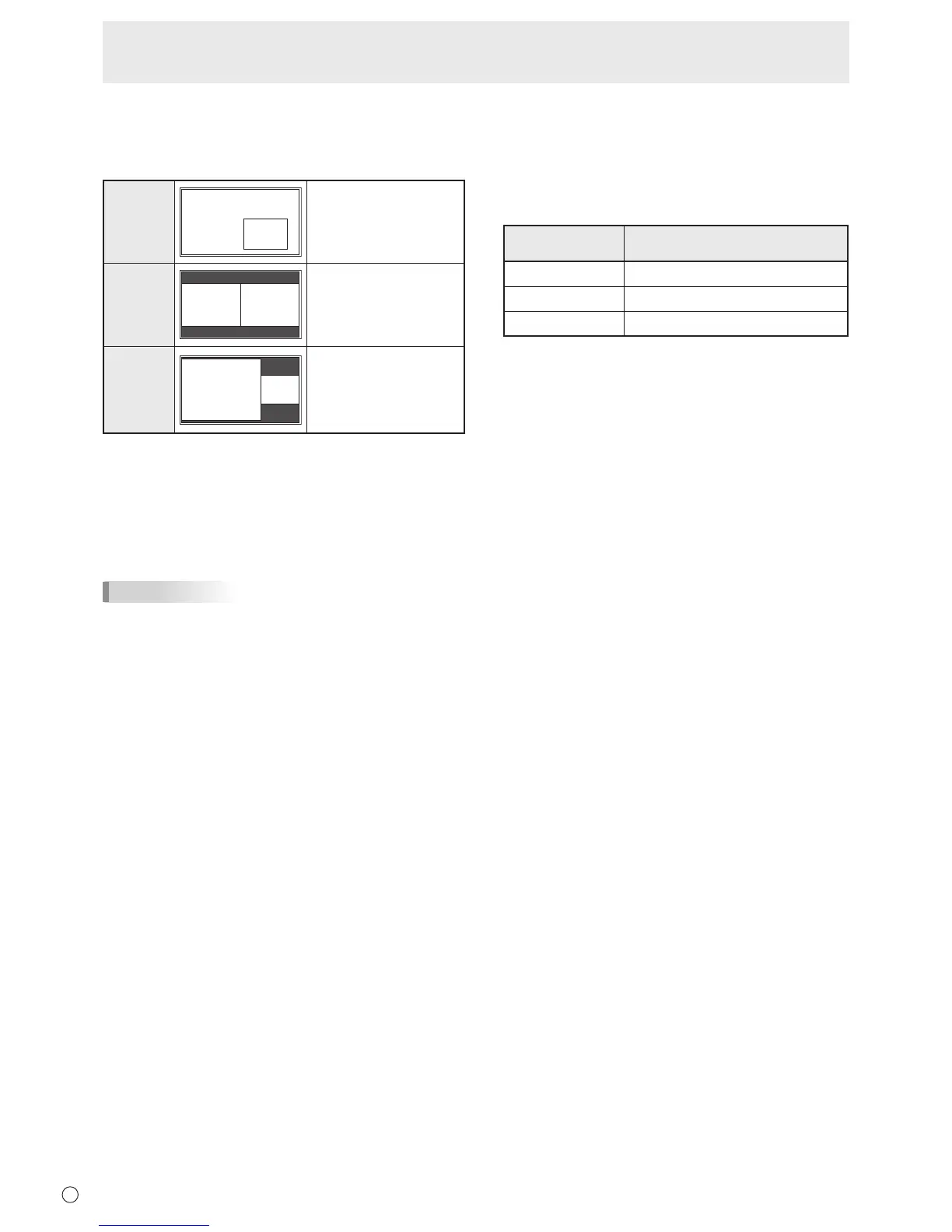
Displaysamainscreen
whichmeasures1280
pixels in the longest
direction and a sub
screen in a line.
* Thecurrentlyselectedinputsignalisdisplayedonthemain
screen.
* Youcannotsimultaneouslydisplaythescreensofsignals
ofthesametype,suchastwotypesofPCinputsignalsor
twotypesofAVinputsignals.
* Thedualscreendisplaycannotbeusedwiththe
combinationofPCDVI-DandAVHDMIorofAVDVI-Dand
PCHDMI.
TIPS
• Youmightinfringeonacopyrightoftheauthorwhichis
protected by copyright law when you display the images of
thecomputerscreenandtelevision/VCRsimultaneouslyfor
prot-makingortoshowtheimagetothepublic.
• Thescreensizefordual-screendisplayisthesameas
thescreensizeforsingle-screendisplay.TheDotbyDot
screenisdisplayedinNORMALsizeexceptwhenitisset
as the PIP main screen.
• Whendual-screendisplayisselected,theAUTOINPUT
CHANGEfunctionisdisabled.
• Whendual-screendisplayisselected,theINPUTSELECT
options cannot be set.
• Whenaninterlacedsignal(1080i,480i,video,S-Video)is
inputtothesubscreen,horizontallinesmayicker.Ifthis
happens, display the image on the main screen.
n
ZOOM2 SPECIAL SETTING
If you connect a laptop computer with any of the following
screen resolutions and black bands appear around the
screen,setZOOM2SPECIALSETTINGofINPUTSIGNALon
theOPTIONmenutoONandthenselectZOOM2intheSIZE
setting.
This displays the area inside the black band.
Laptop computer
resolution
Correspondingsignal*
1
1280x800 1280x1024,1280x960,1400x1050*
2
1280x600 1280x720
1024x600 1024x768
*1:Thissettingiseffectiveonlywhenthescreenresolution,
including the black band, is one of the resolutions listed
above.
*2:Usetheautomaticscreenadjustment.



 To Next Page