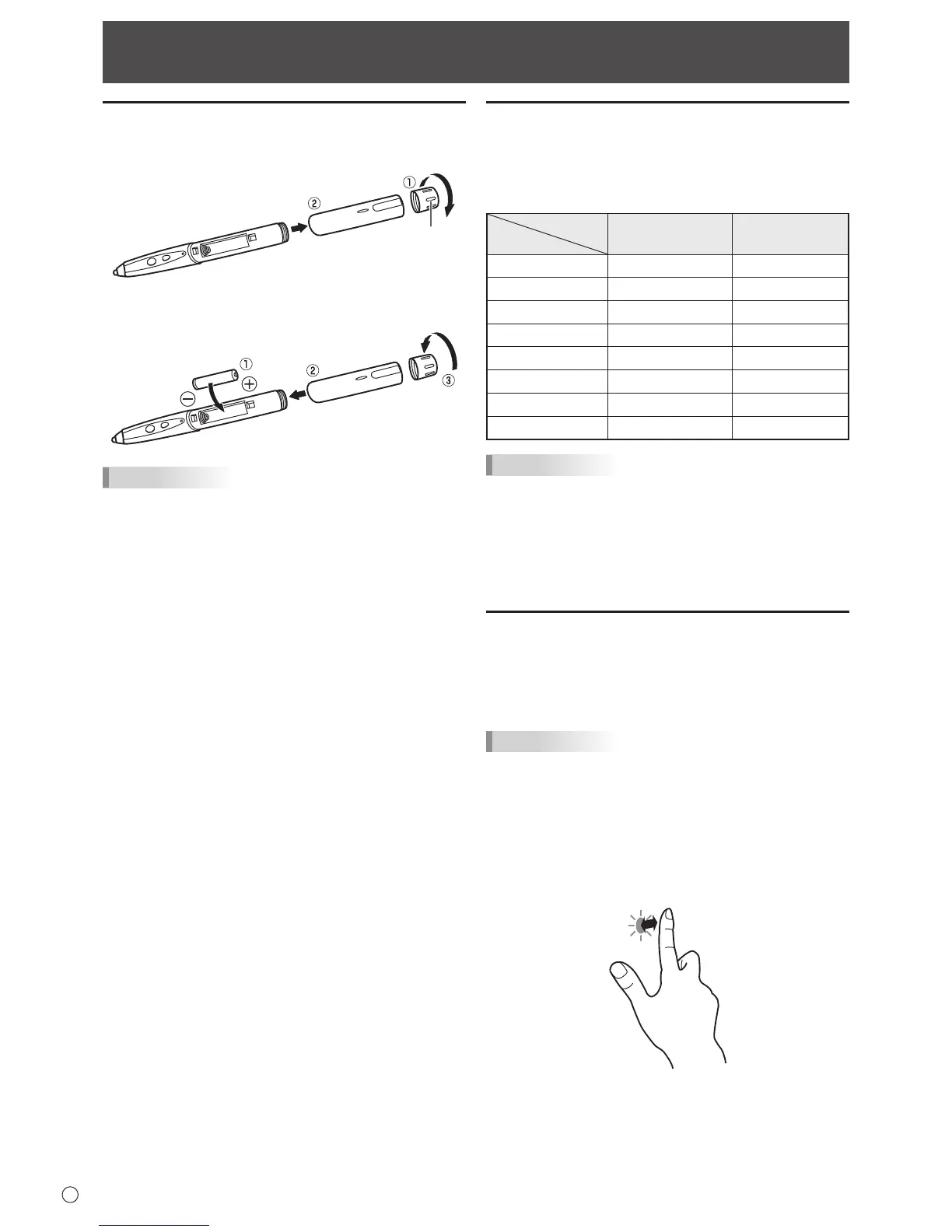
2. Insertthesuppliedbattery(LR-03(“AAA”size))inthe
orientation shown, and attach the cover and battery cap.
TIPS
• Thesuppliedbattery(LR-03(“AAA”size))maybe
exhausted in a short time, depending on how it was stored.
• Ifthetouchpenwillnotbeusedforanextendedtime,
remove the battery from the touch pen.
• Forthebattery,useanalkalinebattery.
Touch action and touch mode
Touch panel actions that can be used vary depending on the
touch mode setting in the touch panel driver.
InWindowsXP/WindowsVista,dualtouchmodecannotbe
used.
Touch mode
Touch action
Single touch mode
Dual touch mode
Single-tap Yes Yes
Double-tap Yes Yes
Drag-and-drop Yes Yes
Flicks No Yes
Press-and-hold No Yes
Pan No Yes
Zoom No Yes
Press-and-tap No Yes
TIPS
• Settingsfortouchpaneloperationsuchasthetouchmode
and actions of the function buttons can be changed in the
touchpaneldriver.Fordetails,seethemanualforthetouch
panel driver.
• InWindows7,ifthecheckmarkhasbeenremovedfrom
“Enablemulti-touchgesturesandinking”in“Penandtouch”
inControlPanel,selectthecheckbox.
Touch action
Whenthetouchpanelistouchedwiththepen,theinputmode
changestopenmode.Whentouchedwithyournger,the
input mode changes to handwriting mode. The input mode is
setbydefaulttochangeautomatically(Standardmode).
TIPS
• FortheproceduresforusingthetouchpeninthePen
Software, see the Pen Software Operation Manual.
n
Common nger and pen actions
Single-tap
Same action as left-clickingamouse.
Touchwithyournger/pen.



 To Next Page