Others
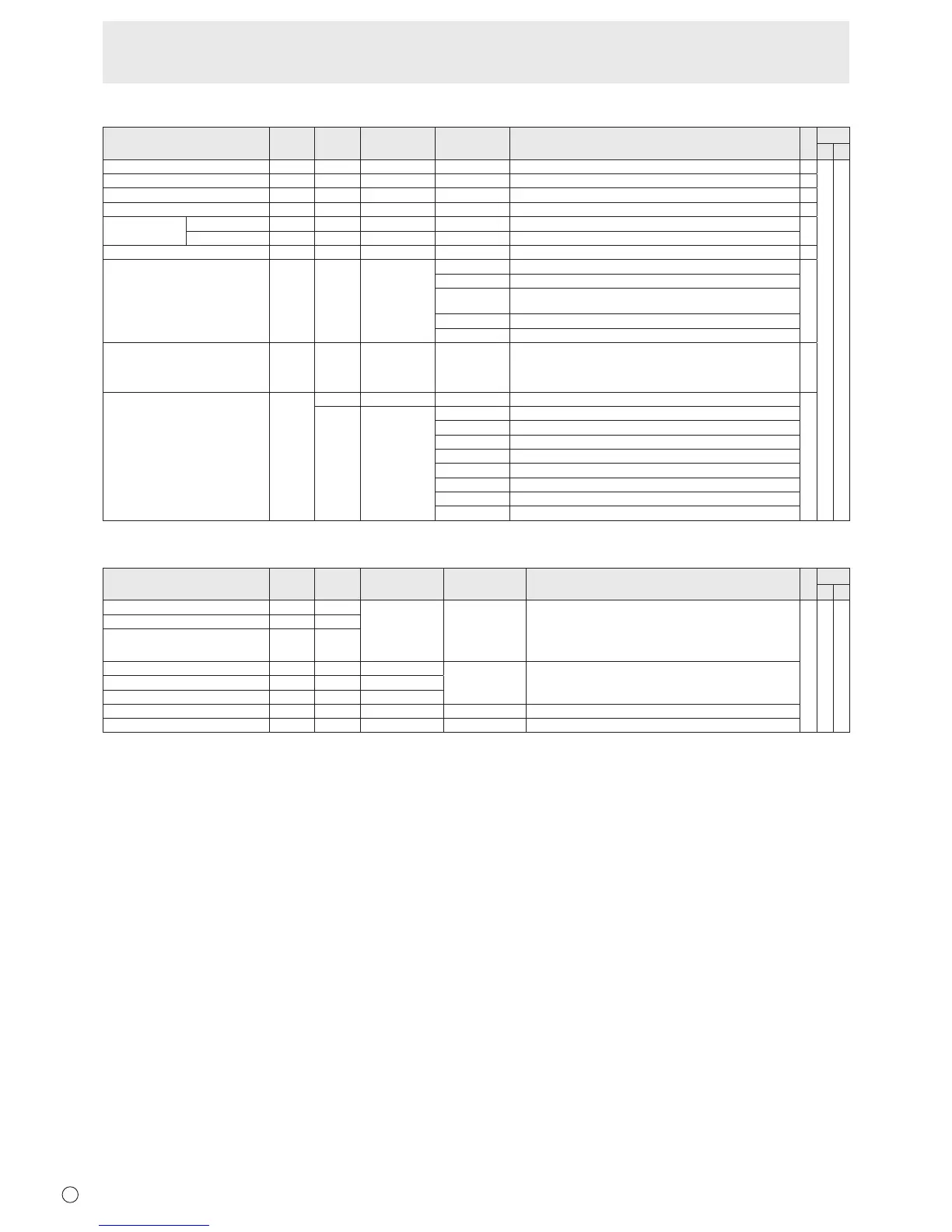
Function
Command Direction
Parameter Reply Control/Response contents *1
*2
(A) (B)
SCREENSIZE(PC) WIDE WR 1-5 1-5 1:WIDE,2:NORMAL,3:DotbyDot,4:ZOOM1,5:ZOOM2
○
○ ○
SCREENSIZE(AV) WIDE WR 1-5 1-5 1:WIDE,2:ZOOM1,3:ZOOM2,4:NORMAL,5:DotbyDot
○
VOLUME VOLM WR 0-31 0-31
○
MUTE MUTE WR 0-1 0-1 0:OFF,1:ON -
INFORMATION MODEL INF1 R Value
●
SERIALNO SRNO R Value
BRIGHT VLMP WR 0-31 0-31
○
TEMPERATURESENSOR DSTA R 0 Internal temperature normal
●
1 Internaltemperatureabnormal(Standbymode)
2 Internaltemperatureabnormal(Temperatureisnormalnow,butitwas
abnormalduringoperation.)
3 Internaltemperatureabnormal(Brightnessofthebacklightdecreases.)
4 Temperature sensor abnormal
TEMPERATUREACQUISITION ERRT R Value Temperatureattemperaturesensors1through3arereturnedinthe
following forms:
[Sensor1],[Sensor2],[Sensor3]
Indicatesatemperaturesensorabnormalitywhen“126”isreturned.
○
CAUSEOFLASTSTANDBYMODE STCA W 0 Initialization
●
R 0 No detectable error has occurred
1 StandbymodebyPOWERbutton
2 Main power off by the main power switch
3 StandbymodebyRS-232CorLAN
4 WaitingmodebyNoSignal
6 Standby mode by abnormal temperature
8 StandbymodebySCHEDULEsetting
20 StandbymodebyOFFIFNOOPERATIONsetting
Commands for setting of the GAMMA user data
Function
Command Direction
Parameter Reply Control/Response contents *1
*2
(A) (B)
REDGAMMADATATRANSFER UGRW W aaxxxx
···
xxxxcc
(xxxx:32pieces)
aa:01-16
xxxx:0000-1023
cc:00-FF
aa:Blocknumber
xxxx:32piecesofuserdata
cc:Checksum(ASCIIdata)oftheblocknumberanduserdata
○ ○ ○
GREENGAMMADATATRANSFER UGGW W
BLUEGAMMADATATRANSFER UGBW W
REDGAMMADATAREAD UGRR W 1-16 xxxx
···
xxxx
(xxxx:32pieces)
xxxx:0000-1023
xxxx:Userdataof32pieces
GREENGAMMADATAREAD UGGR W 1-16
BLUEGAMMADATAREAD UGBR W 1-16
USERDATAINITIALIZE UGRS W 0 Initializetheuserdata.
USERDATASAVE UGSV W 0 Save the user data in the monitor.
Controlling the Monitor with a PC (RS-232C)



 To Next Page