R-775(W)R-785(AL) - 11
AUTOMATIC COOKING
AUTO COOK, EXPRESS PIZZA, PIZZA
AUTO DEFROST, FUN MENUS
Above functions are automatic cooking. They automati-
cally work out the correct cooking mode and time for
cooking. They will cook according to the special cooking
sequence.
POWER OUTPUT REDUCTION
After the same cooking mode is carried out for more than
the specified cooking time, the power output is automati-
cally reduced by turning the control relays on and off
intermittently, as shown in the table below. This is to
protect the oven door against temperature rising.
D
U
A
L
Specified cooking Limited power
Cooking mode time (minutes) output (%)
Microwave (100%) 20 70
Top grill 15 50
Bottom grill 15 50
Top grill and 6 (Top) 70 (NOTE 2)
Bottom grill 6 (Bottom) 70 (NOTE 2)
Micro. (100%) 20 (Micro.) 70
+ Top grill 15 (Grill) 50
Micro. (100%) 20 (Micro.) 70
+ Bottom grill 15 (Heater) 50
Micro. (70 - 100%)
__
+ Top grill 15 50
Micro. (70 - 100%)
__
+ Bottom grill 15 50
NOTE:
1. In case of same cooking mode is repeated within 1
minute 15 seconds, the oven calculates total cook-
ing time and reduces the power level.
2. And then, 9 minutes later, the power is reduced to
50%.
FAN MOTOR OPERATION (In Grill or Dual mode)
When the oven is stopped during cooking, or when the
cooking is completed, the fan motor will operate for 5
minutes if the oven has been operated for more than 2
minutes.
FUNCTION OF IMPORTANT COMPONENTS
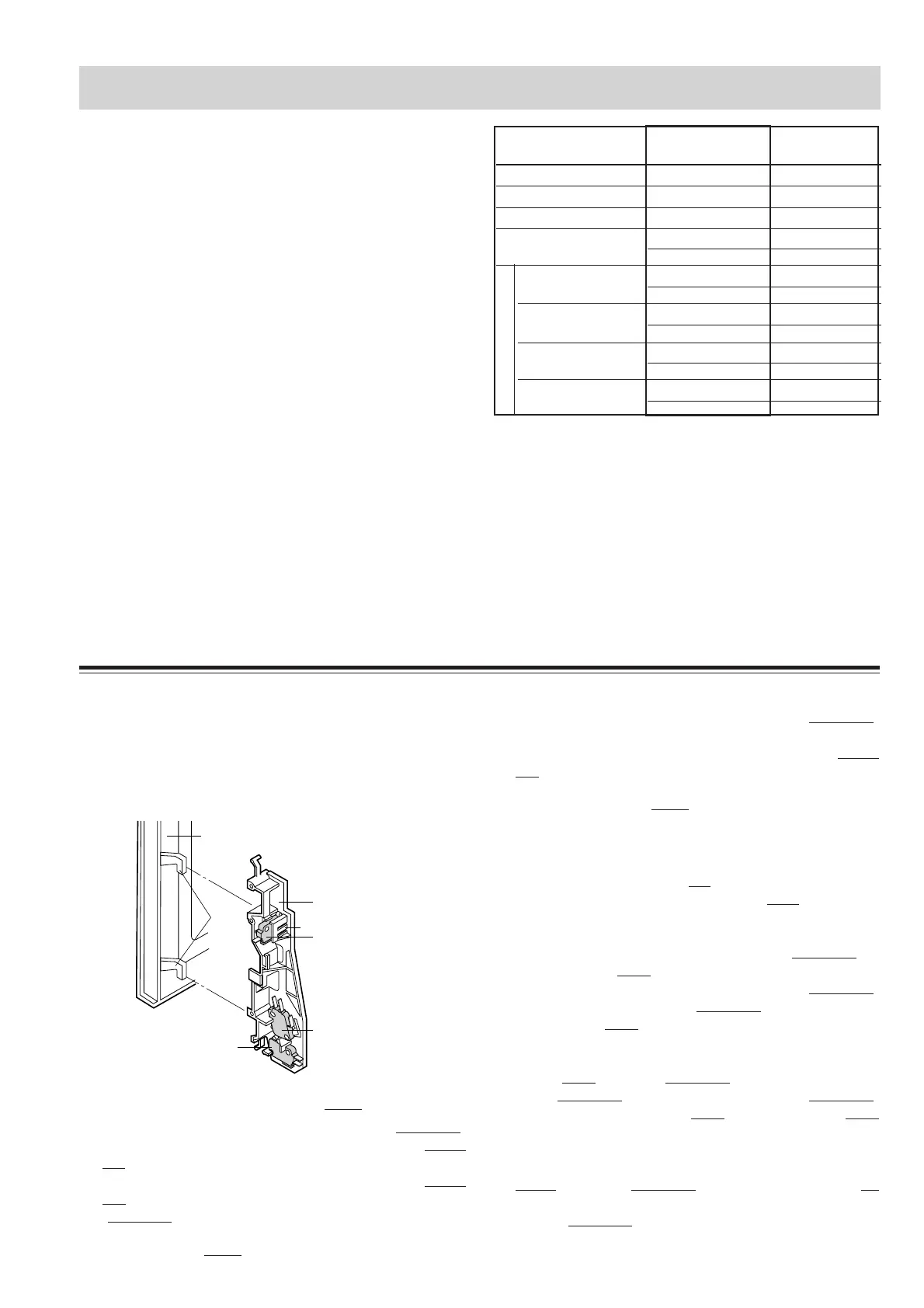
DOOR OPEN MECHANISM
The door can be opened by pulling the door handle. When
the handle is pulled, the latch head is pulled, the latch head
is moved upward, and released from the latch hook now
the door can be opened.
Figure D-1. Door Open Mechanism
MONITORED LATCH SWITCH SW1
1. When the oven door is closed, the contacts (COM-NO)
of the switch must be closed. And the contacts (COM-
NC) must be opened.
2. When the oven door is opened, the contacts (COM-
NO) of the switch must be opened. And the contacts
(COM-NC) must be closed.
STOP SWITCH SW2
1. When the oven door is closed, the contacts (COM-NO)
of the switch must be closed.
2. When the oven door is opened, the contacts (COM-
NO) of switch must be opened.
MONITOR SWITCH SW3
The monitor switch is activated (the contacts(COM-NC)are
opened) by the lower latch head on the door while the door is
closed. The switch is intended to render the oven inoperative
by means of blowing the fuse F2 F8A when the contacts
(COM-NC) of the monitored latch switch SW1 fail to open
when the door is opened.
Function
1. When the door is opened, the contacts (COM-NC) of
monitor switch SW3 close (to the ON condition) due to
their being normally closed and contacts (COM-NO)
open. At this time contacts (COM-NO) of the monitored
latch switch SW1 is in the OFF condition (contacts
open due to their being normally open contact switches.
2. As the door goes to a closed position, the monitor
switch SW3 contacts (COM-NC) are opened and con-
tacts (COM-NO) closed and then contacts (COM-NO)
of monitored latch switch SW1 and stop switch SW2
are closed.(On opening the door, each of these switches
operate inversely.)
3. If the door is opened and the monitored latch switch
SW1 contacts (COM-NO) fail to open, the fuse F2
(F8A) blows immediately after closing of the monitor
switch (COM-NC) contacts.
Latch hook
Door
SW2: Stop switch
Latch
Heads
SW3: Monitor switch
SW1:Monitored
latch switch
Tab
OPERATION SEQUENCE


 To Next Page