R-775(W)R-785(AL) - 30
Latch hook
Door
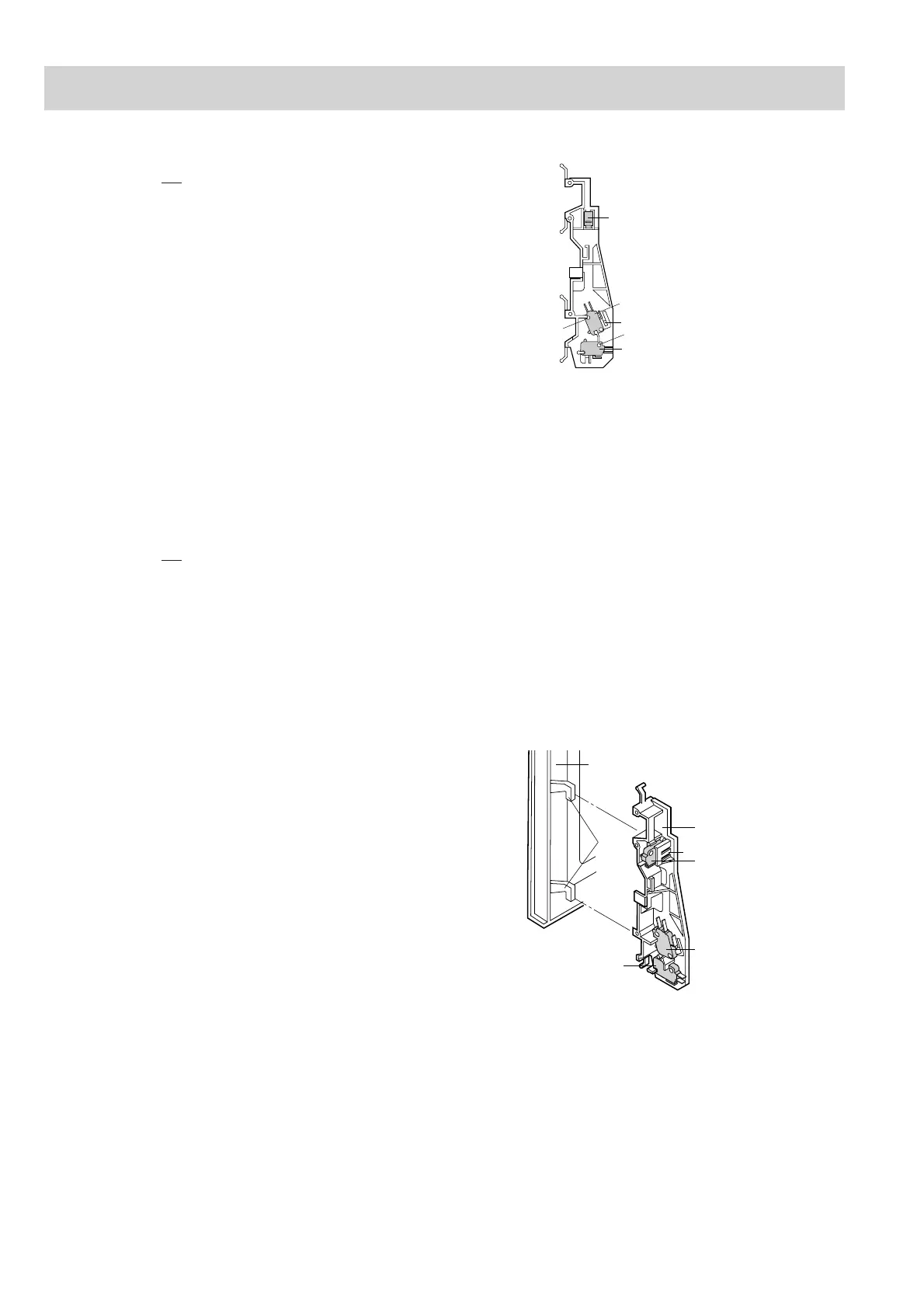
SW2: Stop switch
Latch
Heads
SW3: Monitor switch
SW1:Monitored
latch switch
Tab
MONITORED LATCH SWITCH, MONITOR SWITCH AND STOP SWITCH REMOVAL
1. CARRY OUT 3D CHECKS.
2. Remove the control panel assembly referring to "CON-
TROL PANEL ASSEMBLY REMOVAL".
3. Disconnect the leads from all switches.
4. Remove the two (2) screws holding the latch hook to
the oven cavity.
5. Remove the latch hook.
6. Remove the switch(es) from the latch hook by pushing
the retaining tab backwards slightly and turning the
switch(es) on the post.
7. Now the switch(es) is free.
SW2: Stop switch
SW3: Monitor switch
SW1:Monitored
latch switch
Tab
Post
Post
Figure C-5. Switches
If the monitored latch switch, stop switch and monitor
switch do not operate properly due to a mis-adjustment,
the following adjustment should be made.
1. CARRY OUT 3D CHECKS.
2. Loosen the two (2) screws holding the latch hook to
the oven cavity front flange.
3.
With the door closed, adjust the latch hook by moving
it back and forward or up and down. In and out play of
the door allowed by the latch hook should be less than
0.5 mm. The horizontal position of the latch hook should
be placed where the monitor switch has activated with
the door closed. The vertical position of the latch hook
should be placed where the monitored latch switch and
stop switch have activated with the door closed.
4. Secure the screws with washers firmly.
5.
Make sure that all switches operate. If the latch head
has not pushed the plungers of the monitor switch with
door closed, adjust the latch hook position.
At that time, the latch head should have pushed the
plungers of the monitored latch switch and stop switch.
If the latch head has not pushed the plungers of the
monitored latch switch and stop switch with door closed,
loose two (2) screws holding latch hook to oven cavity
front flange and adjust the latch hook position.
After adjustment, make sure of following:
1. In and out play of door remains less than 0.5 mm when
latched position. First check the latch hook position,
pushing and pulling upper portion of the door toward
the oven face. Then check the lower latch hook posi-
tion, pushing and pulling lower portion of the door
toward the oven face. Both results (play of the door)
should be less than 0.5mm.
MONITOR
ED LATCH SWITCH, STOP SWITCH AND MONITOR SWITCH ADJUSTMENT
2. The contacts (COM-NO) of the stop switch and the
monitored latch switch open within 1.8mm gap be-
tween right side of cavity face plate and door when
door is opened.
3. When the door is closed, the contacts (COM-NO) of the
stop switch close.
4. When the door is closed the contacts (COM-NC) of the
monitor switch and monitored latch switch open. And
the contacts (COM-NO) of their switches close.
5. Re-install outer case and check for microwave leakage
around the door with an approved microwave survey
meter. (Refer to Microwave Measurement Procedure.)
COMPONENT REPLACEMENT AND ADJUSTMENT PROCEDURE
Figure C-6 Latch Switches Adjustment


 To Next Page