EasyManua.ls Logo

Sharp SF-2022 - Dual; Edge Erase

Sharp SF-2022
76 pages
Print Icon
To Next Page IconTo Next Page
To Previous Page IconTo Previous Page
Loading...
vt
|
_ -
QUAL
PAGE
EDGE
-
MARGIN
ERASE
SHIFT
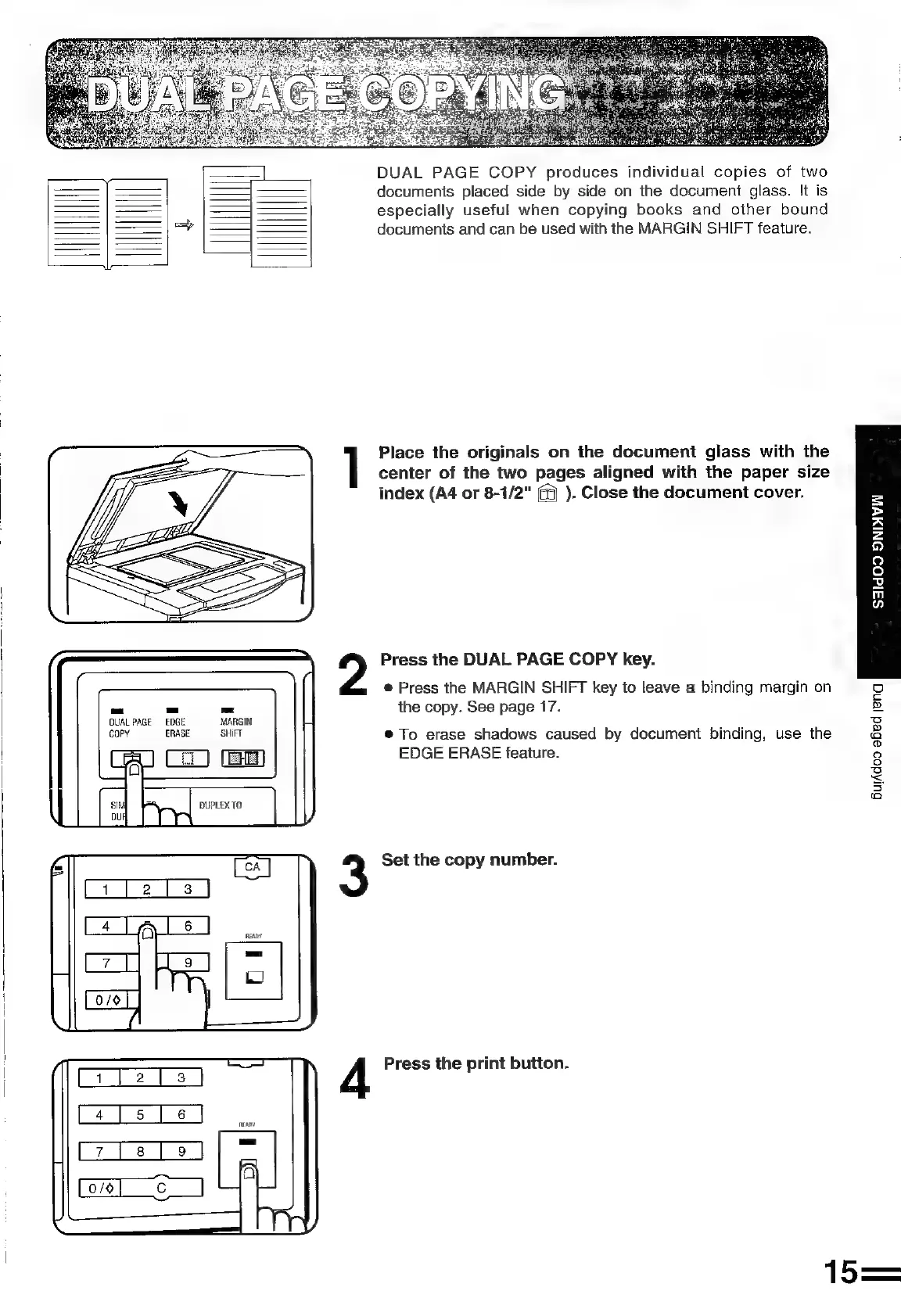
DUAL
PAGE
COPY
produces
individual
copies
of
two
documents
placed
side
by
side
on
the
document
glass.
It
is
especially
useful
when
copying
books
and
other
bound
documents
and
can
be
used
with
the
MARGIN
SHIFT
feature.
Place
the
originals
on
the
document
glass
with
the
center
of
the
two
pages
aligned
with
the
paper
size
index
(A4
or
8-7/2"
).
Close
the
document
cover.
Press
the
DUAL
PAGE
COPY
key.
e@
Press
the
MARGIN
SHIFT
key
to
leave
a
binding
margin
on
the
copy.
See
page
17.
®@
To
erase
shadows
caused
by
document
binding,
use
the
EDGE
ERASE
feature.
Oo
c
iy
uel
s
a
®
Q
ie}
3
Ss.
5
a
15=
Set
the
copy
number.
4
Press
the
print
button.

Related product manuals