EasyManua.ls Logo

Sharp SF-2022 - 9, Misfeed Removal

Sharp SF-2022
76 pages
Print Icon
To Next Page IconTo Next Page
To Previous Page IconTo Previous Page
Loading...
MISFEED
REMOVAL
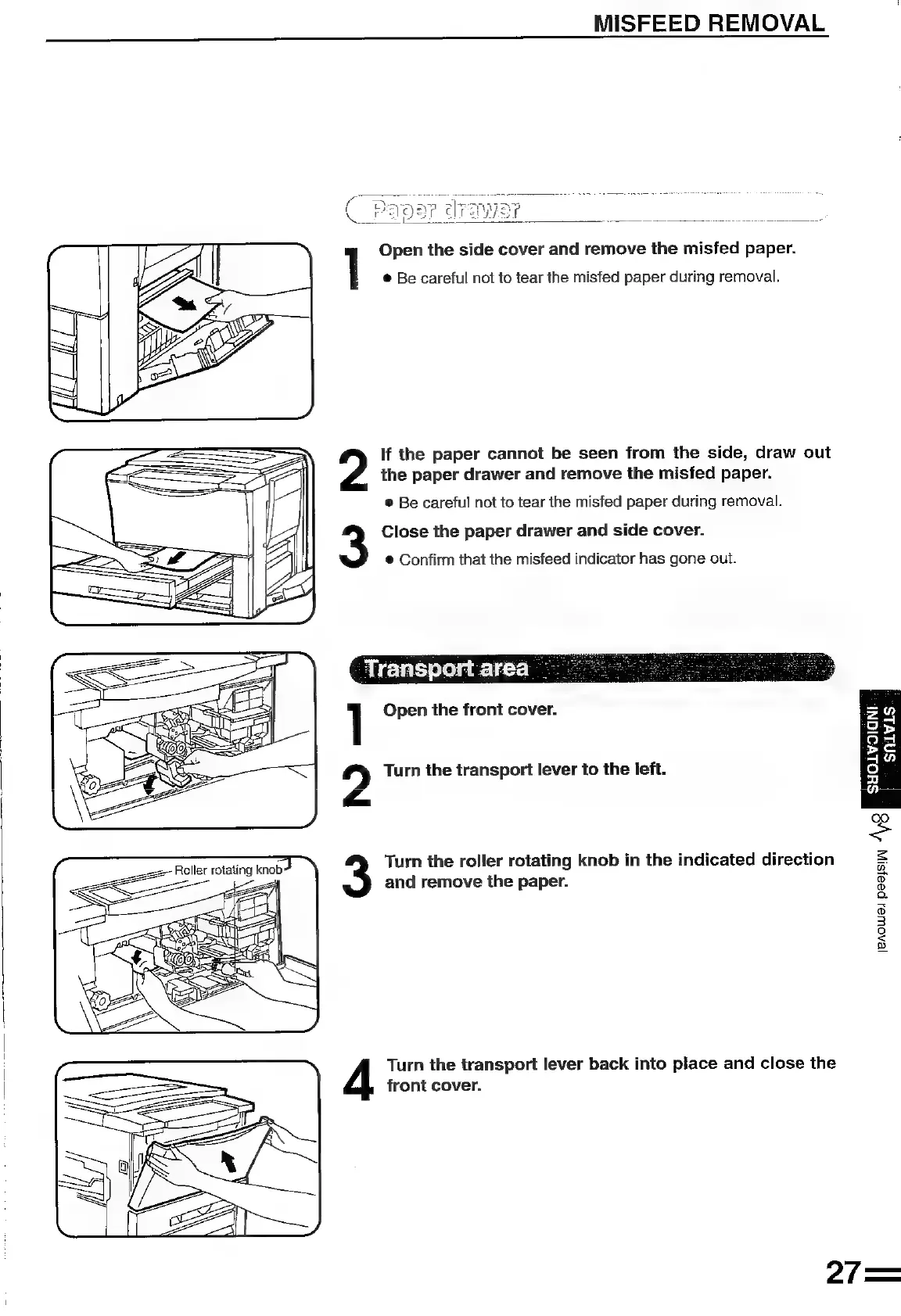
1
Open
the
side
cover
and
remove
the
misfed
paper.
®
Be
careful
not
to
tear
the
misfed
paper
during
removal.
If
the
paper
cannot
be
seen
from
the
side,
draw
out
the
paper
drawer
and
remove
the
misfed
paper.
®
Be
careful
not
to
tear
the
misfed
paper
during
removal.
3
Close
the
paper
drawer
and
side
cover.
@
Confirm
that
the
misfeed
indicator
has
gone
out.
Transport
area
]
Open
the
front
cover.
SN
fy
Turn
the
transport
lever
to
the
left.
&
Turn
the
roller
rotating
knob
in
the
indicated
direction
and
remove
the
paper.
S
=
Q
©
©
ra
co)
3
3
<
ss
Turn
the
transport
lever
back
into
place
and
close
the
front
cover.
27=

Related product manuals