EasyManua.ls Logo

Sharp SF-2022 - 20-Bin Sorter (Sf-S15)

Sharp SF-2022
76 pages
Print Icon
To Next Page IconTo Next Page
To Previous Page IconTo Previous Page
Loading...
20-BIN
SORTER
Y
SF-S15
20-Bin
]
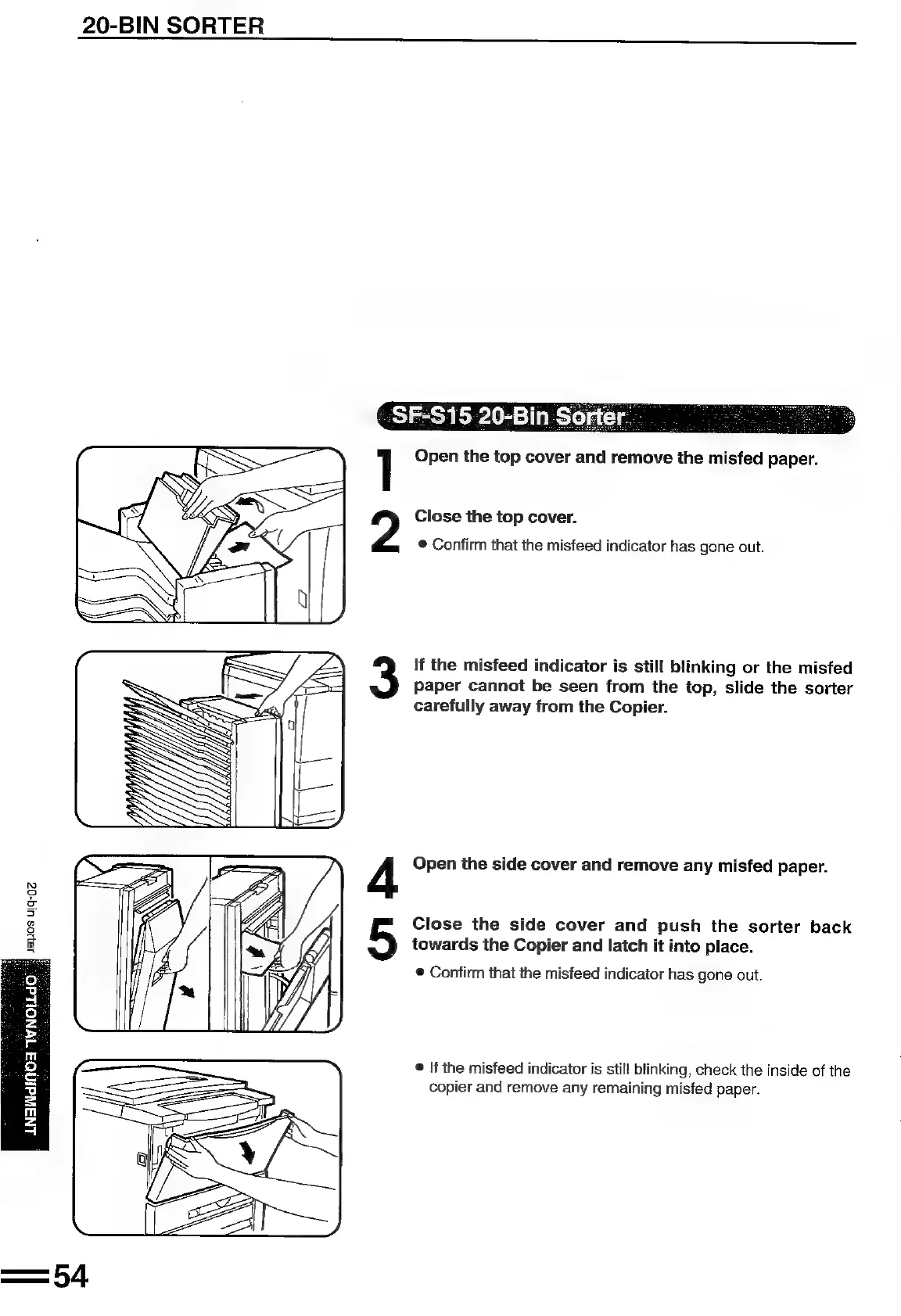
Open
the
top
cover
and
remove
the
misfed
paper.
Close
the
top
cover.
®
Confirm
that
the
misfeed
indicator
has
gone
out.
If
the
misfeed
indicator
is
still
blinking
or
the
misfed
Paper
cannot
be
seen
from
the
top,
slide
the
sorter
carefully
away
from
the
Copier.
Open
the
side
cover
and
remove
any
misfed
paper.
Close
the
side
cover
and
push
the
sorter
back
towards
the
Copier
and
latch
it
into
place.
iS)
2
oF
5
®
3
=
&
g
®
Confirm
that
the
misfeed
indicator
has
gone
out.
©
If
the
misfeed
indicator
is
still
blinking,
check
the
inside
of
the
copier
and
remove
any
remaining
misfed
paper.
ANAINdINDA
TWNOLEdO:.

Related product manuals