EasyManua.ls Logo

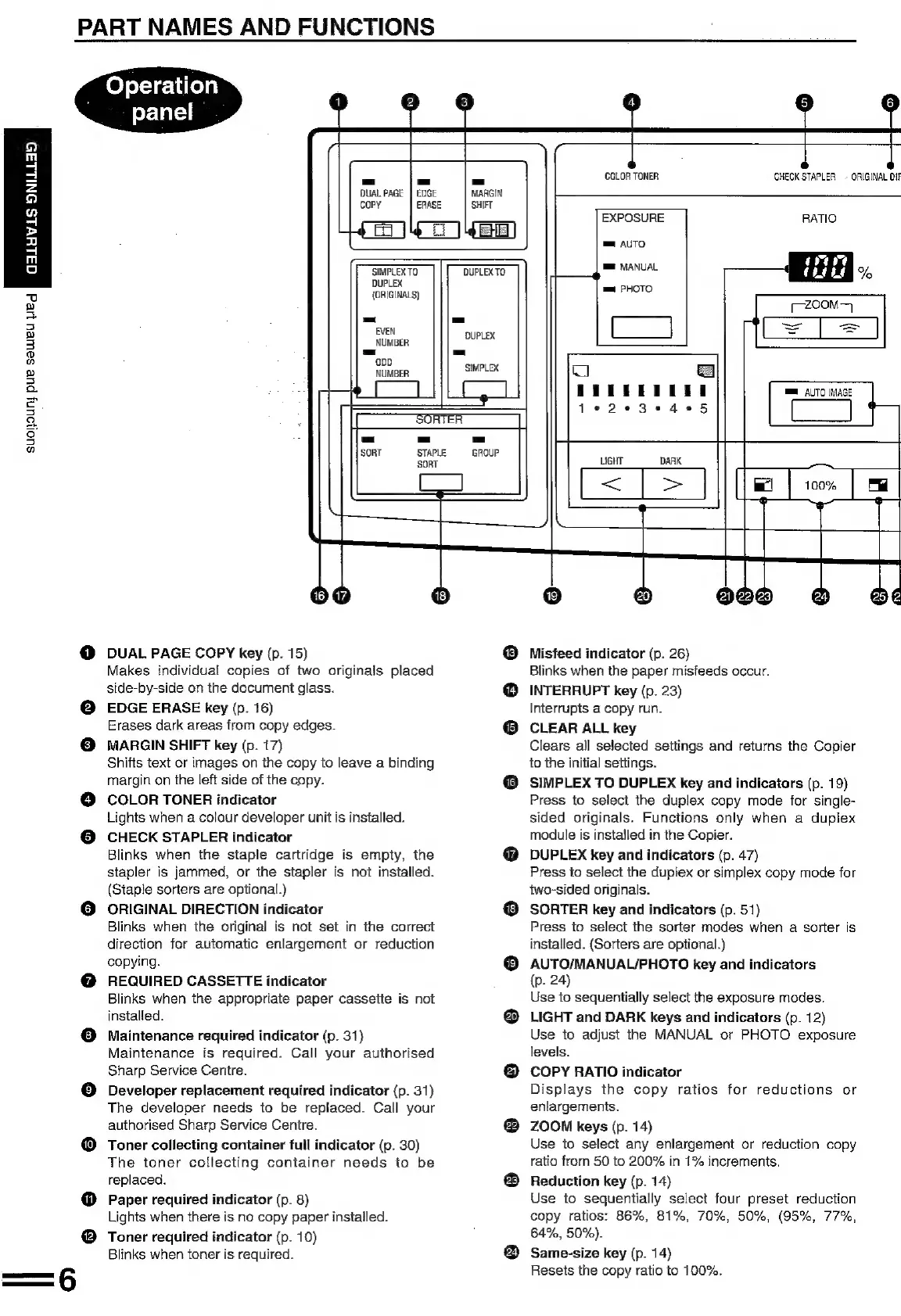
Sharp SF-2022 - Operation Panel

Sharp SF-2022
76 pages
Print Icon
To Next Page IconTo Next Page
To Previous Page IconTo Previous Page
Loading...
SuO}OUNY
pur
SeWeU
Wee}
MRUERRS
AEE]
MEE
bo)
PART
NAMES
AND
FUNCTIONS
°
8
Operation
panel
DUAL
PAGE
cOoPY
EDGE
ERASE
4
MARGIN
SHIFT
SIMPLEX
TO
DUPLEX
(ORIGINALS)
-_
EVEN
NUMBER
-
plait)
>
Gy
18
DUAL
PAGE
COPY
key
(p.
15)
Makes
individual
copies
of
two
originals
placed
side-by-side
on
the
document
glass.
EDGE
ERASE
key
(p.
16)
Erases
dark
areas
from
copy
edges.
MARGIN
SHIFT
key
(p.
17)
Shifts
text
or
images
on
the
copy
to
leave
a
binding
margin
on
the
left
side
of
the
copy.
COLOR
TONER
indicator
Lights
when
a
colour
developer
unit
is
installed.
CHECK
STAPLER
indicator
Blinks
when
the
staple
cartridge
is
empty,
the
stapler
is
jammed,
or
the
stapler
is
not
installed.
(Staple
sorters
are
optional.)
ORIGINAL
DIRECTION
indicator
Blinks
when
the
original
is
not set
in
the
correct
direction
for
automatic
enlargement
or
reduction
copying.
REQUIRED
CASSETTE
indicator
Blinks
when
the
appropriate
paper
cassette
is
not
installed.
Maintenance
required
indicator
(p.
31}
Maintenance
is
required.
Call
your
authorised
Sharp
Service
Centre.
Developer
replacement
required
indicator
(p.
31)
The
developer
needs
to
be
replaced.
Call
your
authorised
Sharp
Service
Centre.
Toner
collecting
container
full
indicator
(p.
30)
The
toner
collecting
container
needs
to
be
replaced.
Paper
required
indicator
(p.
8)
Lights
when
there
is
no
copy
paper
installed.
Toner
required
indicator
(p.
10)
Blinks
when
toner
is
required.
DUPLEX
TO.
-=
DUPLEX
-
‘SIMPLEX
4
5 6
j
COLOR TONER CHECK
STAPLER
ORIGINAL
DIA
EXPOSURE
RATIO
mm
AUTO
rane
mm
MANUAL
i
Coane
mm
PHOTO
[zoom
=
mm
AUTO
IMAGE
(ee
[ox
Ta
8
(i
f22%23
@
Misfeed
indicator
(p.
26)
Blinks
when
the
paper
misfeeds
occur.
INTERRUPT
key
(p.
23)
nterrupis
a
copy
run.
CLEAR
ALL
key
Clears
all
selected
settings
and
returns
the
Copier
o
the
initial
settings.
SIMPLEX
TO
DUPLEX
key
and
indicators
(p.
19)
Press
to
select
the
duplex
copy
mode
for
single-
sided
originals.
Functions
only
when
a
duplex
module
is
installed
in
the
Copier.
DUPLEX
key
and
indicators
(p.
47)
Press
to
select
the
dupiex
or
simplex
copy
mode
for
wo-sided
originals.
SORTER
key
and
indicators
(p.
51)
Press
to
select
the
sorter
modes
when
a
sorter
is
installed.
(Sorters
are
optional.)
AUTO/MANUAL/PHOTO
key
and
indicators
p.
24)
Use
to
sequentially
select
the
exposure
modes.
LIGHT
and
DARK
keys
and
indicators
(p.
12)
Use
to
adjust
the
MANUAL
or
PHOTO
exposure
levels.
COPY
RATIO
indicator
Displays
the
copy
ratios
for
reductions
or
enlargements.
ZOOM
keys
(p.
14)
Use
to
select
any
enlargement
or
reduction
copy
ratio
from
50
to
200%
in
1%
increments.
Reduction
key
(p.
14)
Use
to
sequentially
select
four
preset
reduction
copy
ratios:
86%, 81%,
70%, 50%,
(95%,
77%,
64%,
50%).
Same-size
key
(p.
14)
Resets
the
copy
ratio
to
100%.

Related product manuals