EasyManua.ls Logo

Sharp SF-2022 - Page 9

Sharp SF-2022
76 pages
Print Icon
To Next Page IconTo Next Page
To Previous Page IconTo Previous Page
Loading...
PART
NAMES
AND
FUNCTIONS
Ll
.
~
s
g
=
xf
Aa
[ml]
[Syl
¥
S
Asta]
/\mal)
|S
'
ADS
Ld
7
B
z
Y
EXTRA
//
|=
|
SIZE
om
|
AUTO
PAPER
|
2
SELECT
CASSETTE
SELECT
@
6
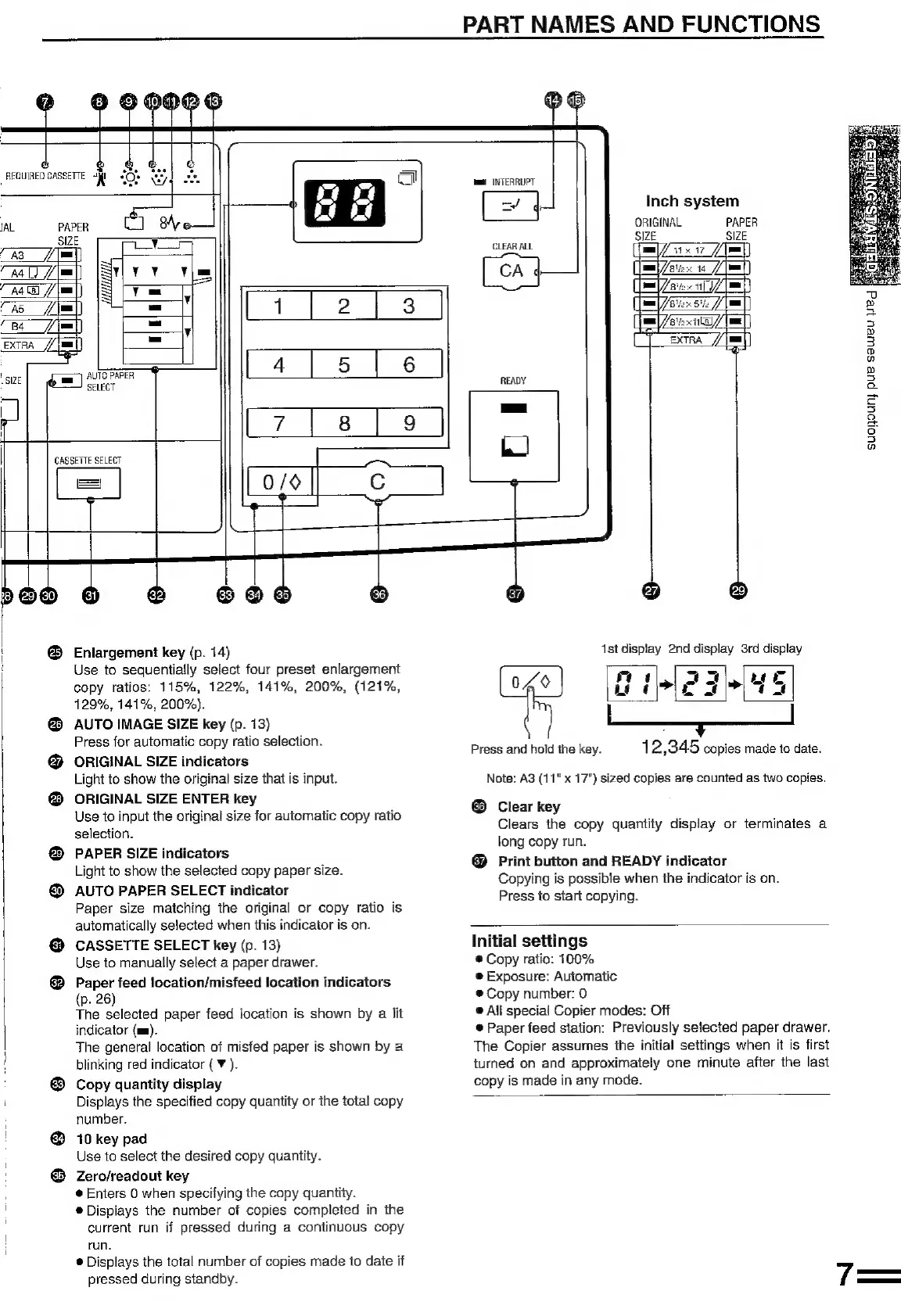
Enlargement
key
(p.
14)
Use
to
sequentially
select
four
preset
enlargement
copy
ratios:
115%,
122%,
141%,
200%,
(121%,
129%,
141%,
200%).
AUTO
IMAGE
SIZE
key
(p.
13)
Press
for
automatic
copy
ratio
selection.
ORIGINAL
SIZE
indicators
Light
to
show
the
original
size
that
is
input.
ORIGINAL
SIZE
ENTER
key
Use
to
input
the
original
size
for
automatic
copy
ratio
selection.
PAPER
SIZE
indicators
Light
to
show
the
selected
copy
paper
size.
AUTO
PAPER
SELECT
indicator
Paper
size
matching
the
original
or
copy
ratio
is
automatically
selected
when
this
indicator
is
on.
CASSETTE
SELECT
key
(p.
13)
Use
to
manually
select
a
paper
drawer.
Paper
feed
location/misfeed
location
indicators
(p.
26)
The
selected
indicator
(mm).
The
general
location
of
misfed
paper
is
shown
by
a
blinking
red
indicator
(
¥
).
Copy
quantity
display
Displays
the
specified
copy
quantity
or
the
total
copy
number.
10
key
pad
Use
to
select
the
desired
copy
quantity.
Zero/readout
key
@
Enters
0
when
specifying
the
copy
quantity.
®
Displays
the
number
of
copies
completed
in
the
current
run
if
pressed
during
a
continuous
copy
run.
®
Displays
the
total
number
of
copies
made
to
date
if
pressed
during
standby.
paper
feed
location
is
shown
by
a
lit
wm
RTERRUPT
Inch
system
ORIGINAL
PAPER
SIZE SIZE
CLEAR
ALL
m/v
fl)
CA
{
melee
14
=i]
m/e
dt)
me
een
52
(ma)
Bie
xt
/
(wml
]
EXTRA
//|mm
uU
»
Es
5
>
3
D
a
»
5
a
=
3
3
oh
fs}
5
a
@
1st
display
2nd
display
3rd
display
®
tl
ay
ae
040
Re
Bn
ne
Press
and
hold
the
key.
1
2,345
copies
made
to
date.
Note:
A3
(11"
x
17")
sized
copies
are
counted
as
two
copies.
®
Clear
key
Clears
the
copy
quantity
display
or
terminates
a
long
copy
run.
@
Print
button
and
READY
indicator
Copying
is
possible
when
the
indicator
is
on.
Press
to
start
copying.
Initial
settings
®
Copy
ratio:
100%
@
Exposure:
Automatic
®
Copy
number:
0
®
Ail
special
Copier
modes:
Off
©
Paper
feed
station:
Previously
selected
paper
drawer.
The
Copier
assumes
the
initial
settings
when
it
is
first
turned
on
and
approximately
one
minute
after
the
last
copy
is
made
in
any
mode.

Related product manuals