EasyManua.ls Logo

Sharp SF-2022 - Page 37

Sharp SF-2022
76 pages
Print Icon
To Next Page IconTo Next Page
To Previous Page IconTo Previous Page
Loading...
COPIER
TROUBLE?
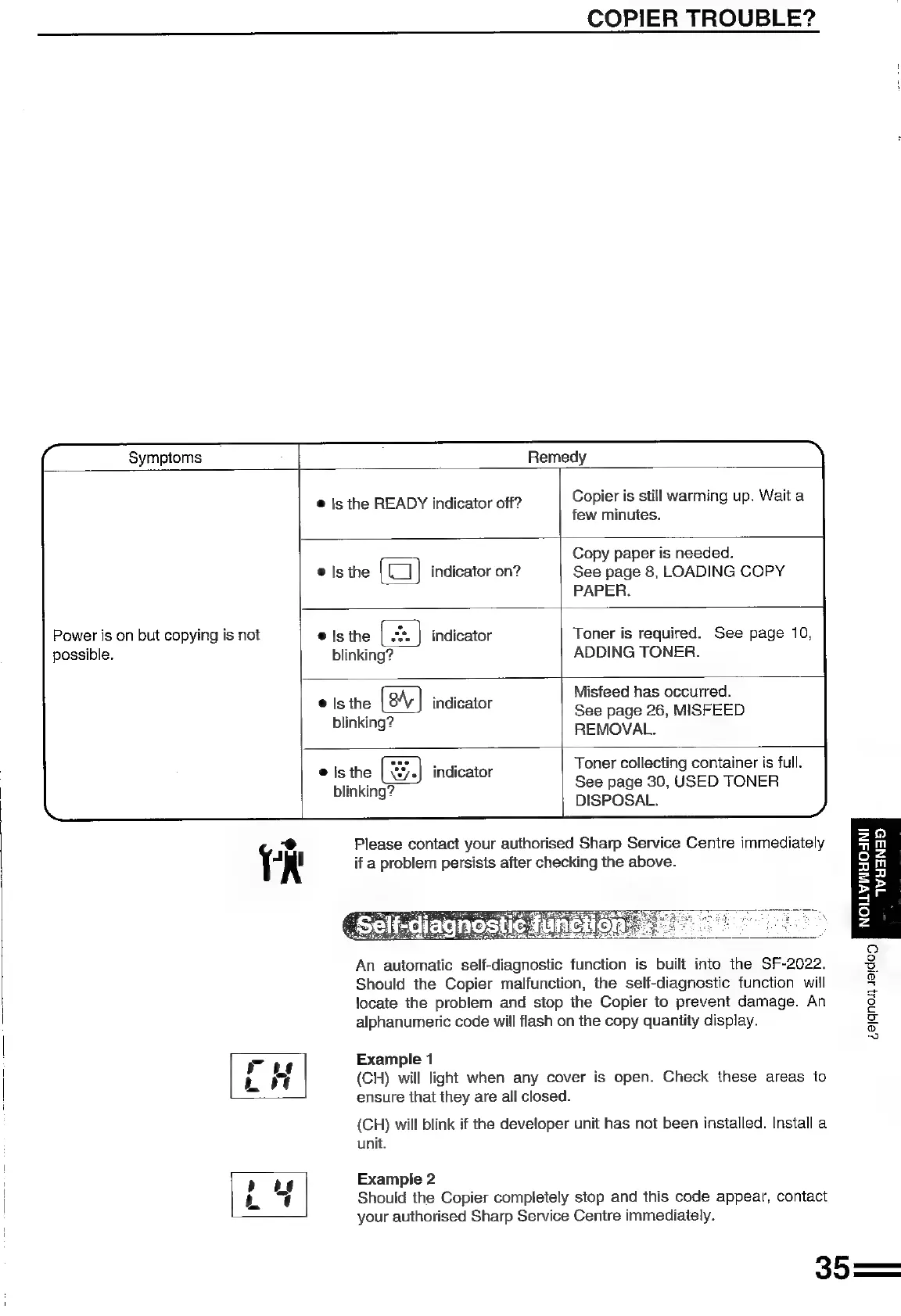
Symptoms
Remedy
©
Is
the
READY
indicator
off?
Copier
is
still
warming
up.
Wait
a
few
minutes.
Copy
paper
is
needed.
indicator
on?
See
page
8,
LOADING
COPY
PAPER.
Power
is
on
but
copying
is
not
@
Is
the
indicator
Toner
is
required.
See
page
10,
possible.
blinking?
ADDING
TONER.
Misfeed
has
occurred.
See
page
26,
MISFEED
REMOVAL.
®
Is
the
indicator
blinkin
o
aoe
Toner
collecting
container
is
full.
e
ae
3
indicator
See
page
30,
USED
TONER
i
DISPOSAL.
-o
Please
contact
your
authorised
Sharp
Service
Centre
immediately
TR
if
a
problem
persists
after
checking
the
above.
Wu3Na5D
2
7
°
z
5
i
fe]
2
co)
An
automatic
self-diagnostic
function
is
built
into
the
SF-2022.
3
Should
the
Copier
malfunction,
the
self-diagnostic
function
will
g
locate
the
problem
and
stop
the
Copier
to
prevent
damage.
An
8
alphanumeric
code
will
flash
on
the
copy
quantity
display.
es
~
ary)
Example
1
fn
(CH)
will
light
when
any
cover
is
open.
Check
these
areas
to
=.
ensure
that
they
are
all
closed.
(CH)
will
blink
if
the
developer
unit
has
not
been
installed.
Install
a
unit.
!
:
>
oe
Example
2
Lh
|
Should
the
Copier
completely
stop
and
this
code
appear,
contact
your
authorised
Sharp
Service
Centre
immediately.
35—

Related product manuals