EasyManua.ls Logo

Sharp SF-2022 - Page 6

Sharp SF-2022
76 pages
Print Icon
To Next Page IconTo Next Page
To Previous Page IconTo Previous Page
Loading...
7)
hud
=}
a
Zz
g)
wn
=
>
es]
4
m
i]
“0
st)
=
Pa
o
3
oO
“a
o
a
a
a
=
3
2
iS}
3
a
13]
°
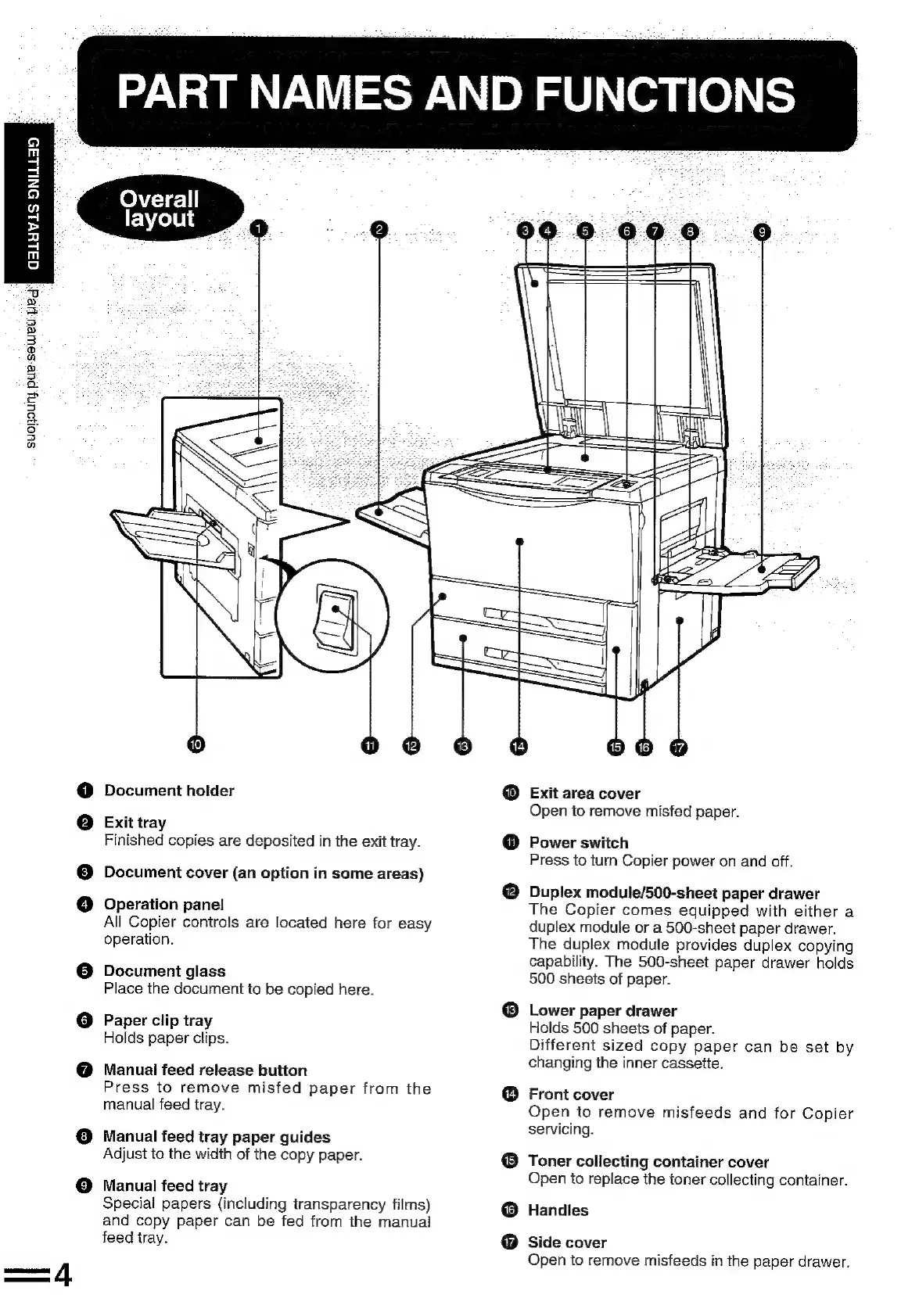
PART
NAMES
AND
FUNCTIONS
Document
holder
Exit
tray
Finished
copies
are
deposited
in
the
exit
tray.
Document
cover
(an
option
in
some
areas)
Operation
panel
All
Copier
controls
are
located
here
for
easy
operation.
Document
glass
Place
the
document
to
be
copied
here.
©
Paper
clip
tray
Holds
paper
clips.
Manual
feed
release
button
Press
to
remove
misfed
paper
from
the
manual
feed
tray.
@
Manual
feed
tray
paper
guides
Adjust
to
the
width
of
the
copy
paper.
©
Manual
feed
tray
Special
papers
(including
transparency
films)
and
copy
paper
can
be
fed
from
the
manual
feed
tray.
®
@
Exit
area
cover
Open
to
remove
misfed
paper.
Power
switch
Press
to
turn
Copier
power
on
and
off.
Duplex
module/500-sheet
paper
drawer
The
Copier
comes
equipped
with
either
a
duplex
module
or
a
500-sheet
paper
drawer.
The
duplex
module
provides
duplex
copying
capability.
The
500-sheet
paper
drawer
holds
500
sheets
of
paper.
Lower
paper
drawer
Holds
500
sheets
of
paper.
Different
sized
copy
paper
can
be
set
by
changing
the
inner
cassette.
Front
cover
Open
to
remove
misfeeds
and
for
Copier
servicing.
®
Toner
collecting
container
cover
8
0
Open
to
replace
the
toner
collecting
container.
Handles
Side
cover
Open
to
remove
misfeeds
in
the
paper
drawer.

Related product manuals