35
COPIER
TROUBLE?
MISFEED REMOVAL
Misfeed removal
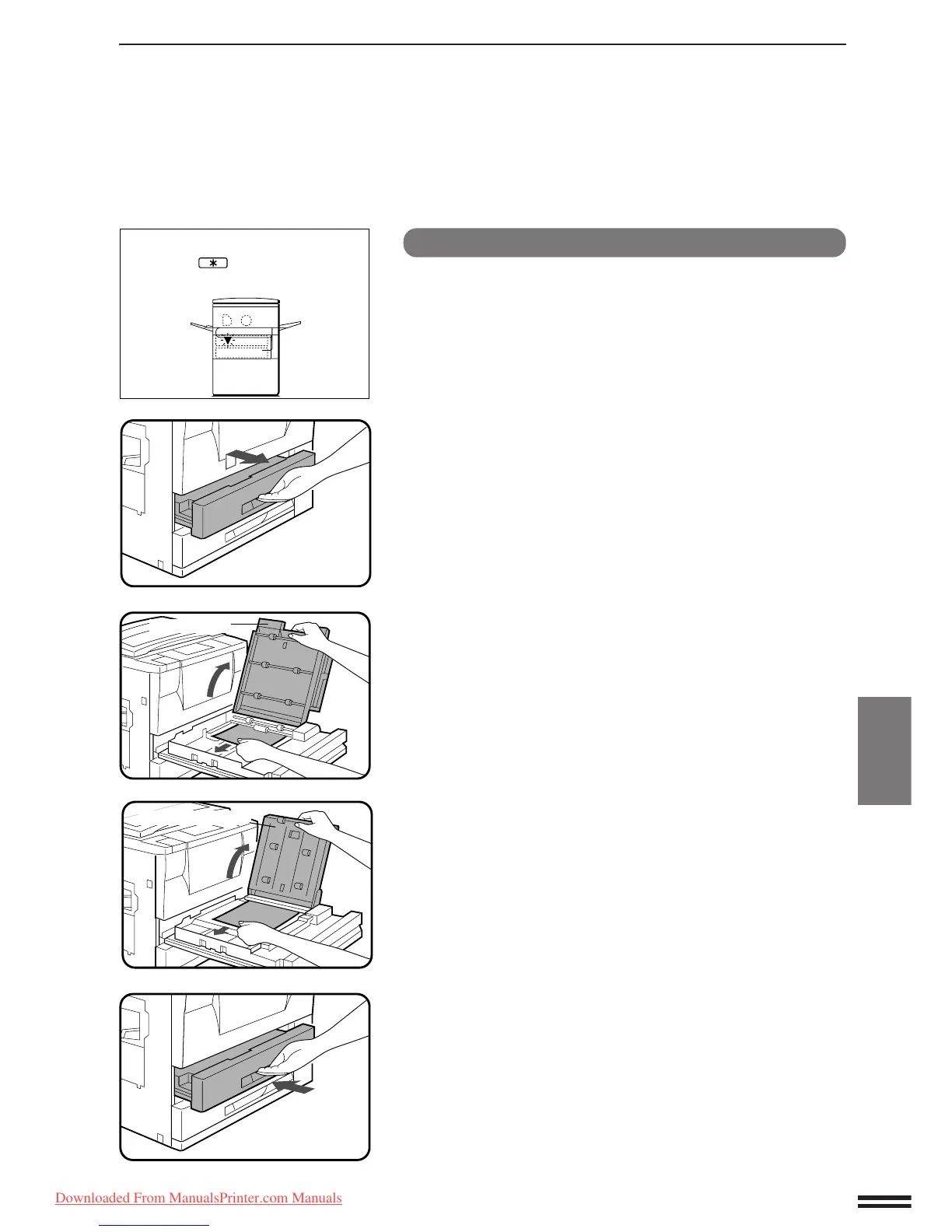
Misfeed in the duplex module
●
The duplex module is optional.
NOTE:
If any other misfeed locations are indicated, be sure to remove
any misfed paper from these locations before performing the
procedure described below. If not, a sheet of paper in another
location may become torn and difficult to remove.
1
Pull out the duplex module.
2
Lift up the upper and lower paper guides, and remove
the misfed paper.
●
When a misfeed occurs between the paper guides, open the
upper paper guide and remove the misfed paper.
3
Close the paper guides and push back the duplex
module.
●
Confirm that the misfeed display is cleared.
A MISFEED HAS OCCURRED.
CLEAR INDICATED AREA.
PRESS THE KEY FOR RECOVERY
INSTRUCTIONS.
Paper guides
Upper paper guide
Downloaded From ManualsPrinter.com Manuals



 To Next Page