72
OPTIONAL
EQUIPMENT
STAND/3000-SHEET PAPER DRAWER (SF-D23)/STAND/500-SHEET PAPER DRAWER (SF-D24)
Loading copy paper
The size of the copy paper for the paper tray will be set by Sharp
service personnel according to your request when you purchase the
copier. If a different paper size setting is required, contact your
authorised Sharp Service Centre.
●
SF-D23
Only A4 (8-1/2" x 11") sized paper can be loaded to the 3000-
sheet paper drawer.
●
SF-D24
The 500-sheet paper drawer is available in four different paper
sizes: A4, A4R, B4, and A3 (8-1/2" x 11", 8-1/2" x 11"R, 8-1/2" x
14" and 11" x 17").
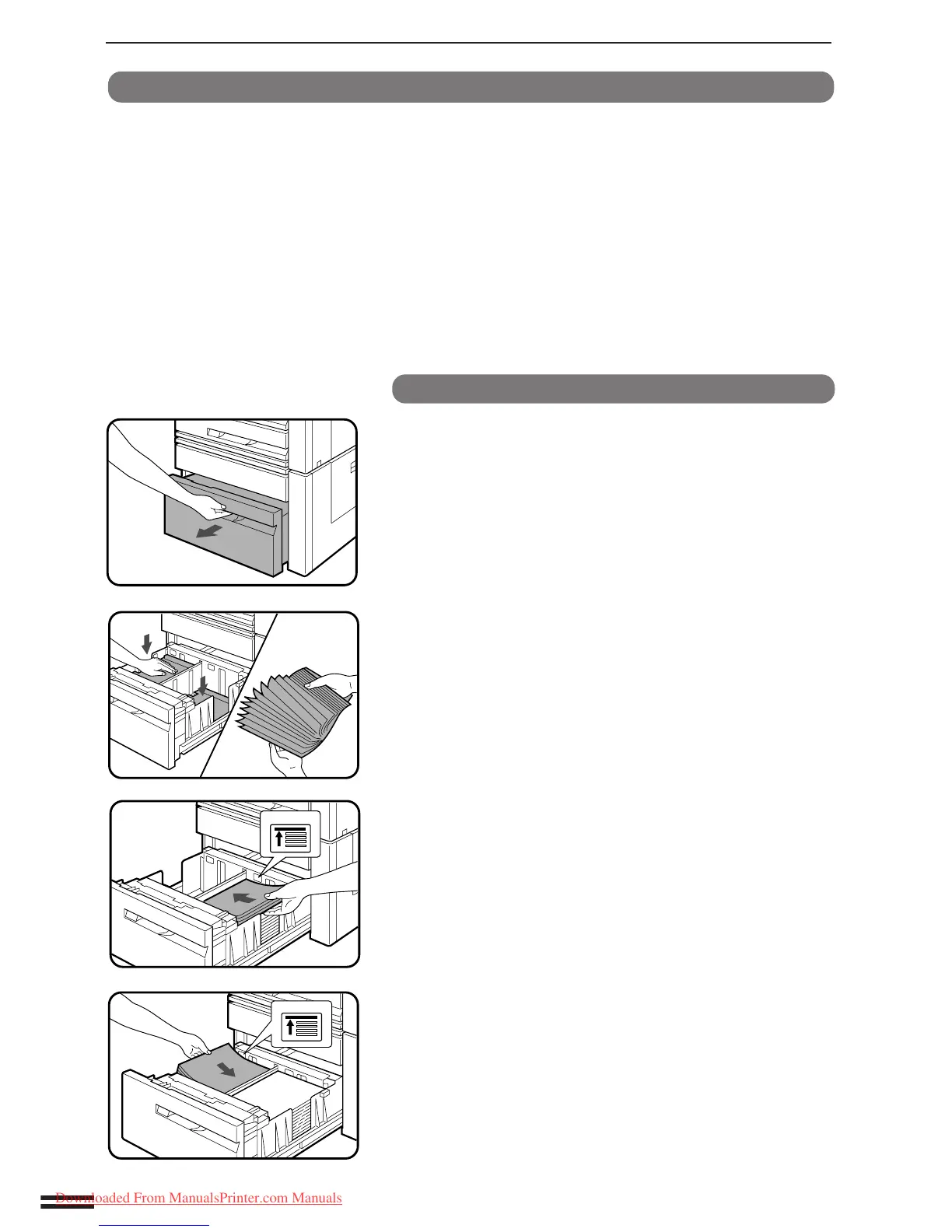
Stand/3000-sheet paper drawer (SF-D23)
1
Gently pull out the paper drawer.
2
Push down the left and right feed tables in the paper
drawer.
3
Fan the copy paper before loading it.
4
Load copy paper onto the left and right feed tables.
●
Each table holds 1,500 sheets of A4 (8-1/2" x 11") sized paper.
●
Do not exceed the maximum height line.
Stand/3000-sheet paper drawer (SF-D23)
Stand/500-sheet paper drawer (SF-D24)
Downloaded From ManualsPrinter.com Manuals



 To Next Page