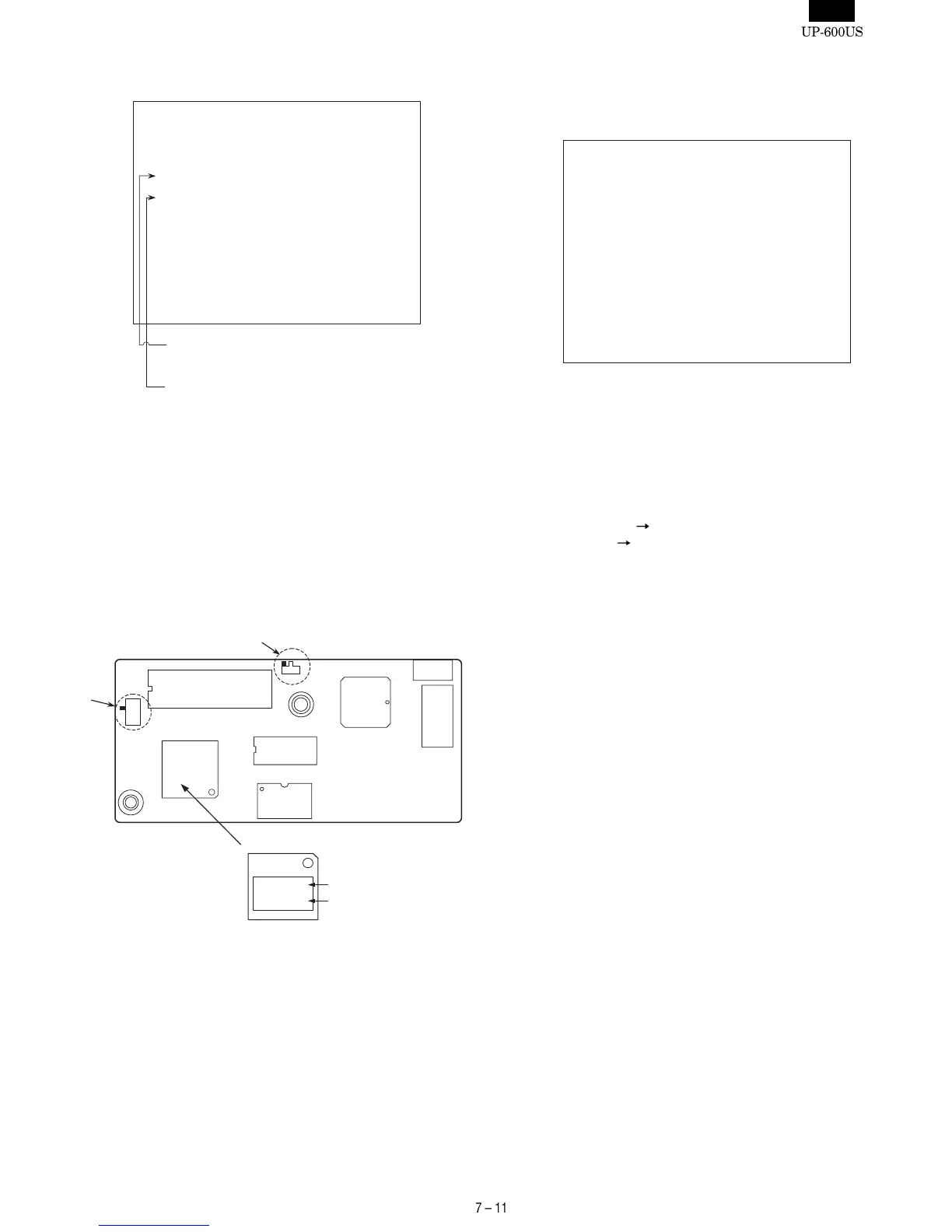
Display : [MAC ADD&FIRM WRITE]
Input the MAC address and press the ENTER key.
• MAC address:
The TCP/IP I/F PWB has a seal carrying a MAC address of hexa-
decimal number attached on its CPU.
Enter this unique code (XXYYZZ) of hexadecimal number as the
values (3 values of 3 digits) converted to decimal numbers,
through the keyboard.
Example: When XX,YY,ZZ = 10,00,EB, enter 016,000,224 as
decimal numbers.
Start the writing of the MAC address & Firmware program
When writing is completed, the following message is displayed as
shown below.
Display :
6) Press the CANCEL key to exit.
7) Turn OFF the AC switch of the UP-600.
8) Remove the EPROM (Master ROM) from the TCP/IP I/F PWB
(IC5: IC socket).
9) Set the following switches to the (Normal mode) on the TCP/IP
I/F PWB.
SW1 : [EPROM]
[FLASH]
SW2 : [VCC]
[GND]
10) Execute the "Service reset" .
MAC ADDR & FIRM Write
MAC ADDRESS:
AAA BBB CCC
08 00 1F XX YY ZZ
AAA BBB CCC
MAC Address : Decimal number
XX YY ZZ
MAC Address : Hexadecimal number
08001F
XXYYZZ
08001F : Fixed code
XXYYZZ : Unique code
MAC ADDRESS
IC1 CPU
SW1
SW2
MAC ADDR & FIRM Write
MAC ADDRESS:
AAA BBB CCC
08 00 1F XX YY ZZ
TCP/IP FIRM CHANGE:
FIRM CHANGE PASS!!













 To Next Page