VL-SD20S-GB/pp. 008-016; 99/8/10/18:00
G. K. Associates, Tokyo
Preparation
10
Powering the VIEWCAM from
an AC Outlet
Caution:
• The supplied AC adapter is specially designed
for use with this VIEWCAM, and should not be
used as a power supply for other camcorders.
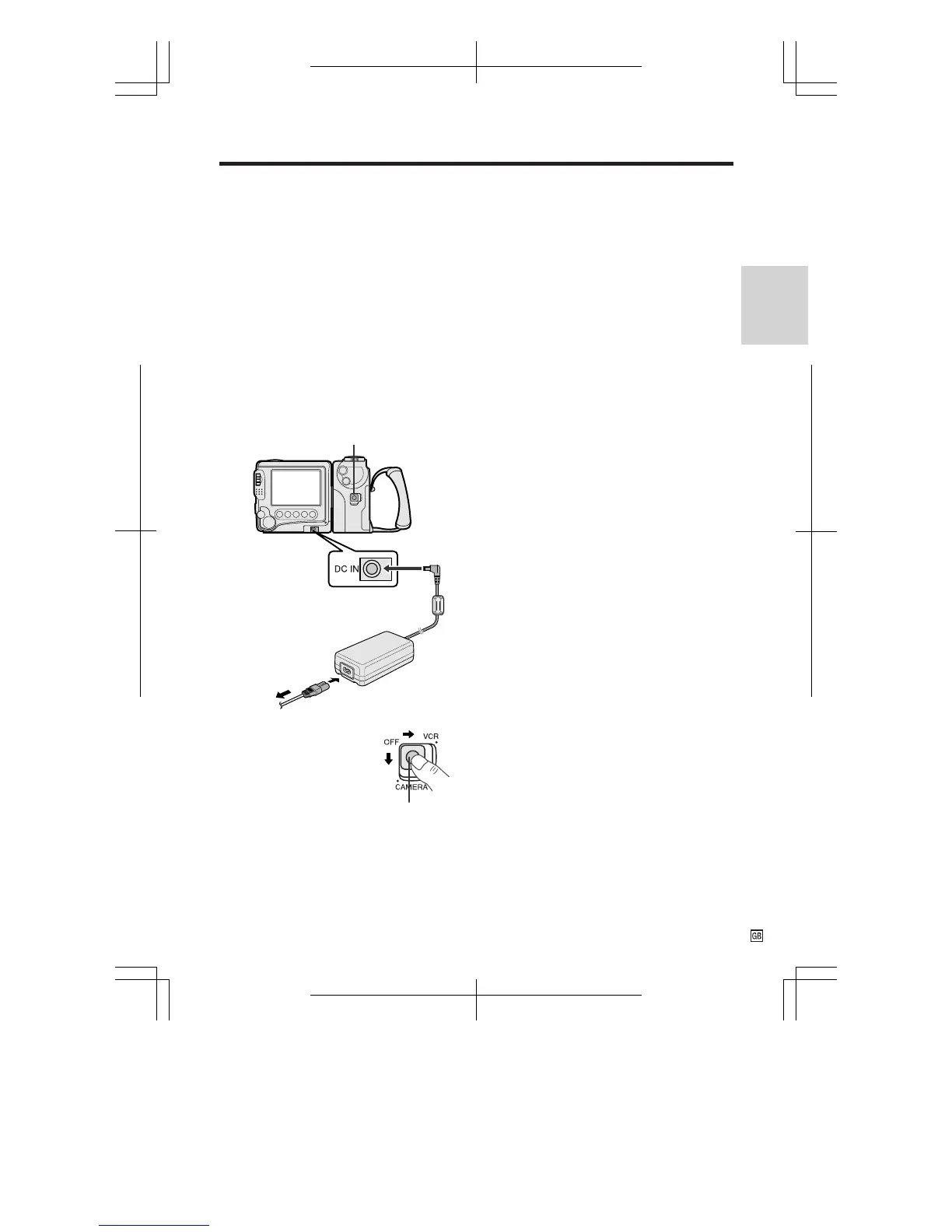
1 Connect the power cord to the AC
adapter, then insert the AC plug into a
power outlet.
2 Make sure that the Power switch on the
VIEWCAM is set to OFF.
3 Insert the DC plug of the AC adapter
into the DC IN jack on the VIEWCAM.
Cautions:
• BEFORE REMOVING THE DC PLUG, ALWAYS
STOP THE TAPE AND TURN THE POWER OFF.
If you remove the DC plug during recording or
playback, the tape will remain wound around the
video head drum, potentially causing damage to
the tape.
• Remove the DC plug from the VIEWCAM if the
VIEWCAM will not be used for a long period of
time.
• When removing the plugs, grasp the plug, not
the cable.
Power switch
4 Hold down the Lock
button and slide the
Power switch to
CAMERA or VCR.
Lock button
DC IN jack
To power
outlet










 To Next Page