04/11/1 XL-MP10H(H)E1.fm
E-7
ENGLISH
TINSZA033SJZZ
XL-MP10H
Basic Operation
Sound control
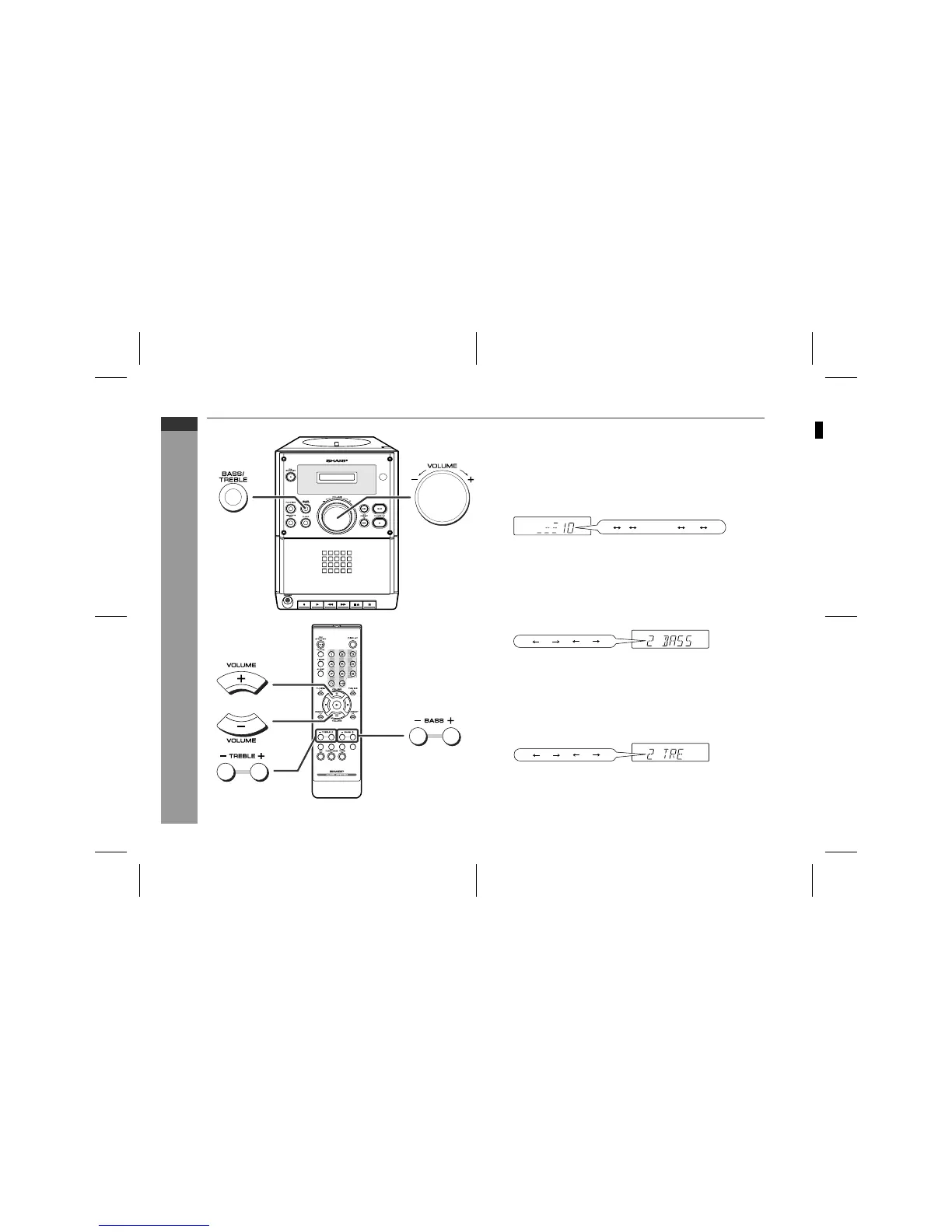
! Adjusting the volume
Main unit operation:
When the VOLUME control is turned clockwise, the volume will
increase. When it is turned anti-clockwise, the volume will decrease.
Remote control operation:
Press the VOLUME (- or +) button to increase or decrease the vol-
ume.
! Adjusting the bass
Main unit operation:
1 Press the BASS/TREBLE button to select "BASS".
2 Within 5 seconds, turn the VOLUME control to adjust the bass.
Remote control operation:
Press the BASS (- or +) button to adjust the bass.
! Adjusting the treble
Main unit operation:
1 Press the BASS/TREBLE button to select "TRE".
2 Within 5 seconds, turn the VOLUME control to adjust the treble.
Remote control operation:
Press the TREBLE (- or +) button to adjust the treble.
21 28 29 300
.....
04-3
...
...
04-3
...
...
12
SHARP TINSZA033SJZZ (H)


 To Next Page