04/11/1 XL-MP10H(H)E1.fm
E-8
ENGLISH
TINSZA033SJZZ
XL-MP10H
8
Basic Operation
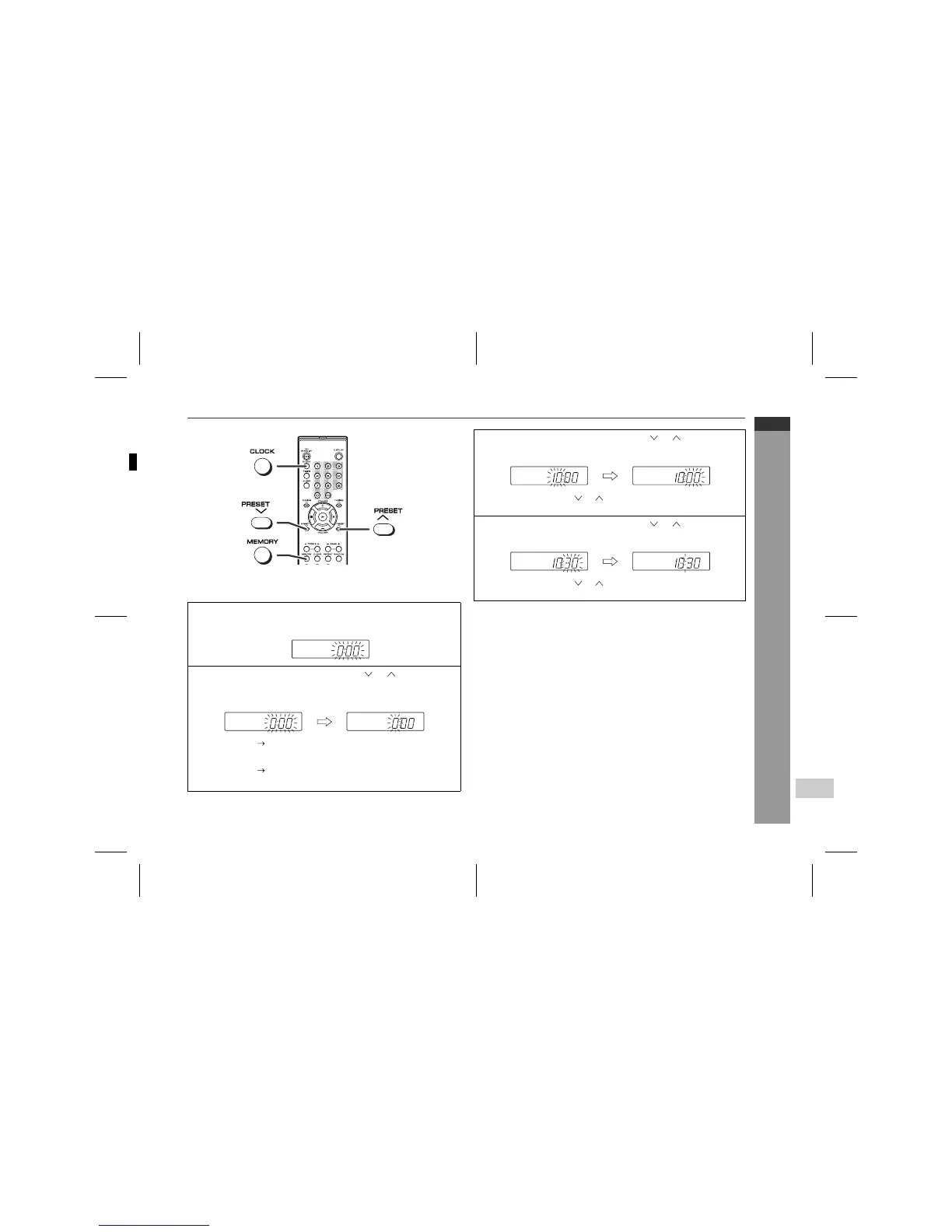
Setting the clock
This may be operated only with the remote control.
In this example, the clock is set for the 24-hour (0:00) display.
To confirm the time display:
Press the CLOCK button.
The time display will appear for about 5 seconds.
Note:
The "0:00" or time will flash when the AC power supply is restored
after a power failure or unplugging the unit.
Readjust the clock as follows.
To readjust the clock:
Perform "Setting the clock" from the beginning. If the "0:00" is not
flashing in step 1, step 2 (for selecting the 24-hour or 12-hour dis-
play) will be skipped.
To change the 24-hour or 12-hour display:
1
Press the CLOCK button and within 5 seconds, press the
MEMORY button.
2
Within 1 minute, press the PRESET ( or ) button to se-
lect 24-hour or 12-hour display and then press the MEMO-
RY button.
"0:00" The 24-hour display will appear.
(0:00 - 23:59)
"AM 12:00" The 12-hour display will appear.
(AM 12:00 - PM 11:59)
3
Within 1 minute, press the PRESET ( or ) button to ad-
just the hour and then press the MEMORY button.
Press the PRESET ( or ) button once to advance the time
by 1 hour. Hold it down to advance continuously.
4
Within 1 minute, press the PRESET ( or ) button to ad-
just the minutes and then press the MEMORY button.
Press the PRESET ( or ) button once to advance the time
by 1 minute. Hold it down to advance continuously.
1 Clear all the programmed contents. [Refer to "Clearing all the
memory (reset)" on page 23 for details.]
2 Perform "Setting the clock" from the beginning.
13
SHARP TINSZA033SJZZ (H)


 To Next Page