04/11/1 XL-MP10H(H)E1.fm
E-10
ENGLISH
TINSZA033SJZZ
XL-MP10H
8
Disc Playback
To stop playback:
Press the button.
To remove the disc:
Whilst in the stop mode, press the CD EJECT button.
Caution:
"
Do not play discs with special shapes (heart or octagon shaped)
as it may cause malfunctions.
"
If a disc is damaged, dirty, or loaded upside down, "NO DISC"
will appear on the display.
"
Keep foreign objects out of the disc compartment.
"
Subjecting the unit to shock or vibration may cause mistracking.
"
When the unit is not being used, be sure to close the disc com-
partment. If it is left open, the lens may be covered with dust and
the unit may not operate properly.
"
If TV or radio interference occurs during disc operation, move the
unit away from it.
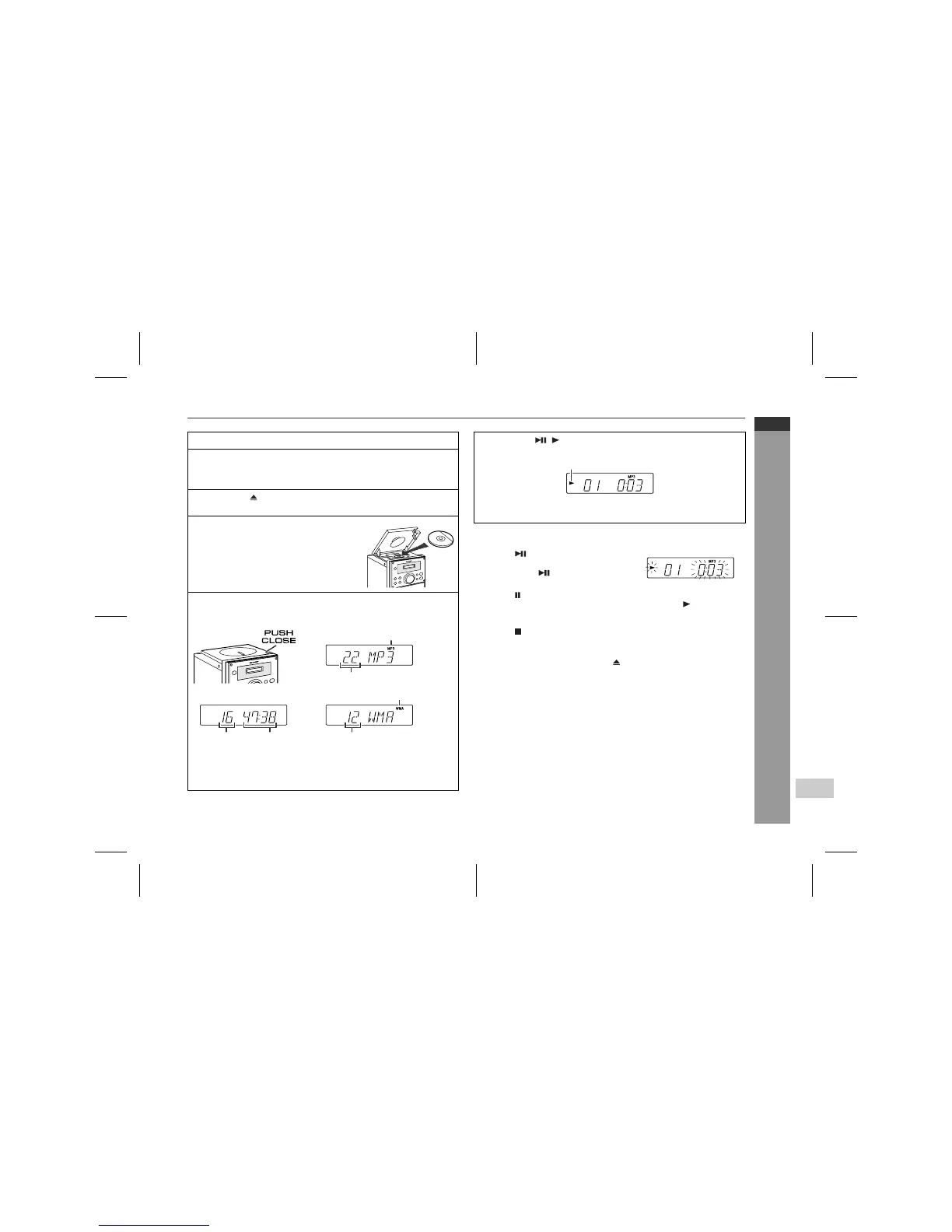
1
Press the ON/STAND-BY button to turn the power on.
2
Press the FUNCTION button until "CD DISC" appears on
the display.
When operating with the remote control, press the CD button.
3
Press the CD EJECT button to open the disc compart-
ment.
4
Place the disc on the spindle, label
side up.
5
Close the disc compartment by firmly pushing the corner
marked "PUSH CLOSE".
"
Due to the structure of its disc information, it takes longer
(approximately 20 to 90 seconds) to read a CD-R/RW disc
recorded in the MP3 or WMA format than a normal CD.
WMA track indicator
Total number
of tracks
[CD]
Total playing
time
Total number of tracks
[WMA]
MP3 track indicator
Total number of tracks
[MP3]
6
Press the ( ) button to start playback from track 1.
When the last track on the disc has finished playing, the unit will
stop automatically.
To interrupt playback:
Main unit operation:
Press the button.
To resume playback from the same
point, press the button again.
Remote control operation:
Press the button.
To resume playback from the same point, press the button.
Disc play indicator


 To Next Page